- Home
- Acrobat
- Discussions
- Re: I need help with Javascript in Acrobat
- Re: I need help with Javascript in Acrobat
I need help with Javascript in Acrobat

Copy link to clipboard
Copied
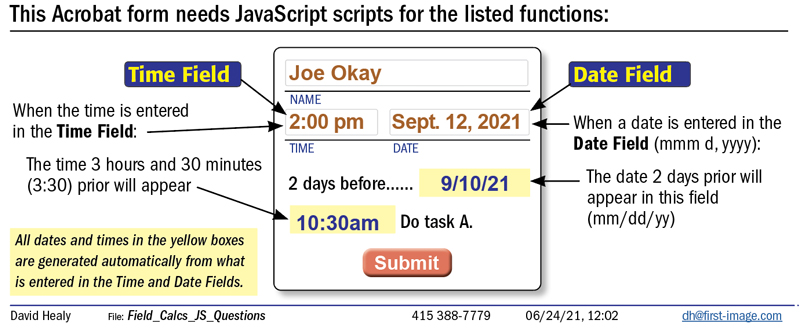
In Acrobat I need:
- a field “Date-2” that subtracts 2 days from a field named,“DateMAIN”
Field “DateMAIN” will display the date as, “June 5, 2021” (mmm d, yyyy)
Field “Date-2” will display the date as, “6/3/21” (mm/dd/yy)
- a field “Time-330” that subtracts 3 hours and 30 minutes from a field named,“TimeMAIN”
Field “TimeMAIN” will display the date as, “June 5, 2021” (mmm d, yyyy)
Once I obtain the code do I enter it in the Custom Calculation Script window?


 25
Replies
25
25
Replies
25


Copy link to clipboard
Copied
For the Day-2 field, in validation script of the DateMAIN field place this script:
this.getField("Day-2").value=util.printd("mm/dd/yy", new Date(util.scand("mmm d, yyyy",event.value)-(1000*3600*24*2)));The format of the DateMAIN field is "mmm d, yyyy".
I don't understand the format of both time fields are not they in a time format?
@+
Copy link to clipboard
Copied
Which window should I enter this code into: JavaScript Debugger, Actions, Custom Calculation Script or other?
Attached is how it should look:
Copy link to clipboard
Copied
Copy link to clipboard
Copied
Here is the script for the time calculation:
var theTime=event.value.toString().split(" ");
var theHour=theTime[0];
var ampm=theTime[1];
var theHour=theHour.split(":");
var theHours=Number(theHour[0]);
var theMinutes=Number(theHour[1]);
var inMinutes=(theHours*60)+theMinutes;
inMinutes-=210; // For 3 hours and 30 minutes
var theHours=Math.floor(inMinutes/60);
var theMinutes=inMinutes-theHours*60;
if (theMinutes<10) var theMinutes="0"+theMinutes;
if (theHours<=0) {
	theHours+=12;
	if (ampm=="am" && theHours!=12) var ampm="pm";
	else if (theHours!=12) var ampm="am";
}
this.getField("Time-330").value=theHours+":"+theMinutes+" "+ampm;
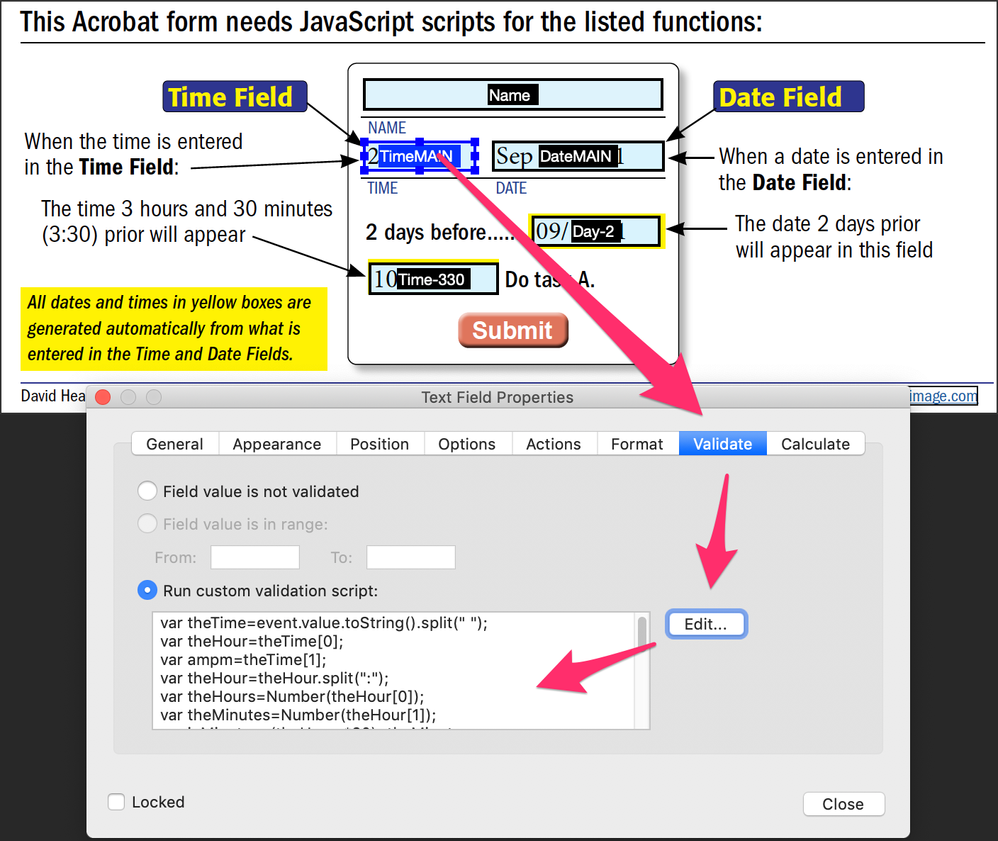
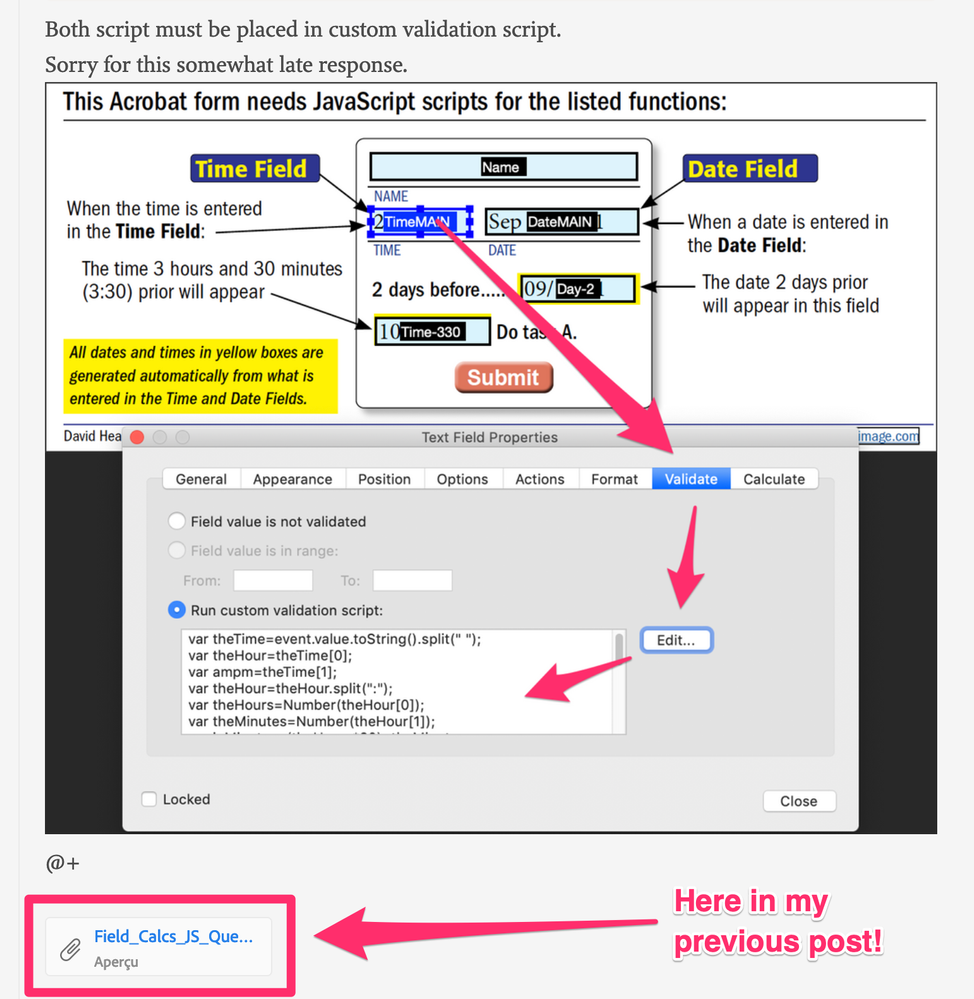
Both script must be placed in custom validation script.
Sorry for this somewhat late response.
@+
Copy link to clipboard
Copied
Copy link to clipboard
Copied
Did you try the file I attached?
That's what's happening!
Moreover, I set both other fields read-only.
@+
Copy link to clipboard
Copied
Where is your file attached? Is see the one with the red arrows is there another. Other than that I only find the .pdf and other .jpgs I had sent. In you code I don't see TimeMAIN mentioned. I thought the Time-330 field would access it to subtract from. Did I get this mixed up?
Copy link to clipboard
Copied
Copy link to clipboard
Copied
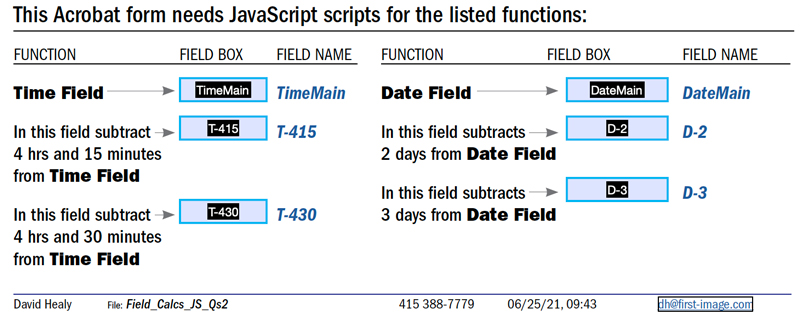
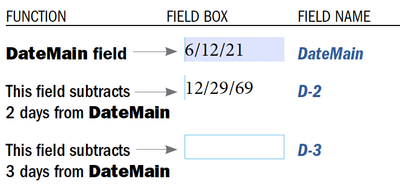
Note: I changed the names for the fields.
For the date subtraction I tried:
this.getField("D-2").value=util.printd("mm/dd/yy", new Date(util.scand("mmm d, yyyy",event.value)-(1000*3600*24*2)));
It posted the date “12/29/69” instead of “6/10/21”
Copy link to clipboard
Copied
Copy link to clipboard
Copied
You didn't only change the name of the field but the date format too!
Attached is my proposal for your new file.
For the date calculation:
this.getField("D-2").value=util.printd("m/d/yy", new Date(util.scand("m/d/yy",event.value)-(1000*3600*24*2)));
this.getField("D-3").value=util.printd("m/d/yy", new Date(util.scand("m/d/yy",event.value)-(1000*3600*24*3)));
As the time calculation have to be executed twice and the calculation script is a bit longer, I used a function:
var theTime=event.value.toString().split(" ");
var theHour=theTime[0];
var ampm=theTime[1];
var theHour=theHour.split(":");
var theHours=Number(theHour[0]);
var theMinutes=Number(theHour[1]);
var inMinutes=(theHours*60)+theMinutes;
function timeCalculation(interval,theField) {
	newMinutes=inMinutes-interval;
	var theHours=Math.floor(newMinutes/60);
	var theMinutes=newMinutes-theHours*60;
	if (theMinutes<10) var theMinutes="0"+theMinutes;
	if (theHours<=0) {
		theHours+=12;
		if (ampm=="am" && theHours!=12) var pmam="pm";
		else if (theHours!=12) var pmam="am";
		else pmam=ampm;
	}
	this.getField(theField).value=theHours+":"+theMinutes+" "+pmam;
}
timeCalculation(255,"T-415");
timeCalculation(270,"T-430");
@+
Copy link to clipboard
Copied
Thank you!!! IT WORKS!!!
Copy link to clipboard
Copied
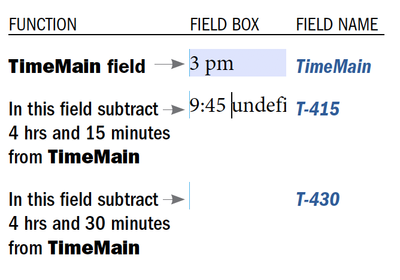
The date works fine but the time isn't. Below is a screen shot and the PDF is included. The T-415 and T-430 fields jumped to subtracting 5 hrs and 15 minutes, 5 hrs. and 30 min. with the word, “undefined” after the time entry. In InDesign I specify the fields that don't have, “Main” in the name as Read Only fields. Is that a problem?
Copy link to clipboard
Copied
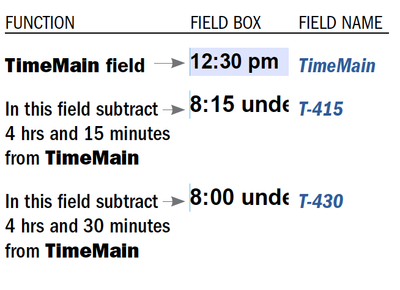
On a second try I got:
Copy link to clipboard
Copied
The undefined value comes because you didn't set the TimeMain fiels with the right date format else you would have this message!
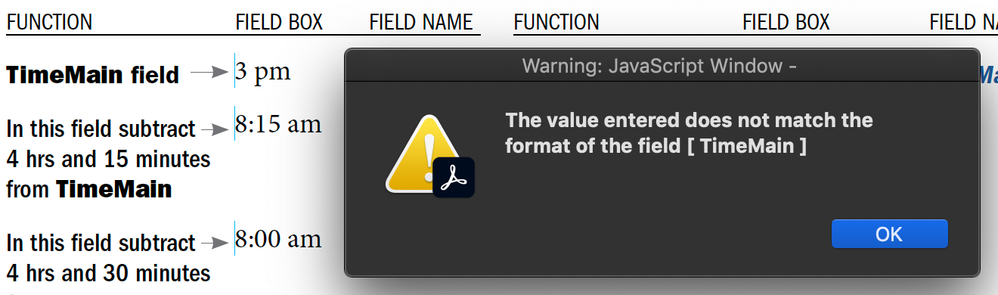
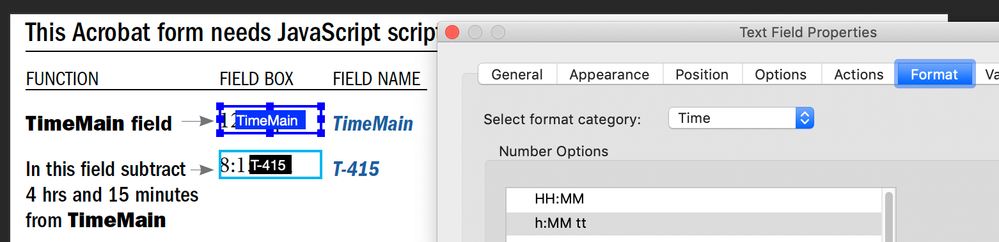
I modified a bit both scripts. Now the calculated date and time fields will be blank if the main fields are blank.
Here are both new scripts:
For the dates I wrote it in 2 different ways only to show you the possibilities.
this.getField("D-2").value=event.value!=""?util.printd("m/d/yy", new Date(util.scand("m/d/yy",event.value)-(1000*3600*24*2))):"";
this.getField("D-3").value=event.value==""?"":util.printd("m/d/yy", new Date(util.scand("m/d/yy",event.value)-(1000*3600*24*3)));
And for the times.
var theTime=event.value.toString().split(" ");
var theHour=theTime[0];
var ampm=theTime[1];
var theHour=theHour.split(":");
var theHours=Number(theHour[0]);
var theMinutes=Number(theHour[1]);
var inMinutes=(theHours*60)+theMinutes;
function timeCalculation(interval,theField) {
	if (theTime!="") {
		newMinutes=inMinutes-interval;
		var pmam=ampm;
		if (theHours==12) {
			if (pmam=="am") var pmam="pm";
			else var pmam="am";
		}
		var newHours=Math.floor(newMinutes/60);
		newMinutes-=newHours*60;
		if (newMinutes<10) var newMinutes="0"+newMinutes;
		if (newHours<=0) {
			newHours+=12;
			if (ampm=="am" && newHours!=12) var pmam="pm";
			else if (newHours!=12) var pmam="am";
		}
		this.getField(theField).value=newHours+":"+newMinutes+" "+pmam;
	} else this.getField(theField).value="";
}
timeCalculation(255,"T-415");
timeCalculation(270,"T-430");
I hope that suits you.
@+
Copy link to clipboard
Copied
That works! For some reason a pop-up menu appears with a calendar which is better
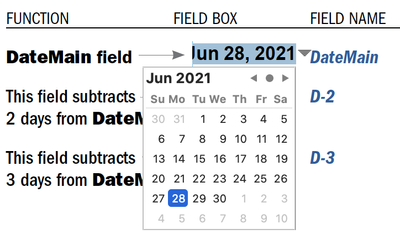
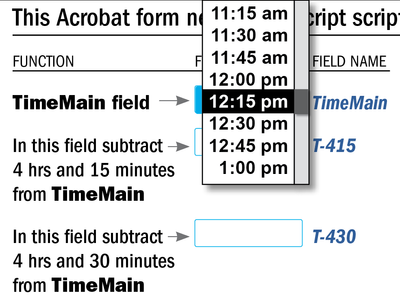
What is involved with making the time selection appearing the same way? I thought this would make it easier in regards to specifying time as on a 12-hour vs. 24-hour clock. Here is an illustration:
Copy link to clipboard
Copied
That doesn't make sense to get a pop-up menu with a lot of times, there would to be too many items!
Unless the selection is only made over a few items...
@+

Copy link to clipboard
Copied
You can use a simple drop-down field and populate it using a script with the various hours.
Just keep in mind that if you specify each 15 minutes interval your drop-down will have almost 100 items...
Copy link to clipboard
Copied
I have a “SUBMIT” that will prompt this screen:
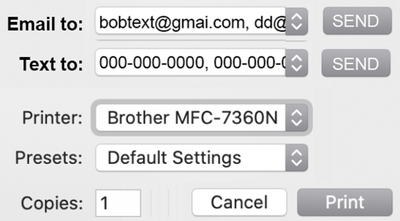
The “Email to:” and “Text to:” sends an uneditable PDF, JPG or other appropiate format to specified Email address and/or phone number.
Do you how this would be implemented?
Copy link to clipboard
Copied
There are a lot of issues here. First of all, what do you mean by "uneditable", exactly?
No file is really uneditable, especially not JPEGs. Also, you can't export a PDF to JPEG if the file is used in Reader, only in Acrobat. And as far as I know you can't text a file, unless you have some web-service that does it, or a printer or something.
Copy link to clipboard
Copied
I just did not want it to be edited in Acrobat Reader once it was exported.
Also the “Clear” function is not reading through from InDesign to Acrobat. "Submit” works fine though:
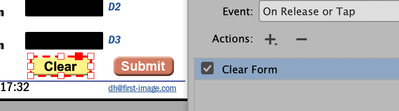
I can place a field over the original “Clear” button but it is a little funky. Any ideas?
Copy link to clipboard
Copied
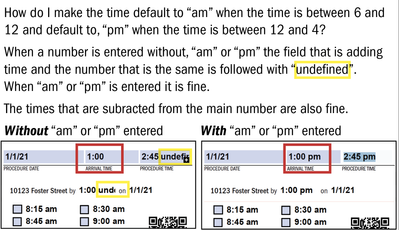
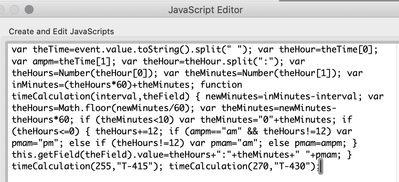
Here is the code that bebarth had so kindly provided. It has been modified a little bit.
var theTime = event.value.toString().split(" "); var theHour = theTime[0]; var ampm = theTime[1]; var theHour = theHour.split(":"); var theHours = Number(theHour[0]); var theMinutes = Number(theHour[1]); var inMinutes = (theHours * 60) + theMinutes; function timeCalculation(interval, theField) { if (theTime != "") { newMinutes = inMinutes - interval; var pmam = ampm; if (theHours == 12) { if (pmam == "am") var pmam = "pm"; else var pmam = "am"; } var newHours = Math.floor(newMinutes / 60); newMinutes -= newHours * 60; if (newMinutes < 10) var newMinutes = "0" + newMinutes; if (newHours <= 0) { newHours += 12; if (ampm == "am" && newHours != 12) var pmam = "pm"; else if (newHours != 12) var pmam = "am"; } this.getField(theField).value = newHours + ":" + newMinutes + " " + pmam; } else this.getField(theField).value = ""; } timeCalculation(0, "TM"); timeCalculation(240, "T400"); timeCalculation(255, "T415"); timeCalculation(270, "T430"); timeCalculation(285, "T445"); timeCalculation(-105, "Tplus");
Copy link to clipboard
Copied
Hi,
Place these lines before your script:
var theTime=event.value.toString().split(":");
if (Number(theTime[0])>=6 && Number(theTime[0])<=12) event.value=theTime[0]+":"+theTime[1].substr(0,2)+" am";
else if (Number(theTime[0])>=1 && Number(theTime[0])<=4) event.value=theTime[0]+":"+theTime[1].substr(0,2)+" pm";
I am not sure for the limits of your intervals... here 12 is included for am and 4 is included for pm, but 5 is not included in any interval!
@+
Copy link to clipboard
Copied
...You said "It has been modified a little bit."
I didn't check modifications.
@+

-
- 1
- 2

Get ready! An upgraded Adobe Community experience is coming in January.
Learn more
 AdChoices