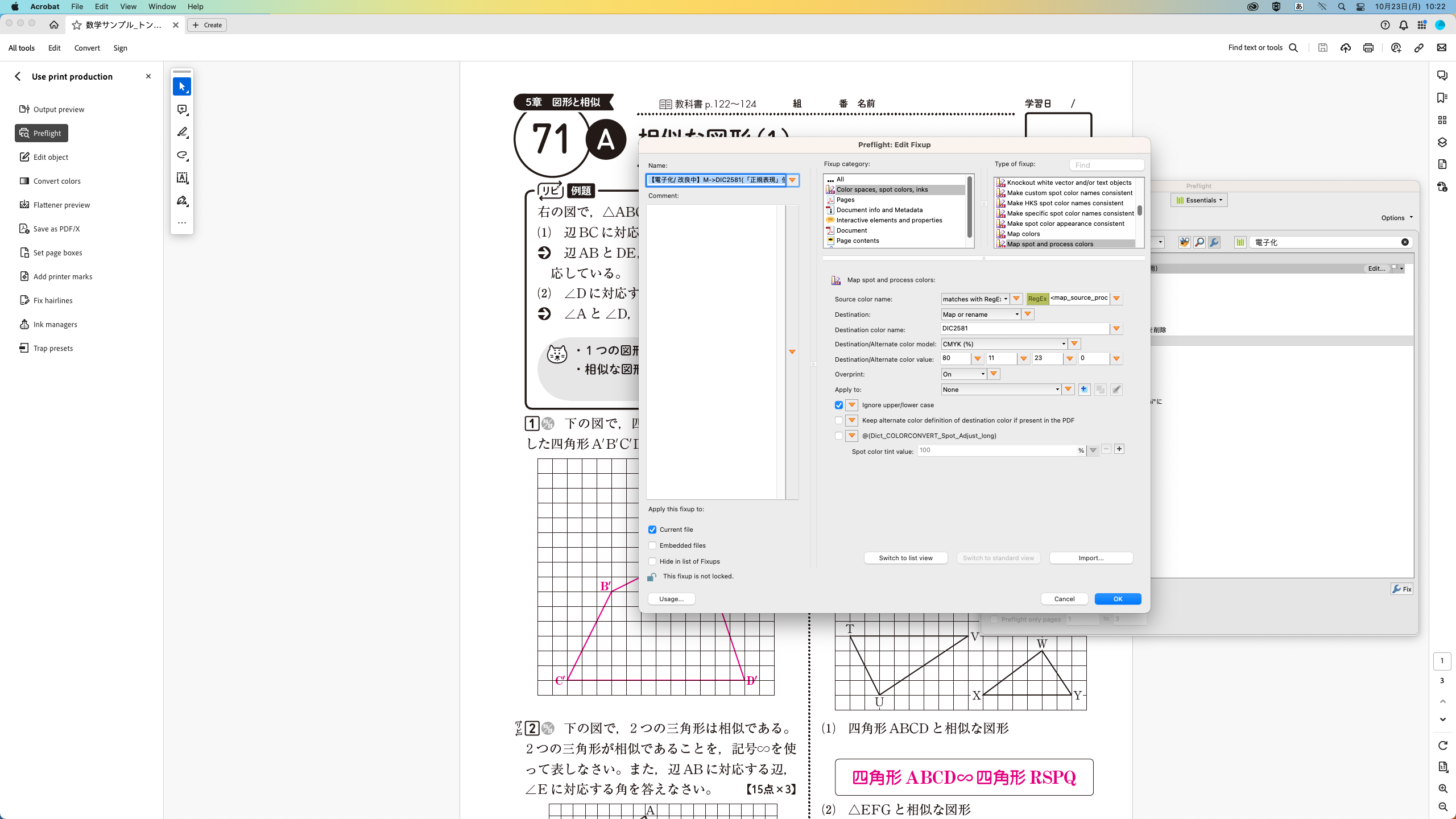
Hello Adobe Community,
I'm encountering a problem with the "Map spot and process colors" fixup in Preflight. I'm trying to utilize regular expressions to target the Magenta color. However, even when I select "Magenta" as my target, it seems to internally convert elements with "Magenta = 0" to spot colors. This behavior is problematic, even if the color transformation isn't visually noticeable, because the internal value of 0 for the spot color element causes issues when I subsequently base operations on the presence of spot colors.
Ideally, I'd like to modify the regular expression such that it targets elements with Magenta values other than 0, or specifically those with values ranging from 1 to 100. I've attached a screenshot of my current setting where "Magenta" is selected.
I understand that the regular expressions in Adobe, especially for color specifications, might be unique. I've included a screenshot of my current setting for reference. Could anyone advise on how I might adjust my expression to achieve the desired behavior?
Thank you in advance for your assistance.









 AdChoices