Exit
  • Global community
    • Language:
      • Deutsch
      • English
      • Español
      • Français
      • Português
  • 日本語コミュニティ
  • 한국 커뮤니티
0

Language settings

New Here ,
Aug 09, 2018 Aug 09, 2018

Hello!

My Acrobat DC pro is set up in french, as well as my online account. My issue is when I send a form for signature to other people, the message is in English. Is there a way to put everything in French?

Thank you!

Corinne

TOPICS
PDF forms
581
Translate
Report
Community guidelines
Be kind and respectful, give credit to the original source of content, and search for duplicates before posting. Learn more
community guidelines
1 ACCEPTED SOLUTION
Adobe Employee ,
Aug 28, 2018 Aug 28, 2018
LATEST

Hi Corinne,

Sorry for the delay in response.

To change the message of "Send for Signature" in the French language, try to send the document online.

Open this link https://cloud.acrobat.com/ and sign in with your Adobe ID.

Go to "Send for Signature" tab and then click on Send for signature in the blue box.
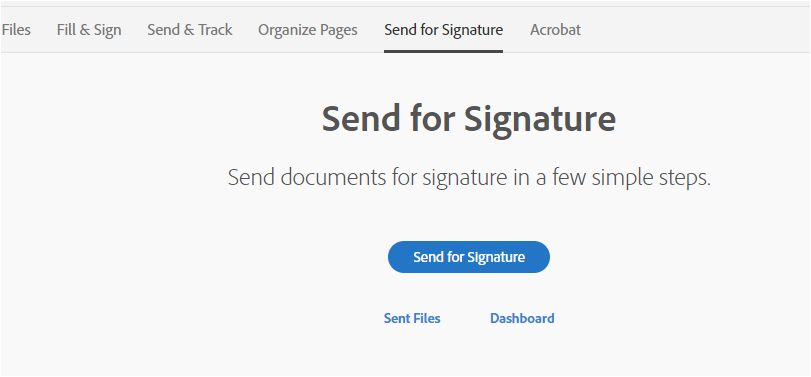
You will receive a window where you can change the language for the recipient as shown below:

language change.JPG

Make sure to check the box for "Preview & Add Signature Fields" if you need to make any changes to PDF form or to preview it before sending.

Hope the information helps.

Let us know if you need any help.

Regards,

Meenakshi

View solution in original post

Translate
Report
Community guidelines
Be kind and respectful, give credit to the original source of content, and search for duplicates before posting. Learn more
community guidelines
Adobe Employee ,
Aug 28, 2018 Aug 28, 2018
LATEST

Hi Corinne,

Sorry for the delay in response.

To change the message of "Send for Signature" in the French language, try to send the document online.

Open this link https://cloud.acrobat.com/ and sign in with your Adobe ID.

Go to "Send for Signature" tab and then click on Send for signature in the blue box.

You will receive a window where you can change the language for the recipient as shown below:

language change.JPG

Make sure to check the box for "Preview & Add Signature Fields" if you need to make any changes to PDF form or to preview it before sending.

Hope the information helps.

Let us know if you need any help.

Regards,

Meenakshi

Translate
Report
Community guidelines
Be kind and respectful, give credit to the original source of content, and search for duplicates before posting. Learn more
community guidelines


