Exit
  • Global community
    • Language:
      • Deutsch
      • English
      • Español
      • Français
      • Português
  • 日本語コミュニティ
  • 한국 커뮤니티
0

Need help saving tools in tool panel

Community Beginner ,
Mar 01, 2018 Mar 01, 2018

Hi:
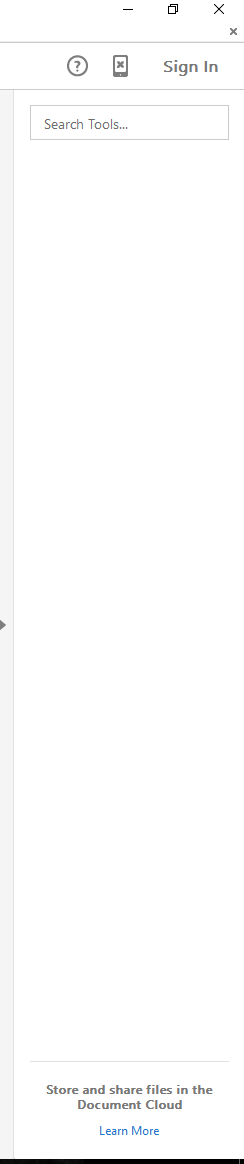
IT had to re-install my Acrobat Pro DC the other day and now I have nothing showing up in the right side pane.  I've tried adding from the Tools selection field but don't know how to save them.  When I close a pdf and open it again, the pane is empty.
Thanks in advance for the help!
Ken

TOPICS
General troubleshooting
1.9K
Translate
Report
Community guidelines
Be kind and respectful, give credit to the original source of content, and search for duplicates before posting. Learn more
community guidelines
Community Expert ,
Mar 04, 2018 Mar 04, 2018

Can you show a screen shot?

Translate
Report
Community guidelines
Be kind and respectful, give credit to the original source of content, and search for duplicates before posting. Learn more
community guidelines
Community Beginner ,
Mar 12, 2018 Mar 12, 2018

Hi.  Sorry for the delay.  I will attempt to attach a screen capture of the right side panel.  As you can see, there is nothing there.  I've dragged them over; closed and re-opened and they are always just gone!??


Capture - Adobe Panel.PNG

Translate
Report
Community guidelines
Be kind and respectful, give credit to the original source of content, and search for duplicates before posting. Learn more
community guidelines
Community Expert ,
Mar 05, 2018 Mar 05, 2018

I made a video about how to customize the toolbar. Maybe this will help: How to Customize Toolbars in Acrobat DC

Translate
Report
Community guidelines
Be kind and respectful, give credit to the original source of content, and search for duplicates before posting. Learn more
community guidelines
Community Beginner ,
Mar 12, 2018 Mar 12, 2018

Hi.  I just watched the video, which was very good.  I followed the steps and just added a few "quick tools", saved them and closed the document.  When I re-opened they were gone, but the : also did not appear.  Screen captures attached.  Thanks!Capture Adobe after saving Quick Tools.PNG

Capture - Adobe after closing and re-opening.PNG

Translate
Report
Community guidelines
Be kind and respectful, give credit to the original source of content, and search for duplicates before posting. Learn more
community guidelines
Adobe Employee ,
May 02, 2018 May 02, 2018
LATEST

Hi Kenc,

Sorry for the delayed response.

Are you still facing this issue? If yes, check if an update is available for Acrobat using "Check for updates" option under "Help" menu, reboot the machine after installing update and try again.

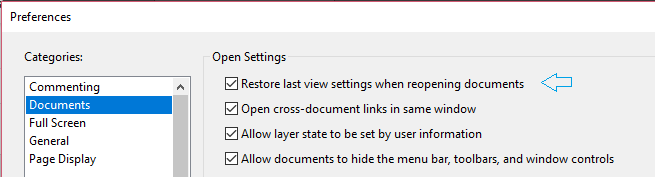
Also, try adding tools to right side panel and quick tools then navigate to Edit > Preferences > Documents > check the box next to restore last view settings when reopening documents and check.
Let us know if you need any help.

Shivam

Translate
Report
Community guidelines
Be kind and respectful, give credit to the original source of content, and search for duplicates before posting. Learn more
community guidelines