Copy link to clipboard
Copied
Hello everyone
I have a situation that need to calculate couple of boxes as below
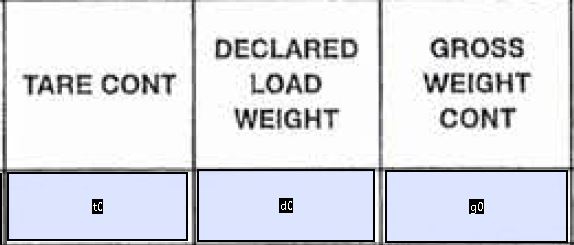
Basically what I want to do is "g0" calculates automatically when I enter the value for "t0" and/or "d0"
g0=d0+t0 and I don't want any of the boxes to show anything (like 0 value) if I don't enter anything in them so I've come up with the below script for "g0" so far:
// Get first field value
var v1 = getField("t0").value;
// Get second field value
var v2 = getField("d0").value;
// Set this field value equal to the difference
event.value = v1 + v2;
if (event.value==0) event.value = "";
above script works just fine, but the problem is sometimes I only have "g0" value and I want to be able to enter the value in "g0" myself (at the moment I can't enter anything in there) and I want the form to calculate "d0" automatically by applying this calculation d0=g0-t0
Any help would be appreciated
Thank you

Copy link to clipboard
Copied
That will be easiest if you use a hidden field to attach the calculation script to. The script should look at the input fields and the field that triggered the calculation (event.source) and set the value of either d0 or g0. You'll have to decide what to do if the user enters a value in d0 and g0, and then enters a value in the previously blank t0. Account for all the possibilities of entering values in those three fields in any order, starting from all fields blank to all fields filled.
So the script would start by getting the values of t0, g0, and d0, and identify which field was changed to cause the calculation script to be triggered (event.source), and decide what to do based on those inputs. If it was some unrelated field that triggered the script, there's no need to proceed.
If you'd like help with the script, give it a try and post what you've tried.
Copy link to clipboard
Copied
That will be easiest if you use a hidden field to attach the calculation script to. The script should look at the input fields and the field that triggered the calculation (event.source) and set the value of either d0 or g0. You'll have to decide what to do if the user enters a value in d0 and g0, and then enters a value in the previously blank t0. Account for all the possibilities of entering values in those three fields in any order, starting from all fields blank to all fields filled.
So the script would start by getting the values of t0, g0, and d0, and identify which field was changed to cause the calculation script to be triggered (event.source), and decide what to do based on those inputs. If it was some unrelated field that triggered the script, there's no need to proceed.
If you'd like help with the script, give it a try and post what you've tried.
Copy link to clipboard
Copied
Hi George, thank you for your through reply, this sounds exactly like what I want to do, but I wish I knew how to do it 🙂 is there any way you can give me an example code for (say g0) so I can have a look ? sorry about the late reply as I work night shifts and I have to sleep during the day.
Get ready! An upgraded Adobe Community experience is coming in January.
Learn more

