Exit
  • Global community
    • Language:
      • Deutsch
      • English
      • Español
      • Français
      • Português
  • 日本語コミュニティ
  • 한국 커뮤니티
0

Need multiple Simplified Field Notations

Community Beginner ,
Oct 03, 2017 Oct 03, 2017

I have a form that I need three different Simplified Field Notations. How do I do that?

TOPICS
General troubleshooting
4.0K
Translate
Report
Community guidelines
Be kind and respectful, give credit to the original source of content, and search for duplicates before posting. Learn more
community guidelines
1 ACCEPTED SOLUTION
Community Expert ,
Oct 04, 2017 Oct 04, 2017

Use this code:

var a = Number(this.getField("M1").valueAsString);

var b = Number(this.getField("T1").valueAsString);

var c = Number(this.getField("A1").valueAsString);

if (c!= 0) {

  event.value=(a+b)/c;

} else {

  event.value = "";

}

View solution in original post

Translate
Report
Community guidelines
Be kind and respectful, give credit to the original source of content, and search for duplicates before posting. Learn more
community guidelines
Community Expert ,
Oct 03, 2017 Oct 03, 2017

For different fields? Just apply each calculation differently. It shouldn't be a problem.

Translate
Report
Community guidelines
Be kind and respectful, give credit to the original source of content, and search for duplicates before posting. Learn more
community guidelines
Community Beginner ,
Oct 03, 2017 Oct 03, 2017

I tried but it keeps writing over the first one.

Translate
Report
Community guidelines
Be kind and respectful, give credit to the original source of content, and search for duplicates before posting. Learn more
community guidelines
Community Expert ,
Oct 03, 2017 Oct 03, 2017

Did you copy and paste the field? If so, you need to rename the copies so they have a unique name. Otherwise, they will remain exact copies of each other.

Translate
Report
Community guidelines
Be kind and respectful, give credit to the original source of content, and search for duplicates before posting. Learn more
community guidelines
Community Beginner ,
Oct 03, 2017 Oct 03, 2017

These are the two different ones. Does Locking the field make a difference?

Translate
Report
Community guidelines
Be kind and respectful, give credit to the original source of content, and search for duplicates before posting. Learn more
community guidelines
Community Expert ,
Oct 03, 2017 Oct 03, 2017

No, it's only preventing you from editing it...

Those screenshots don't show that the fields are actually named differently.

Translate
Report
Community guidelines
Be kind and respectful, give credit to the original source of content, and search for duplicates before posting. Learn more
community guidelines
Community Beginner ,
Oct 03, 2017 Oct 03, 2017

The fields being:

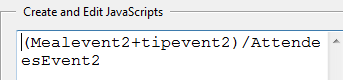
Mealevent2 + tipevent2/AttendeesEvent2  This being the first Scripts

and

Refreshments+tip/Ateendees  this being the second Script.

Are these not different enough?

Translate
Report
Community guidelines
Be kind and respectful, give credit to the original source of content, and search for duplicates before posting. Learn more
community guidelines
Community Expert ,
Oct 03, 2017 Oct 03, 2017

Can you share the file in question (via Dropbox, for example)?

On Wed, Oct 4, 2017 at 12:09 AM, beverlyh81967728 <forums_noreply@adobe.com>

Translate
Report
Community guidelines
Be kind and respectful, give credit to the original source of content, and search for duplicates before posting. Learn more
community guidelines
LEGEND ,
Oct 03, 2017 Oct 03, 2017

Those are the calculations, not the names. What are the names?

Translate
Report
Community guidelines
Be kind and respectful, give credit to the original source of content, and search for duplicates before posting. Learn more
community guidelines
Community Beginner ,
Oct 03, 2017 Oct 03, 2017

Those are the names of the fields.

Translate
Report
Community guidelines
Be kind and respectful, give credit to the original source of content, and search for duplicates before posting. Learn more
community guidelines
LEGEND ,
Oct 03, 2017 Oct 03, 2017

Maybe that's the problem. Try giving them normal names (letters and numbers only)

Translate
Report
Community guidelines
Be kind and respectful, give credit to the original source of content, and search for duplicates before posting. Learn more
community guidelines
Community Beginner ,
Oct 03, 2017 Oct 03, 2017

Will do. Let you know tomorrow if it makes any difference. Thank you for your help.

Translate
Report
Community guidelines
Be kind and respectful, give credit to the original source of content, and search for duplicates before posting. Learn more
community guidelines
Community Beginner ,
Oct 04, 2017 Oct 04, 2017

Well that worked but now I'm getting the Java script error that the value entered does not match the field that has the division in it. From what I've seen on the web if the field is blank or 0 I'm going to get this error unless I can write a custom calculation script. Have you done that? I just need field 1 ("M1") + field 2 ("T1") / field 3 ("A1")

Translate
Report
Community guidelines
Be kind and respectful, give credit to the original source of content, and search for duplicates before posting. Learn more
community guidelines
Community Expert ,
Oct 04, 2017 Oct 04, 2017

This happens when you try to divide by zero (or an empty value). You can't

use the Simple Field Notation if that's the case. You must write a custom

calculation script.

On Wed, Oct 4, 2017 at 8:04 PM, beverlyh81967728 <forums_noreply@adobe.com>

Translate
Report
Community guidelines
Be kind and respectful, give credit to the original source of content, and search for duplicates before posting. Learn more
community guidelines
Community Beginner ,
Oct 04, 2017 Oct 04, 2017

Can you help with that? I saw on another post one that you worked on but of course it doesn't work specially with mine. I'm close but it doesn't pick up the two fields needing to be added before the division.

var a =this.getField("M1");

var b =this.getField("T1");

var c =this.getField("A1");

if(a.value != 0)

{

  // perform division;

   event.value=((a.value+b.value)/(c.value))

} else {

  // do not divide by zero;

   event.value = "";

}

Translate
Report
Community guidelines
Be kind and respectful, give credit to the original source of content, and search for duplicates before posting. Learn more
community guidelines
Community Expert ,
Oct 04, 2017 Oct 04, 2017

You're almost there, you're just checking the wrong variable... It's "c" that must not be zero, not "a".

Translate
Report
Community guidelines
Be kind and respectful, give credit to the original source of content, and search for duplicates before posting. Learn more
community guidelines
Community Beginner ,
Oct 04, 2017 Oct 04, 2017

I made that change but it's still not calculating correcting.

Attendees (A1)=2

Meals (M1)=100.00

tip(T1)=5.00

Cost per person=502.50 should be 52.50

The formula works if I take out the tip.

Translate
Report
Community guidelines
Be kind and respectful, give credit to the original source of content, and search for duplicates before posting. Learn more
community guidelines
Community Expert ,
Oct 04, 2017 Oct 04, 2017

Use this code:

var a = Number(this.getField("M1").valueAsString);

var b = Number(this.getField("T1").valueAsString);

var c = Number(this.getField("A1").valueAsString);

if (c!= 0) {

  event.value=(a+b)/c;

} else {

  event.value = "";

}

Translate
Report
Community guidelines
Be kind and respectful, give credit to the original source of content, and search for duplicates before posting. Learn more
community guidelines
Community Beginner ,
Oct 04, 2017 Oct 04, 2017

Yes!! That worked. You are amazing! OK why didn't the other one work?

Translate
Report
Community guidelines
Be kind and respectful, give credit to the original source of content, and search for duplicates before posting. Learn more
community guidelines
Community Expert ,
Oct 04, 2017 Oct 04, 2017

Because you didn't explicitly converting the values to numbers (as I did), they were being treated as strings and concatenated, instead of added up.

Translate
Report
Community guidelines
Be kind and respectful, give credit to the original source of content, and search for duplicates before posting. Learn more
community guidelines
Community Beginner ,
Oct 04, 2017 Oct 04, 2017
LATEST

Thank You, Thank You!. One little field cost me a full day but with your help made it all worth it. Thanks again.

Translate
Report
Community guidelines
Be kind and respectful, give credit to the original source of content, and search for duplicates before posting. Learn more
community guidelines