Exit
  • Global community
    • Language:
      • Deutsch
      • English
      • Español
      • Français
      • Português
  • 日本語コミュニティ
  • 한국 커뮤니티
1

PDF Form Fields Highlight Too Dark

Guest
Apr 23, 2021 Apr 23, 2021

For some reason on one of my users acrobat DC 2017 installs form fields are being highlighted in this very dark gray. I have not been able to find any setting in adobes preferences or the form fields properties to adjust this. Heres an example. I went as far as to reinstall this tool but it seems to be pulling some stored settings from somewhere. It does not do this for other users that weve setup with the same install files and process.


Capture.PNG

TOPICS
Create PDFs , Edit and convert PDFs , General troubleshooting , How to , PDF forms , Standards and accessibility
1.7K
Translate
Report
Community guidelines
Be kind and respectful, give credit to the original source of content, and search for duplicates before posting. Learn more
community guidelines
1 ACCEPTED SOLUTION
Community Expert ,
Apr 23, 2021 Apr 23, 2021

Hi,


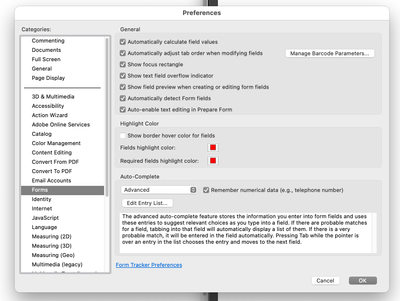
In the preferences there should be the "Forms" section which has a "Highlight Color" section, if it is on turn it off, if off, turn it on and change the colours.


BarlaeDC_0-1619190882359.png


View solution in original post

Translate
Report
Community guidelines
Be kind and respectful, give credit to the original source of content, and search for duplicates before posting. Learn more
community guidelines
Community Expert ,
Apr 23, 2021 Apr 23, 2021

Hi,


In the preferences there should be the "Forms" section which has a "Highlight Color" section, if it is on turn it off, if off, turn it on and change the colours.


BarlaeDC_0-1619190882359.png


Translate
Report
Community guidelines
Be kind and respectful, give credit to the original source of content, and search for duplicates before posting. Learn more
community guidelines
Guest
Apr 23, 2021 Apr 23, 2021
LATEST

I found this shortly after posting but for some reason my changes were reverted everytime the app was closed and reopened, I resolved this with the steps in my reply to this post. Thanks!

Translate
Report
Community guidelines
Be kind and respectful, give credit to the original source of content, and search for duplicates before posting. Learn more
community guidelines
Guest
Apr 23, 2021 Apr 23, 2021

This can be ignored, I used voidtools everything to remove and and all adobe related items from the pc and performed a fresh install

Translate
Report
Community guidelines
Be kind and respectful, give credit to the original source of content, and search for duplicates before posting. Learn more
community guidelines