Exit
  • Global community
    • Language:
      • Deutsch
      • English
      • Español
      • Français
      • Português
  • 日本語コミュニティ
  • 한국 커뮤니티
0

PDF form - printing text boxes

New Here ,
Jan 02, 2019 Jan 02, 2019

I have created a form in Adobe Acrobat Pro.  My issue is with the printing of multi-line text fields.  I only see the text on the screen and none of the hidden text when I print the form.  Can you assist?

TOPICS
PDF forms
3.5K
Translate
Report
Community guidelines
Be kind and respectful, give credit to the original source of content, and search for duplicates before posting. Learn more
community guidelines
1 ACCEPTED SOLUTION
Community Expert ,
Jan 02, 2019 Jan 02, 2019
LATEST

That's not possible in an Acrobat form. You can either resize the box, change the font size or copy the text to a larger box using a script.

View solution in original post

Translate
Report
Community guidelines
Be kind and respectful, give credit to the original source of content, and search for duplicates before posting. Learn more
community guidelines
New Here ,
Jan 02, 2019 Jan 02, 2019

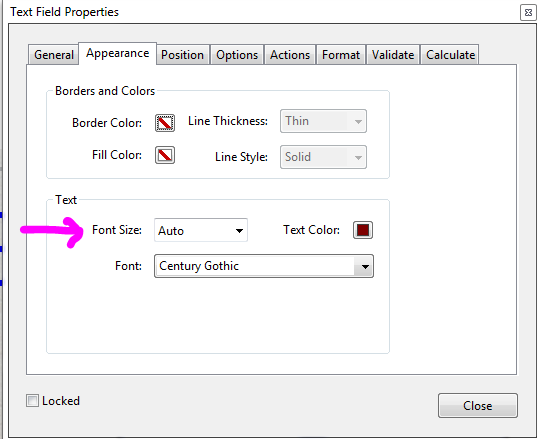
Any text that falls outside of your text box will not be printed. Can you make the box bigger or set the text to Auto size under the

appearance tab on the text field properties?

Font Size Auto.PNG

Translate
Report
Community guidelines
Be kind and respectful, give credit to the original source of content, and search for duplicates before posting. Learn more
community guidelines
New Here ,
Jan 02, 2019 Jan 02, 2019

I do have the auto font size selected.  I assume then my only option is to make the box bigger?  This is for a performance review and managers will be given latitude to provide as much feedback as needed.  Hence that is why I was hoping for something that would expand as needed.

Translate
Report
Community guidelines
Be kind and respectful, give credit to the original source of content, and search for duplicates before posting. Learn more
community guidelines
Community Expert ,
Jan 02, 2019 Jan 02, 2019
LATEST

That's not possible in an Acrobat form. You can either resize the box, change the font size or copy the text to a larger box using a script.

Translate
Report
Community guidelines
Be kind and respectful, give credit to the original source of content, and search for duplicates before posting. Learn more
community guidelines