


print problem

Copy link to clipboard
Copied
Hello dear readers,
Does someone know a solution to this print problem. I make music scores in the software Sibelius but when I try to print a score with pdf the print isn't readeble
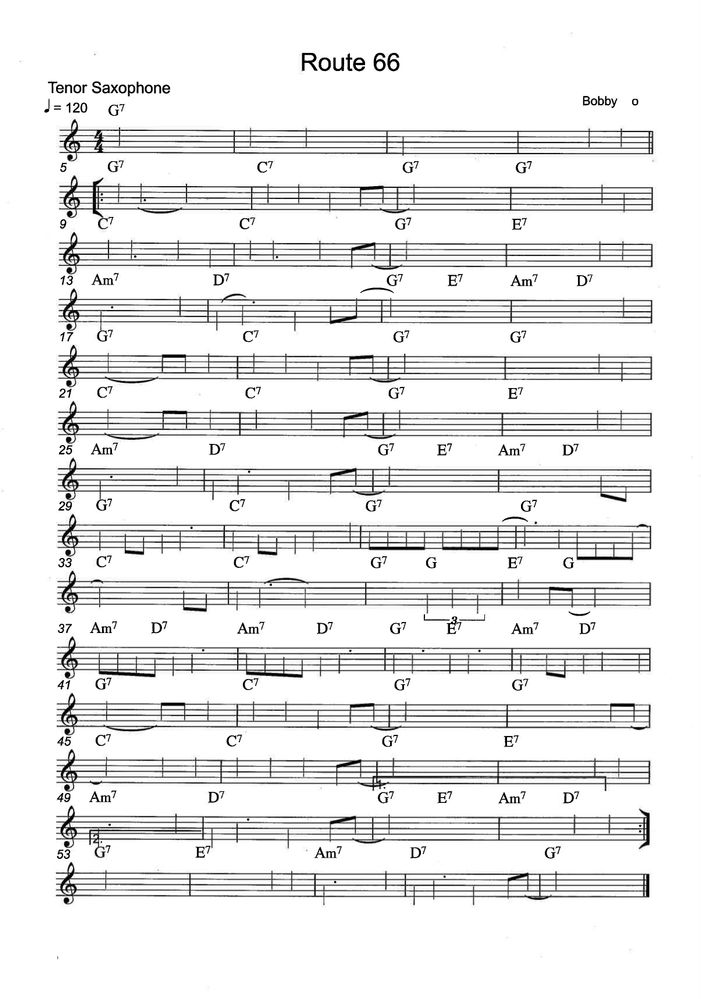


 34
Replies
34
34
Replies
34


Copy link to clipboard
Copied
Nina,
In addition to working with PDFs all the time, I am a graduate of a music conservatory. But in my day, we did our transcriptions by hand! I've only toyed with Sibelius and Finale, and have never committed time to a large project.
I have seen 'modern' music that looks and sounds like your page, though!! 😉
Did you use a Sibelius command to export to PDF, or did you 'print' to PDF?
Does this one page come out garbled if you export it alone? If it exports alone OK, you could replace the old page with the new as a work-around.
My best,
Dave

Copy link to clipboard
Copied
I have a music calligraphy pen... somewhere! (but my calligraphy looked a
bit like this page 🙂
I hear you about modern music!
I exported the score to PDF. I tried highlighting the passage that was
messed up - 20 bars - asking it to export but the whole score always gets
made into the PDF, with that horrible mess on page 14!
I have been working in panorama. When I go to page view, the horrible
stacked page is visible. Panorama looks perfect. I tried turning off
magnetic layout but it got worse... if that's possible?
It's almost 4am here, so I'm going to hit the sack and tackle this in the
morning.
Appreciate your suggestions.
Nina
PS Attaching the mp3 out of Sibelius so you can hear that at least it
didn't affect the sound!
Copy link to clipboard
Copied
BTW, I'm on PC, not Mac... if that matters.
Nina

Copy link to clipboard
Copied
On a mac, Premiere works. Adobe, even with 'save as' does not. I have yet to update Brother firmware and install the latest Sibelius update.
Copy link to clipboard
Copied
Sorry about my previous comment I meant Preview not Premiere.
On a mac, PREVIEW works. Adobe, even with 'save as' does not. I have yet to update Brother firmware and install the latest Sibelius update.
Copy link to clipboard
Copied
Reading back in other responses, it seems as if you are not alone with this issue happening in Sibelius. Have you visited their support page (assuming they have one)? I also wonder if there isn't a patch available now, or one in development since this problem is not isolated to just you.
My best,
Dave

Copy link to clipboard
Copied
I use Sibelius Ultimate on a Mac with Catalina. PDF files created in Sibelius Ultimate (using default fonts) do NOT print in
either Adobe Acrobat or Adobe Acrobat Pro on a MAC (the noteheads do NOT print).
This is NOT the case for PDF files created by rearlier versions of Sibelius like Sibelius 7 and Sibelius First 7.
If I save the Sibelius Ultimate file in an older Sibelius format, such as Sibelius First 7, and then create a .pdf file using the older version of Sibeilius, then the resulting pdf file will print correctly using Adobe Acrobat.
However, the Sibelius Ultimate pdf file WILL PRINT CORRECTLY on a MAC using any of the following:
1) The Sibelius Ultimate app itself
2) The MAC Preview app
3) The Safari App
4) The Google Chrome App
If I open the pdf file using (2) (3) or (4) above, I can print the file correctly.
I have NOT yet tried to experiment with changing the default font for noteheads.
Copy link to clipboard
Copied
Rick Sacks
rixax@rixax.com

Copy link to clipboard
Copied
I found a definitive solution on a friend's MacBook Pro M1, exported from Sibelius Ultimate 2022.
He "Saved as other" PDF/A (Archivable) and done. It says that you cannot edit the score, but for that purpose we have Sibelus 😁.
Cheers,
Copy link to clipboard
Copied
Hi Aldo,
Thank you very much!
Regards...

-
- 1
- 2

Get ready! An upgraded Adobe Community experience is coming in January.
Learn more
 AdChoices