


- Home
- Acrobat
- Discussions
- Re: Reset behavior differs by platform
- Re: Reset behavior differs by platform

Copy link to clipboard
Copied
I've added a Reset Form button on a PDF Form created with Acrobat XI under Win10. It clears all fields, even if the form is launched from a copy that has entries. This is the expected/preferred behavior.
But if the same partly-filled form is loaded by an iOS device, and the Reset button is clicked, only the changes made since the initial load are discarded. The loaded partial entries are retained.
My intent was to distribute the new form to the intended users with sample data included as a training assist. When ready to start using the form, users would simply click the Reset Form button to start fresh with entering their own info. What is happening on the iOS devices defeats this approach.
Also, once a user has finished their entries, saved the form and sent the form via email, they may want to clear the form in order to send more info. Having to step through (in my case) 40 separate fields in order to empty them one at a time seems just a little tedious.
Is there some other way to reliably clear all entries on a form?
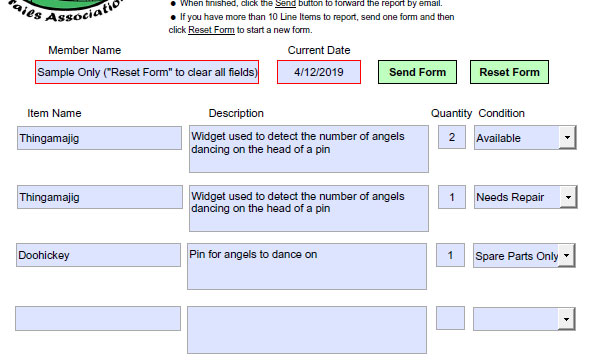
Here's what my form looks like...


 Correct answer by
natbarn
AUTHOR
Correct answer by
natbarn
AUTHOR
Copy link to clipboard
Copied
In reply to both Test Screen Name and gkaiseril, I agree that non-Adobe offerings cannot be relied upon. What I understand you both to be saying or implying is that Acrobat Forms when manipulated by Adobe-made programs are, as a general rule, platform independent. All well and good, but the Reader implementation does seem to differ between the PC version and the mobile app.
Bottom line, I will have to scrap use of the form I created for my organization's use. Since we have no standard platform, there are simply too many ways for the thing to fail, and responding to each user as they report problems would be a game of whack-a-mole.
Thanks for the reality check.
 5
Replies
5
5
Replies
5


Copy link to clipboard
Copied
What app on iOS do you use?
Copy link to clipboard
Copied
Thanks, Bernd,
The problem described is based on iPad testing using the Acrobat app, Firefox browser app and the iOS Mail app. In each case the Reset Form action restores whatever is in the fields when the form is loaded. It appears that the Win version of Acrobat Pro XI (that I used to create the form) and the Win Acrobat Reader DC treat field contents as being distinct from the form itself. The iOS apps do not.
The possibility of a platform problem was first was called to my attention by a user who received the form from me as an email attachment on her iPhone. She launched from the attachment in her Mail app but the form display was apparently presented via her default browser, Safari. (This is second-hand info that I am not equipped to verify.) In that case, none of the fields or buttons were active. That behavior tracks with what happens when I open the form in my Win version of Firefox. Apparently there are several browsers that do not support Acrobat forms as part of their seamless display efforts. This non-support problem is not what my posting is trying to address.

Copy link to clipboard
Copied
You are using three different PDF engines, only one of which is made by Adobe. The built in iOS app is notoriously bad at forms. Use only Acrobat Reader. If you can find a way to make Apple fix its app, please use it!
Copy link to clipboard
Copied
Further, mobile devices, if they even support JavaScript, do not use all of the Acrobat JavaScript that is used on a notebook or desk top computer. This may result in no action being taken upon the reset and forms not working as expected.
Correct answer by
natbarn
AUTHOR
Copy link to clipboard
Copied
In reply to both Test Screen Name and gkaiseril, I agree that non-Adobe offerings cannot be relied upon. What I understand you both to be saying or implying is that Acrobat Forms when manipulated by Adobe-made programs are, as a general rule, platform independent. All well and good, but the Reader implementation does seem to differ between the PC version and the mobile app.
Bottom line, I will have to scrap use of the form I created for my organization's use. Since we have no standard platform, there are simply too many ways for the thing to fail, and responding to each user as they report problems would be a game of whack-a-mole.
Thanks for the reality check.


Get ready! An upgraded Adobe Community experience is coming in January.
Learn more
 AdChoices