
Participant
September 18, 2023
解決済み

Save As button gone

  • September 18, 2023
  • 返信数 4.
  • 10172 ビュー

Hey can you bring back the "save as" button? You only kept the "save button" and there are no file tools in the new update. Tried to leave feedback through the app, but the pop up is being blocked by admin security. You have to search for the function save as, use the save as PDF/A, and then change the file type to adobe pdf?
 

解決に役立った回答 Amal.

Hi @sarah24473490wtby 


Hope you are doing well, and thanks for reaching out.


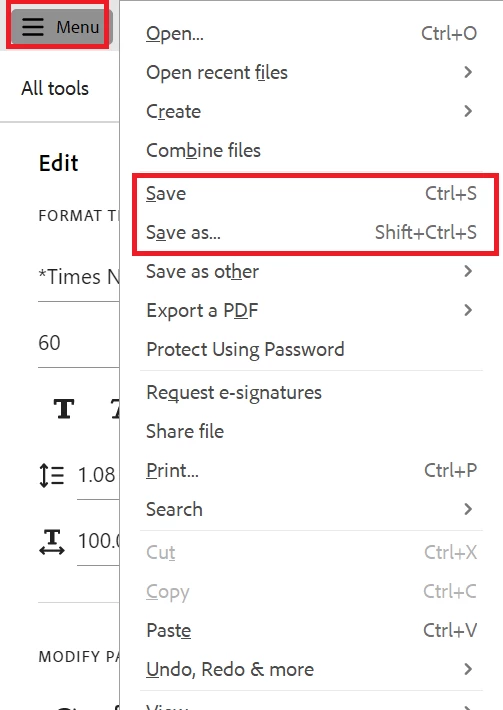
The option to save and save as is present under the hamburger menu at the top left corner of the new Acrobat experience, as shown in the screenshot below:


What is the version of the Acrobat DC you are using? To check the version go to Help > About Acrobat and make sure you have the recent version 23.06.20320 installed. Go to Help > Check for updates and reboot the computer once.

Also try to repair the installation from the help menu (Win Only) and see if that works.

Please try to reset the Acrobat preferences as described here https://community.adobe.com/t5/acrobat-discussions/how-to-reset-acrobat-preference-settings-to-default/td-p/4792082

You may also try to create a new test user profile with full admin rights in Win or enable the root account in MAC and try using the application there and check.


Let us know how it goes.


~Amal


返信数 4

Participant
June 19, 2025

This is extremely difficult to navigate and limiting. Another example of develpers that done use the product they are developing and create updates that don't support users. 

mrtdg
Inspiring
October 5, 2024

When you try to do a save as the interface now appears as a file export menu. Until you choose a folder there is little to make me think I can just save another pdf with a new name. This interface is just way over done and common work methods in every other program are masked by the over designed interface.

Participant
June 20, 2024

Hello 


We have a user that wants to have a save icon that has the functionality like save as.

Is there a way to change the functionality of the normal save icon so it does the save as?


kind regards

try67
Community Expert
Community Expert
June 20, 2024

No.

Amal.
Community Manager
Amal.Community Manager解決!
Community Manager
September 18, 2023

Hi @sarah24473490wtby 


Hope you are doing well, and thanks for reaching out.


The option to save and save as is present under the hamburger menu at the top left corner of the new Acrobat experience, as shown in the screenshot below:


What is the version of the Acrobat DC you are using? To check the version go to Help > About Acrobat and make sure you have the recent version 23.06.20320 installed. Go to Help > Check for updates and reboot the computer once.

Also try to repair the installation from the help menu (Win Only) and see if that works.

Please try to reset the Acrobat preferences as described here https://community.adobe.com/t5/acrobat-discussions/how-to-reset-acrobat-preference-settings-to-default/td-p/4792082

You may also try to create a new test user profile with full admin rights in Win or enable the root account in MAC and try using the application there and check.


Let us know how it goes.


~Amal


Participant
September 18, 2023

Thank you! That's perfect!