


- Home
- Acrobat
- Discussions
- Re: Shrink document feature when adding footer cau...
- Re: Shrink document feature when adding footer cau...
Shrink document feature when adding footer causes page contents to be centered vertically - ugh!

Copy link to clipboard
Copied
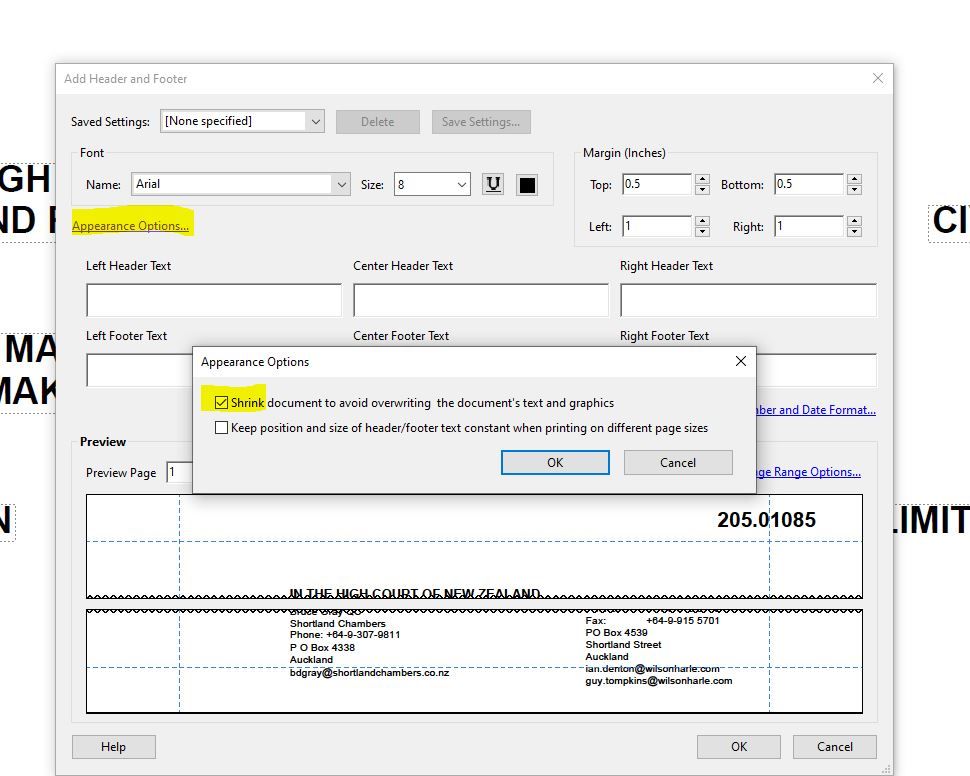
When I add a footer to a multiple page PDF using Adobe Acrobat Pro DC and check the "Shrink document to avoid overwriting the document's text and graphic" in the Appearance Options menu, I end up with pages that are centered horizontally on the page. For instance, if the content of the page is in the top half, then after the footer is added the content of the page is centered. How do I stop this?? I want my pages to be the same as before the header is added, not centered vertically on the page.


 11
Replies
11
11
Replies
11



Copy link to clipboard
Copied
hi - i just posted this exact same question - did you ever resolve your issue? i see no one ever responded.


Copy link to clipboard
Copied
- - - - - - -
Acrobate du PDF, InDesigner et Photoshopographe
Copy link to clipboard
Copied
Copy link to clipboard
Copied
Thanks for the response. Yes, I know how to click the "shrink document" checkbox However, this does not help resolve the issue of having a page with information on the top half of the page from being centered vertically on the page after the footer is added.
Copy link to clipboard
Copied
sorry- no i posted that in response to the reply from JR Boulay that is just showing as ------- above. The email i got with that question was that they had been a user for 25 years and did not know anything about the shrink document checkbox so i was just showing that person where it was in case they had an answer.
Copy link to clipboard
Copied
Sorry, I deleted my answer, it was a mistake.
Acrobate du PDF, InDesigner et Photoshopographe

Copy link to clipboard
Copied
You can make a feature request for future Acrobat versions here:
https://acrobat.uservoice.com/forums/590923-acrobat-for-windows-and-mac
Are you comfortable with InDesign? As a work-around, you could place your pdf into InDesign and add the footer and/or header to the master page, then export to a new pdf.

Copy link to clipboard
Copied
This issue is still happening today. So aggravating that this hasn't been fixed yet.

Copy link to clipboard
Copied
Hi, this is also an issue when using shrink while bates stamping. I found this workaround where you first insert an 'invisible' (white font) character in the footer AND THEN proceed again with your 'real' job with shrink selected:
While this helps, it is not a perfect fix (depending on the page content, you might still have centering vertically or horizontally). I found that putting an 'invisible' header/footer character in ALL FOUR CORNERS helps.
Adobe needs to address this, it creates a lot more work than should be necessary.
FYI, will note that Nuance/Kofax does not seem to have this issue.
Copy link to clipboard
Copied
We also see this and I have spent countless hours researching and testing. I have an open ticket with Adobe (demonstrated it for them March 2023 and this seemed to be a completely new to them). I am pretty sure this has to do with Headers and Footers. For instance, a Word document containing existing headers and footers which is converted to PDF will be fine since these seem to 'anchor' the page content. However, this depends on HOW the Word doc is converted to PDF....Acrobat plugin in Word is not good!) But not all PDFs are created the same and you can't control this - not to mention it can vary from page to page within the same file. Some pages center (vertically AND horizonally) while others are fine. Often you don't even notice this if there is enough content on the page that the centering is imperceptible.
I did receive an email yesterday that their engineers are looking into it, fingers crossed. In the meantime, there are other programs that do not have this problem and the workaround of creating invisible header/footer BEFORE using the shrink does work but adds time and inefficiency since you don't know you'll have the problem until after you try it.
I will update the page here when Adobe fixes this!
Copy link to clipboard
Copied
Thank you for sharing. I hope Adobe is able to resolve the issue. I stopped using Adobe for Bates numbering for this reason.


Get ready! An upgraded Adobe Community experience is coming in January.
Learn more
 AdChoices