


Stop Acrobat DC update

Link in Zwischenablage kopieren
Kopiert
I have creative cloud installed for Photoshop. I also have my own copy of Acrobat 10 installed. Creative cloud keeps asking to update to Acrobat DC. I don't want Acrobat DC, so how do I stop the requests to update.
Thank you.


 70
Antworten
70
70
Antworten
70


Link in Zwischenablage kopieren
Kopiert
You say you selected Uninstall. Not sure where you did that. Perhaps in Creative Cloud app?
In Windows, the Control Panel for uninstall should give a choice of versions.
In Mac, the uninstall App in the Acrobat folder should do it.

Link in Zwischenablage kopieren
Kopiert
this is what console told me:
02.12.15 18:31:49,334 Setup[5179]: WARNING: The Gestalt selector gestaltSystemVersion is returning 10.9.1 instead of 10.11.1. This is not a bug in Gestalt -- it is a documented limitation. Use NSProcessInfo's operatingSystemVersion property to get correct system version number.
Call location:
02.12.15 18:31:58,672 Creative Cloud[5167]: CoreAnimation: warning, deleted thread with uncommitted CATransaction; set CA_DEBUG_TRANSACTIONS=1 in environment to log backtraces.
don't know if it helps…
Link in Zwischenablage kopieren
Kopiert
Ok, you're on a Mac. Please use the Uninstall app in the Acrobat folder within Applications.
Link in Zwischenablage kopieren
Kopiert
There is no Acrobat app or Acrobat folder. Sorry, can't uninstall anything…

Link in Zwischenablage kopieren
Kopiert
Yep, I have exactly the same issue. Windows 10. No Acrobat DC folder or programs to uninstall. Ran AdobeAcroCleaner_DC2015.exe, didn't work. Have Photographers' subscription and want to keep PS, LR and Bridge up to date. Have no interest in Acrobat and am absolutely furious over this frustration. There should be a way to selectively kill this obnoxious grab for my wallet.
Link in Zwischenablage kopieren
Kopiert
bausi82, do you mean there is currently no Acrobat at all installed? You should reinstall the one you want and ignore requests to update. If Creative Cloud is set to auto update you might have to turn that off.
ExecLeaderCoach, it seems to be a nasty and serious problem that Adobe have said nothing about fixing, that people with an old Acrobat and selective Creative Cloud subscription (without Acrobat) still get recommended to update to Acrobat DC. This is bad, and unless or until Adobe choose to fix it, you just have to ignore the message. If Creative Cloud is set to auto update you might have to turn that off. Let's hope they do something soon.
Link in Zwischenablage kopieren
Kopiert
There is no instance of Acrobat installed - at least I can't find anything!

Link in Zwischenablage kopieren
Kopiert
I, too, have the same problem and hope Adobe will fix this.

Link in Zwischenablage kopieren
Kopiert
Similar problem...no Acrobat to uninstall but insists on updating it. Tried uninstall but nothing to uninstall. Tried turning off notifications....that didn't work.
Please fix this annoying glitch.

Link in Zwischenablage kopieren
Kopiert
I have had a subscription to Acrobat Pro since November 2014. My subscription is now listed in my Adobe account as an Acrobat Pro Subscription (which allows me to use Acrobat XI Pro client app as well as the DC version). I've installed the latest version of Acrobat XI Pro on a new Windows 10 PC and am using it, but after reading the informational material on Acrobat DC am not interested in using it.
Every time I open Acrobat Pro XI, I get a pop-up window from Acrobat XI Pro thanking me for "trying Acrobat XI" and telling me that "Acrobat Pro DC is here. Buy it today..." with buttons to "Buy Now," "License This Software" or "Continue Trial." I have a paid subscription and am not using any Trial. I have no Acrobat product to buy or license as I already subscribe. It is simply unacceptable that I have to close--and confirm "Quit"--this popup every time I use Acrobat XI.
Adobe needs to provide a way to suppress these popups.

Link in Zwischenablage kopieren
Kopiert
Do you have Adobe Acrobat Reader DC installed on your PC? If so perhaps un-install this program from add/remove programs which should cease prompts from CC app to update Acrobat DC . I have Windows 10 and on a CC photography plan but chose to keep my Adobe Acrobat X Pro from CS6 version and I use that with no problems.
Link in Zwischenablage kopieren
Kopiert
Rosa,
Thank you very much for your input. It is interesting that you have not had a problem.
I had this problem for a long time while Adobe Acrobat reader was non-installed. I recently installed and then shortly thereafter uninstalled Adobe acrobat reader due to another problem with a file viewer. it is conceivable that I had Adobe Acrobat reader installed several months ago and perhaps that triggered the problem in the first place, but clearly uninstalling Adobe acrobat reader has not solved the problem.
Again, thanks for your input.
Link in Zwischenablage kopieren
Kopiert
No, I only installed Acrobat XI Pro on this new Windows 10 system. No Acrobat Reader came pre-installed either. Given the message I repeatedly receive, I assume if I had installed (and activated, if that's required) Acrobat DC, I would not be getting messages to buy, license or "continue trial".

Link in Zwischenablage kopieren
Kopiert
I have the same issue. CC Photography Plan and Acrobat Pro XI. I'm perfectly happy with Acrobat XI. I do not wish to upgrade to a subscription with Acrobat.
Now if the non-subscription upgrade pricing was more reasonable, I might go for it. If for nothing else to stop the incessant reminders to upgrade. But seriously Adobe... $199 to upgrade a program I originally paid $119 for??? Yes, we got the student/teacher pricing. My wife homeschools our children and uses Acrobat, but Adobe is making it very difficult. It appears the only way to get the Teacher pricing is to get the monthly subscriptions... which we are not interested in for Acrobat.
If anyone knows how to get the Teacher pricing on an upgrade to the stand-alone (non-subscription) Acrobat DC Pro please let me know.
Link in Zwischenablage kopieren
Kopiert
I don't think educational discount applies to upgrades, and discount pricing definitely doesn't apply to educational copies. In the days before subscriptions were pushed so hard, if you wanted the new one and were still a student, you just bought a new one at standard educational discount.
Link in Zwischenablage kopieren
Kopiert
The problem people are discussing here IS NOT FIXABLE from the user end....Stated and restated, seems the people responding are not reading the posts.
Link in Zwischenablage kopieren
Kopiert
so true, and apparently Adobe does not want to fix the problem.
Link in Zwischenablage kopieren
Kopiert
Agreed. It would be helpful if the people who have issues other than the one clearly stated by the OP would create their own threads, instead of hijacking this one.
The problem we are discussing here is the inability to disable the prompts to upgrade to Acrobat DC when an older, non-subscription version of Acrobat is installed, such as Acrobat X or XI. If this isn't the issue you are experiencing, kindly start your own thread. Thanks.

Link in Zwischenablage kopieren
Kopiert
I too have this problem on by my Macintosh computers - a Mac Pro and a MacBook Pro running the Creative Cloud Photography plan as well as previously purchased CS6 including Acrobat Pro.
Stop telling me I need to update my Acrobat DC!!
Roger

Link in Zwischenablage kopieren
Kopiert
Hey,
Having installed CS6, I can see "Try / Buy Now" buttons next to CC Apps, why Acrobat has "Update"?
In my opinion, this notification is not only annoying but also misleading - instead of "Update" it should say "Try" or "Buy". like the other Apps.
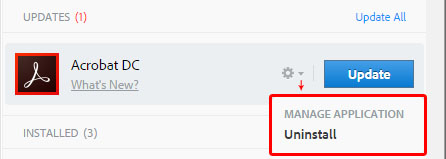
Although @Test Screen Name suggested it is very complicated, I think this could be simply resolved by adding another option under the gear icon, next to the Apps' name.
Currently it has just one option "Manage application > Uninstall" and you could add there "Ignore this App update notifications".
Thx

Link in Zwischenablage kopieren
Kopiert
There must be thousands of users of CC Photography Plan who have an older version of Acrobat installed and are being prompted to Update to Acrobat DC.
It's really frustrating, interestingly Acrobat X does not appear under the 'Previous Versions' listing unlike all my other CS6 products. (Mac 10.11.3)
Adobe please listen and fix!

Link in Zwischenablage kopieren
Kopiert
OK Adobe. Are you going to fix this or not. It is still a problem. Results count. So far you are a failure.

Link in Zwischenablage kopieren
Kopiert
Here too - don't have DC installed, but it shows up as an 'update'. This is deceptive. They'd fixed it for the other applications, but for some reason are pushing this hard.
Very bad approach.

Link in Zwischenablage kopieren
Kopiert
For the record, another one here with the same problem. Acrobat X installed alongside CC Photo plan and getting Acrobat DC 'Install' reminders daily.

Link in Zwischenablage kopieren
Kopiert
Just for the record, I too have the same problem with having a Creative Cloud Photography subscription and a purchased version of Adobe Acrobat X Pro that does everything that I need to do. Creative Cloud continually tells me that I need to update and install the latest version of Acrobat DC.
When is Adobe going to let us choose what applications need updating, as I still want Lightroom, Photoshop and Illustrator all up to date?
Grant


Weitere Inspirationen, Events und Ressourcen finden Sie in der neuen Adobe Community
Jetzt ansehen
 AdChoices