- Página inicial
- Acrobat
- Discussões
- Re: Submit button in a fillable form
- Re: Submit button in a fillable form

Copiar link para a área de transferência
Copiado
How do I get the SUBMIT button in a fillable PDF form to work for those that only have "reader"?





Copiar link para a área de transferência
Copiado
So, from the settings I can tell that whoever created this PDF saved it as Reader Extended. That's why the submit isn't working. It's a bit counter intuitive, but Reader Extending actually reduces functionality. It's because the Extending causes all non-standard Reader features to be blocked, except the specific extended features.
However, Reader Extending hasn't been necessary for most non-standard Reader features for years. Basically you don't need it. Tell whoever created the form not to do it. And then the submit will work.
Use the Acrobat JavaScript Reference early and often
 18
respostas
18
18
respostas
18


Copiar link para a área de transferência
Copiado
It already works the same in Reader as it does in Acrobat Pro.
What specific issue are you having? And what are your submit parameters?
Use the Acrobat JavaScript Reference early and often
Copiar link para a área de transferência
Copiado
Hi,
I created a SUBMIT button on a fillable form... when pressed, it works and opens up an email with th attachment. When tested it only works for those with Acrobat Pro... for those with just "reader" it does nothing. This is also the case for a field with a date, those with reader can enter the date manually but do not get the dropdown of the calendar options.
Thank you in advance!
Copiar link para a área de transferência
Copiado
In previous versions, Acrobat Reader was able to submit data, but restricted from submitting an entire PDF. That is no longer true with Acrobat Reader DC. The calendar popup for a date field is also something that was not available in older versions of Reader. So, what version of the Adobe Acrobat Reader are you using? If its DC, then is it the 64bit version?
Use the Acrobat JavaScript Reference early and often
Copiar link para a área de transferência
Copiado
I have Adobe Pro DC 64 bit. One of those that couldn't get the features to work has the following Reader version (see below)

Copiar link para a área de transferência
Copiado
I have exactly the same version of Reader and it works for me.
Was this form saved as a Reader Extended PDF? What are the Enhanced Security Preferences in Reader?
Use the Acrobat JavaScript Reference early and often
Copiar link para a área de transferência
Copiado
I am not sure. Can you let me know how to check and what needs to be selected?
Copiar link para a área de transferência
Copiado
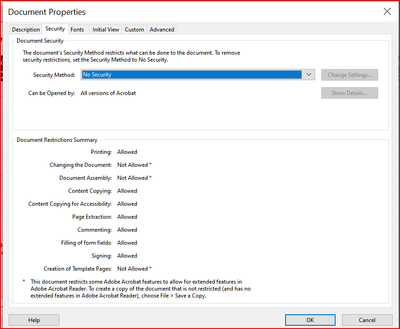
To check for document level security issues, open the document properties dialog and click on the Security tab. This will show any security restrictions.
To check for application level issues, open the Acrobat Preferences dialog and select the "Secuity (Enhanced)" category.
Use the Acrobat JavaScript Reference early and often
Copiar link para a área de transferência
Copiado
Below is a screenshot of first part (restrictrions) not able to find the enhanced option.

Copiar link para a área de transferência
Copiado
It's under Edit (or the Reader app menu on a Mac), then Preferences.
Copiar link para a área de transferência
Copiado
So, from the settings I can tell that whoever created this PDF saved it as Reader Extended. That's why the submit isn't working. It's a bit counter intuitive, but Reader Extending actually reduces functionality. It's because the Extending causes all non-standard Reader features to be blocked, except the specific extended features.
However, Reader Extending hasn't been necessary for most non-standard Reader features for years. Basically you don't need it. Tell whoever created the form not to do it. And then the submit will work.
Use the Acrobat JavaScript Reference early and often
Copiar link para a área de transferência
Copiado
i created it... not sure how to remove the Reader Extended... please show me.
Copiar link para a área de transferência
Copiado
From the file menu select "Save a Copy". This will remove the Reader Extension.
Use the Acrobat JavaScript Reference early and often
Copiar link para a área de transferência
Copiado
I did as instructed and still it doesn't work! 😞
Copiar link para a área de transferência
Copiado
Can you post the form, or make up a test form that exhibits the same behavior?
Use the Acrobat JavaScript Reference early and often
Copiar link para a área de transferência
Copiado
Copiar link para a área de transferência
Copiado
Why did you add two separate Submit commands, to the same email address?
Copiar link para a área de transferência
Copiado
First, as try67 says, you don't need two submit actions on the same button.
I tried this form out on the exact same version of the 32 bit Reader you've shown above and both the Calendar and the Submit work without issue. This could be something to do with your local setup.
Use the Acrobat JavaScript Reference early and often
Copiar link para a área de transferência
Copiado


Prepare-se! Uma experiência aprimorada da Adobe Community chegará em janeiro.
Saiba mais
 AdChoices