Exit
  • Global community
    • Language:
      • Deutsch
      • English
      • Español
      • Français
      • Português
  • 日本語コミュニティ
  • 한국 커뮤니티
0

Submit Form Issue

New Here ,
Oct 02, 2017 Oct 02, 2017

I have created a form with a submit button, the email will go through but when the recipient trys to open the file this error appears: "The file you are attempting to open contains comments or form data that are supposed to be placed on. This document cannot be found. It may have been moved, or deleted." I set the submit to button up using the Action, Mouse Up, Submit Form. In the URL box I typed mailto: my email address. I also selected fields to send. Thanks for any help you can offer (I'm new to this).

TOPICS
PDF forms
669
Translate
Report
Community guidelines
Be kind and respectful, give credit to the original source of content, and search for duplicates before posting. Learn more
community guidelines
1 ACCEPTED SOLUTION
Adobe Employee ,
Dec 18, 2017 Dec 18, 2017
LATEST

Hi Aprylccbcu,

Sorry for the delay in response.

I hope you already have found a solution to this problem. It is likely when you placed a button on the form under properties of the Button, Under Actions, when you choose "Submit a form" an action. You get a dialog with a number of options, you should choose "PDF The complete document" rather FDF.  Please check the screenshot attached.
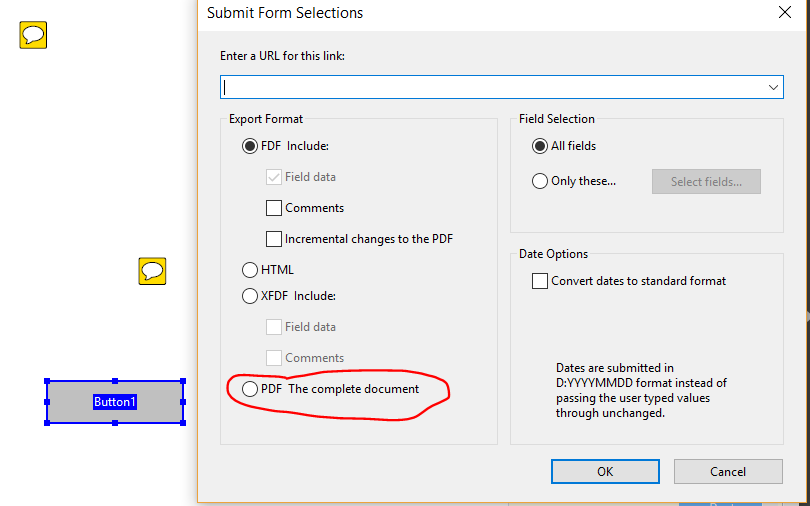
Let us know if that helps.

-Tariq Dar

View solution in original post

Translate
Report
Community guidelines
Be kind and respectful, give credit to the original source of content, and search for duplicates before posting. Learn more
community guidelines
Adobe Employee ,
Dec 18, 2017 Dec 18, 2017
LATEST

Hi Aprylccbcu,

Sorry for the delay in response.

I hope you already have found a solution to this problem. It is likely when you placed a button on the form under properties of the Button, Under Actions, when you choose "Submit a form" an action. You get a dialog with a number of options, you should choose "PDF The complete document" rather FDF.  Please check the screenshot attached.

Let us know if that helps.

-Tariq Dar

Translate
Report
Community guidelines
Be kind and respectful, give credit to the original source of content, and search for duplicates before posting. Learn more
community guidelines


