


Copy link to clipboard
Copied
I am using Acrobat XI pro in shared review. I want to extract the comments to, preferably an Excel file to manage the resolution of the comments in a tabulated form. I see that in the comments, the option available is to export to Word. But on trying to do so gives me a message that the PDF I am working on is not a tagged one.
"Change conversion settings from Adobe PDF menu and check the box labeled, enable accessibility and reflow with tagged PDF".
I am not able to see where the settings are available in the XI pro. Can anyone please help, how I may convert to a tagged PDF?





Copy link to clipboard
Copied
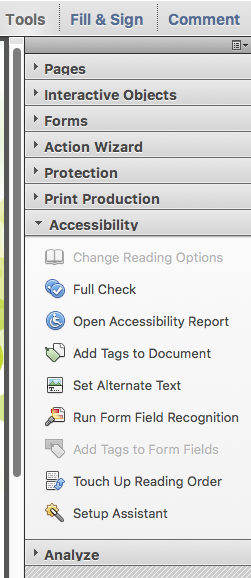
I think this may be what you are after. Tools > Accessibility > Add Tags to Document.
 6
Replies
6
6
Replies
6


Copy link to clipboard
Copied
I think this may be what you are after. Tools > Accessibility > Add Tags to Document.

Copy link to clipboard
Copied
I don't see the 'add tags to doc' link in the Acrobat DC that I am using. Instead there is a auto tag link. It merely makes some garbled content. I used another file which it said that it is tagged. I don't remember having done the accessibility step. When I tested it with a few comments inserted, and saving it with a new file name. It said that 'unable to find Adobe PDF resource files'
Today I tried with Chat support and they were neither able to help. I wanted to export the comments to have a resolution sheet in Excel.

Copy link to clipboard
Copied
I'm facing the same issue with Acrobat DC, have you resolved it? kindly advise how?

Copy link to clipboard
Copied
This is an option, not in the Acrobat app, but in the Acrobat ribbon (toolbar) in the Windows version of Word.
Copy link to clipboard
Copied
But... Acrobat XI is obsolete and not compatible with the current version of Word.

Copy link to clipboard
Copied
The Accessibility Tools panel shown in @Document Geek's screen capture is not available in Acrobat XI.
Only recent recent versions of Acrobat have this panel and tools for tagging PDFs.
| PubCom | Classes & Books for Accessible InDesign, PDFs & MS Office |


Get ready! An upgraded Adobe Community experience is coming in January.
Learn more
 AdChoices