Exit
  • Global community
    • Language:
      • Deutsch
      • English
      • Español
      • Français
      • Português
  • 日本語コミュニティ
  • 한국 커뮤니티
0

UNC link inside Javascript dialog box

Community Beginner ,
Jun 03, 2019 Jun 03, 2019

I have a dialog box defined that pops up when a checkbox is checked.  In that dialog box, I'd like to put the path to a folder on the network; so the user could just click on that link and Windows Explorer opens to that location.  Can this be done, and how?  I'd like the bold information below to be an actual link.

var myMsg = 'Our suggested best practice is to create a new folder in the network location "Z:\\12345_1234" and copy your data there.' ;

// Dialog Definition

var oDlg = {

    description: { name: "Test Dialog", elements: [

    { name: myMsg, type: "static_text" },

    { type: "ok", },

    ] }

};

if (fld1.value != "Off") app.execDialog(oDlg);

TOPICS
PDF forms
410
Translate
Report
Community guidelines
Be kind and respectful, give credit to the original source of content, and search for duplicates before posting. Learn more
community guidelines
Community Expert ,
Jun 03, 2019 Jun 03, 2019

As a link to a folder? No.

Translate
Report
Community guidelines
Be kind and respectful, give credit to the original source of content, and search for duplicates before posting. Learn more
community guidelines
Community Beginner ,
Jun 03, 2019 Jun 03, 2019

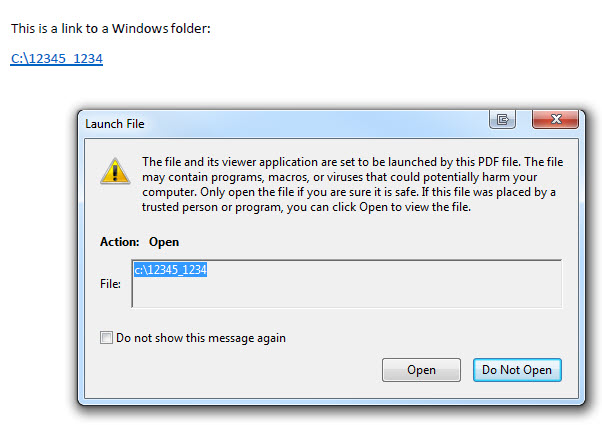
I know the user will receive the applicable security warning message, but why would the message in a dialog not be similar to a link, as shown below which I hardcoded into a PDF file?

PDF link.jpg

Translate
Report
Community guidelines
Be kind and respectful, give credit to the original source of content, and search for duplicates before posting. Learn more
community guidelines
Community Expert ,
Jun 03, 2019 Jun 03, 2019
LATEST

You can't create such links in Acrobat. You can do it using an external application, but it's not a supported feature and should not be counted on to work. I recommend you abandon this course of action. Provide the link as plain text to the user and instruct them to copy and paste it into Windows Explorer, or something like that.

Translate
Report
Community guidelines
Be kind and respectful, give credit to the original source of content, and search for duplicates before posting. Learn more
community guidelines