Copy link to clipboard
Copied
Has a recent update to Adobe Acrobat changed the layout of the toolbars?
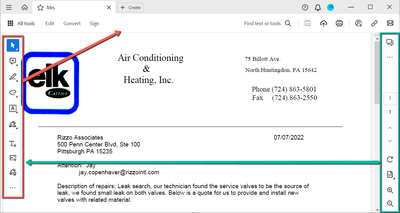
My Custom Toolbar (RED) used to be along the top under the menu bar and my sidebar tools (GREEN) used to be on the left-side that is now occupied by the Custom Toolbar.
I'm not finding anything online about this change or how to change it back. It will no longer allow me to remove the Digital Signature from the Custom Toolbar either. We always replace that with the Certificate Signature. Having both will be confusing to our users and cause problems if they use the wrong one.
Copy link to clipboard
Copied
Thank you for reaching out.
This is a new Acrobat experience introduced with the recent update. For more information about the new Acrobat experience, please refer to the following help document: https://helpx.adobe.com/acrobat/using/new-acrobat-experience.html.
Let us know if you need any help.
Thanks,
Meenakshi
Copy link to clipboard
Copied
Hi Meenakshi,
I would suspect all the shortcuts are there somewhere, but with a complete new look, and no overhead toolbar I must go searching each time to locate before using and that is wasting too much time.
Now that I have been able to roll back I am able to continue as before.
Spending 95% of my time on a desktop and not a tablet / mobile the previous version is preferred.
Perhaps in the future I will spend time learning the updated layout and reevaluate.

Copy link to clipboard
Copied
Hi Bobmcc,
Thank you for the information and update. If you have any issues, please don't hesitate to let us know.
You may also share your suggestion on this with the team here: https://adobe.ly/4e52GqO.
Thanks,
Meenakshi
Get ready! An upgraded Adobe Community experience is coming in January.
Learn more