
Participant
March 3, 2017
Answered

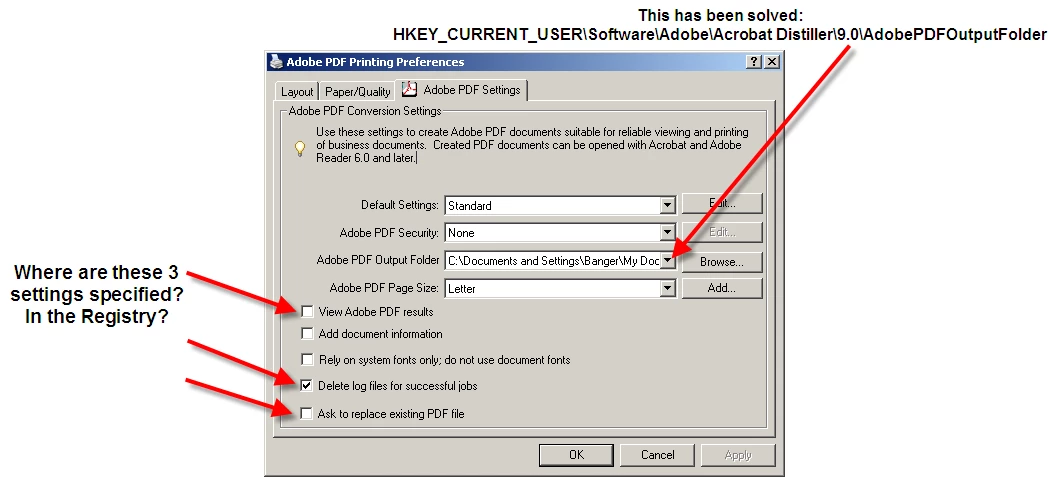
Where on earth are the Distiller settings specified?

  • March 3, 2017
  • 2 replies
  • 1034 views

Hello folks:

I am writing a "Robot" which will automate a lot of clicks. Its task is to produce a large number of PDF files in a specified directory. All settings can be modified manually using the Printing Preferences dialog of the Distiller virtual printer. However, I prefer to do this programmatically. Please see enclosed image.

TIA
This topic has been closed for replies.
Correct answer Test Screen Name

These are settings that belong to a printer instance. They are stored by Windows... somewhere. Probably in the registry, but a different location on each system. These parameters should never be modified even if you find them; you need to use a Windows API, if there is one. The chances are, that they are mapped into a block of binary data attached to the driver, rather than held as named parameters. Never heard of anyone succeeding at this.

2 replies

Inspiring
March 3, 2017

You can open Distiller, select the "Settings" option, then "Edit Settings". Now change the current settings to the desired settings you want to use and then use the "Save as ..." option to create a ".JobOptions" file. If you are using Watched Files, then you edit the setting for the Watched File folders.

Test Screen NameCorrect answer
Legend
March 3, 2017

These are settings that belong to a printer instance. They are stored by Windows... somewhere. Probably in the registry, but a different location on each system. These parameters should never be modified even if you find them; you need to use a Windows API, if there is one. The chances are, that they are mapped into a block of binary data attached to the driver, rather than held as named parameters. Never heard of anyone succeeding at this.