

Adobe Acrobat and Reader - September 2024 Updates Now Available!!
Adobe Acrobat and Reader - September 2024 Updates Now Available!!
We are happy to announce that the latest DC Continuous (Acrobat and Reader) 24.003.20112, Acrobat 2024 (Acrobat and Reader) 24.001.30187 and Acrobat 2020 (Acrobat and Reader) 20.005.30680 is live now.
What's Included in the Update?
-
The most recent Acrobat & Reader update brings you the following:
- Exciting new features.
- Essential bug fixes.
To begin enjoying these new features immediately, update your Acrobat by navigating to the Help menu, clicking "Check for updates," and following the on-screen instructions to complete the update process.
Here are some of the notable features introduced in this release:
Add reactions to reviews on shared files.
You can now enhance your reviews on shared PDFs in Acrobat by adding reaction emojis to comments, making the reviews more interactive. To add reactions:
- Open a shared PDF and select the Comments panel.
- Select the emoticon icon next to the comment you want to react to. A dialog box appears.
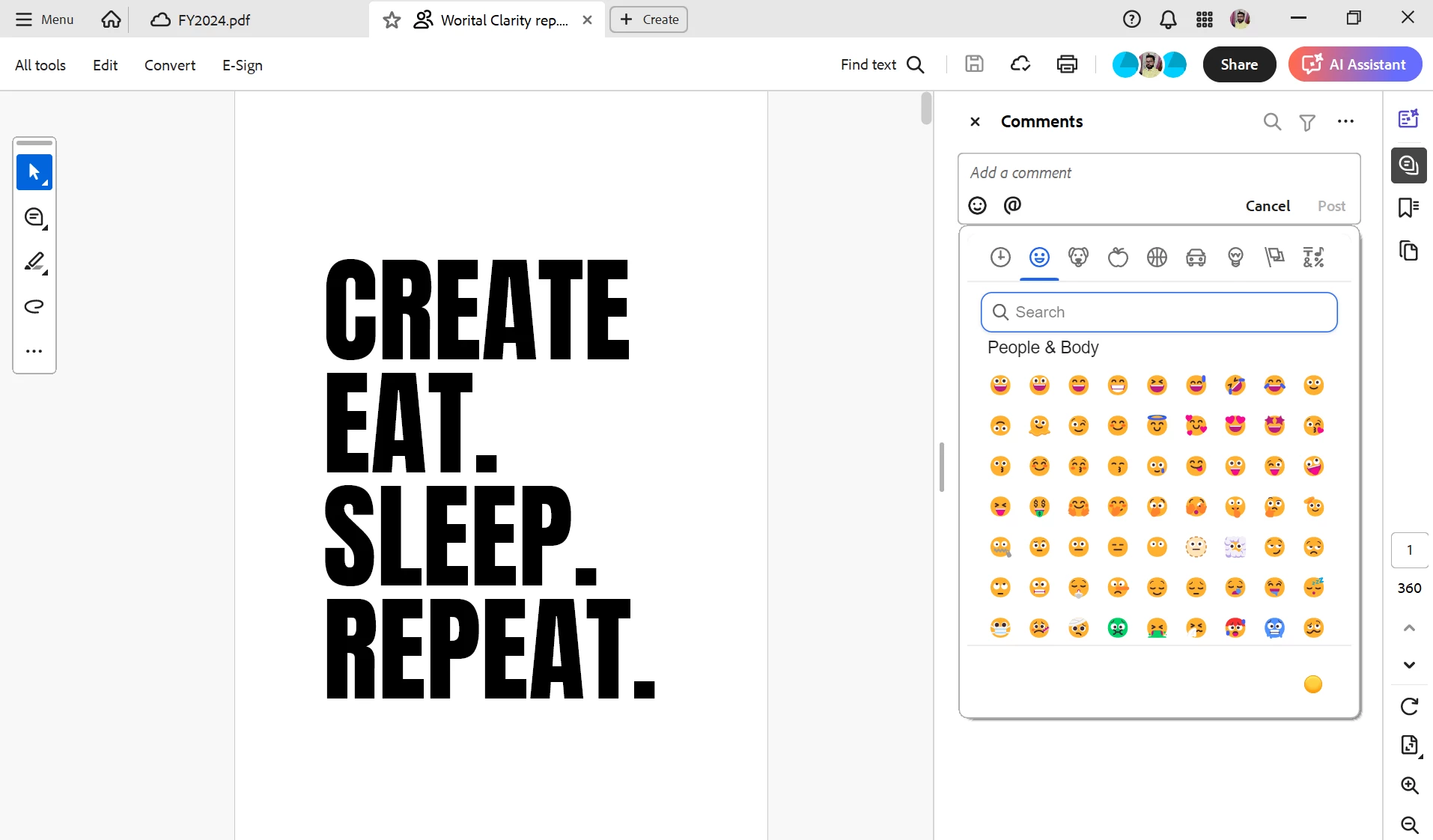
- Select an emoticon from the dialog box or use the search bar to find and select your desired reaction.
Access AI Assistant chats across multiple documents
Acrobat's AI Assistant now supports cloud files with a persistent chat history across multiple documents. This feature allows you to easily revisit and continue previous conversations with the AI Assistant, ensuring seamless workflow continuity across your cloud-stored files.
Access Adobe Express features from Acrobat
Access Remove background and Generative fill features of Adobe Express directly from the Edit panel in Acrobat.
To access these features:
- In the Edit panel, select Image from the Add Content section.
- Choose an image to insert it in the document. The Remove background and Generative fill options appear in the Edit panel.
- Select Remove background or Generative fill to use these features and edit your images in Adobe Express.
For more exciting new features, see this article .
Bug Fixes:
Export PDF
- Alert shown on opening temp file while using Export pdf service in Reader
Forms
- Eform created by LiveCycle designer & AEM designer cannot be submitted
Installers
- Run time error 53 on launching PowerPoint after uninstallation of Acrobat on MacOS
Rendering
- Fonts do not render properly
Viewer
- Feature lockdown key to disable showing additional apps in app(bToggleDCAppCenter) is not working
- Option to remember the state of the “All Tools” panel is missing in Adobe Acrobat
To update the apps manually & more information about this release, see Release Notes.
For known issues with Adobe Acrobat and Reader DC, please refer to the following document: Known issues | Acrobat DC, Reader DC
Acrobat DC System Requirements.
Enterprise-Centric features: For these, refer to the Administration Guide.


 AdChoices