
Inspiring
January 21, 2016
Question

Acrobat Pro DC – Comment Summary issue – comments overlaid on same page as comment markers

  • January 21, 2016
  • 10 replies
  • 4672 views

Hi all,

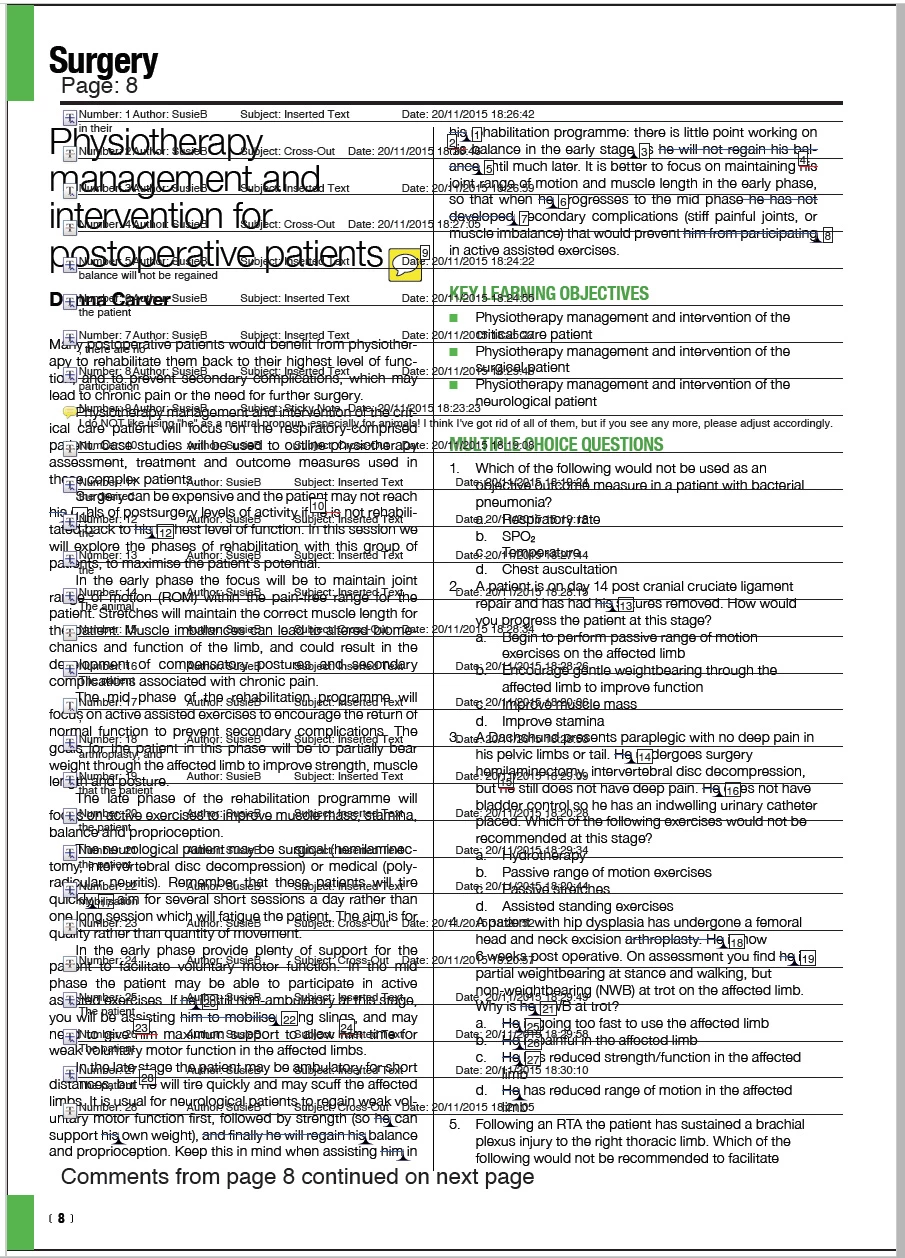
I've been created comment summaries with Acrobat without problem for years now. In the last few days when I try to create one the first 6 pages are always fine (page showing comment markers, followed by page showing relevant comments, then the same again x2), then page 7 of the comment summary is blank and the page showing showing the comment markers "shifts" to page 8 along with the relevant comments for that page. The result being both printed on the same page which, if there's a lot of amendments to that page, makes for an unreadble document (see image).

I'm running OSX 10.10.5 and creating comment summaries (as far as I know!) in exactly the same way as I have been for ages. As I said, the results are always the same... first 6 pages fine and then subsequent pages are blank, mish mash, blank, mish mash etc.

Any help gratefully welcome!

Graeme
This topic has been closed for replies.

10 replies

x8x foxy x8x
Participant
February 16, 2016

We have a problem with rolling back to a previous version. As many of our publishers copy and paste their corrections from word into the comments the type, when creating a comment summary sometimes appears at 60pt in the commenting, so you can imagine if an author puts a new sentence into the comments how many pages that takes up when printing out. So for us, at the moment, this software is pretty much unusable as a tool. Surely a fix must be coming soon as this has now been happening for a few weeks

Participant
February 11, 2016

Same issue here. Hoping for a fix soon because it's terribly annoying!

Community Manager
January 26, 2016

Hi Graeme,

Thank you for writing on Forums.

We are aware of this issue and a bug has been logged with our engineering team regarding the same.

Kind Regards,

Tanvi

Ham1000Author
Inspiring
January 26, 2016

That's great, thanks Tanvi. Looking forward to the fix in due course.

Inspiring
February 8, 2016

Having the same issue. User was reverted back to Acrobat 10 Pro and the problem went away.

Unfortunately, word has gotten out in my office that it's possible to revert back to Acrobat 10, and nearly everyone who was using Acrobat DC has opted to revert. They simply despise Acrobat DC.

x8x foxy x8x
Participant
January 25, 2016

Hi Adobe

We're having the same problem. It started doing this for us a few days ago. There isn't really a practical work around as we have books marked up with comments and they are usually hundreds of pages, so to split the comments on to separate pages means a forest loses another tree (or two)!

Please sort it out Adobe, it seems to me that you fix one thing and break something else that was working perfectly fine, but don't worry we don't pay a lot of money each month for Creative Cloud. Sorry for being sarcastic but it's difficult enough as a small business without you introducing bugs that cost us even more.

Ham1000Author
Inspiring
January 22, 2016

Got to be a bug then as others are experiencing the same problem. Thanks guys. Presumably there'll be a fix in due course...

Participant
January 22, 2016

Mac OS X 10.9 and 10.10 both have these issues in our environment. Acrobat can print comment summaries in small batches, but it seems like 8 page documents and larger cause the issue. We have to work around it by printing the documents in small batches so that the comments (with numbering) are printed with the PDF content.

Ham1000Author
Inspiring
January 22, 2016

I've been doing the same to get around the problem, which is fine on a small job of about 24pp maximum, but anything bigger and it's a total nightmare!

Participant
January 22, 2016

We have the same problem in Acrobat Pro DC for about the last week or so. Comment Summaries that are generating the in the print window AND the comments tab of Acrobat create a print job that results in a blank 7th page and comments printed over the PDF content thereafter (a 12 page document turns into a 25 page document instead of a 24 page document). It seems that a page is skipped in the printing/preflight process when comment summaries are added to the print job, and because of the skipped/blank page all the of following pages are coupled together.

Participant
January 22, 2016

Same here since about two weeks.

De- and new installation doesn't help :-(

Arnout_A
Participant
January 22, 2016

Same problem.

AadeshSingh
Participating Frequently
January 21, 2016

Hi Ham1000,

Install the latest update of Acrobat Pro DC Release Notes | Adobe Acrobat, Reader & then try to print the comment summary.

If it still doesn't work, to test install Acrobat Reader DC Acrobat Reader Help | Acrobat Reader DC Help & try to print comment summary.

Regards,
Aadesh

Ham1000Author
Inspiring
January 21, 2016

Thanks for the promot reply, Aadesh.

Acrobat Pro DC is already up-to-date.

Have downloaded Reader DC. The results from this are the same... first 6 pages fine, pages thereafter blank followed by gobbledegook.

I experimented with another PDF from a totally different job. Comments marked up by a completely different person. Sadly the result is the same... Everything fine for 6 pages and wrong thereafter.

Have opened one of the PDFs on a different Mac (again running the most up-to-date Acrobat Pro DC)... same problem.

HOWEVER, I opened one of the PDFs in Reader on a PC and produced a comment summary and this was fine.

So I'm guessing the problem is either a bug in the current update of Acrobat Pro DC (surprised no one else has mentioned this problem if that is the case) or a problem with the Macs that we have in-house. I can investigate further when I get home tonight as I have a Mac there too...

Document Geek
Community Expert
Community Expert
January 21, 2016

Out of curiosity, are you using "Summarize Comments" from the Print dialog box, or "Create Comment Summary" from the Comments Pane flight menu?