

Adobe Acrobat XI Textbox Editing Issues
For a while I've been noticing some seemingly buggy behavior when I edit the text in a PDF. The PDFs I'm working with are generated by printing Word docs to PDF. Some things I've noticed:
-Occasionally I will edit text and save the document. Upon reopening the document some of the letters have seemed to have disappeared. The remaining letters are still spaced correctly.
-Sometimes if I paste text into an existing textbox, it will completely resize it, and if there were any lines of text below where I pasted, they get relocated to the spot right next to where I pasted, and their formatting is changed to match. A fix is generally not achieved by simply placing my cursor at the end of the text I pasted and hitting enter -- I usually have to do a bit of adjusting, or, I undo, move the existing box down, and type new text above it.
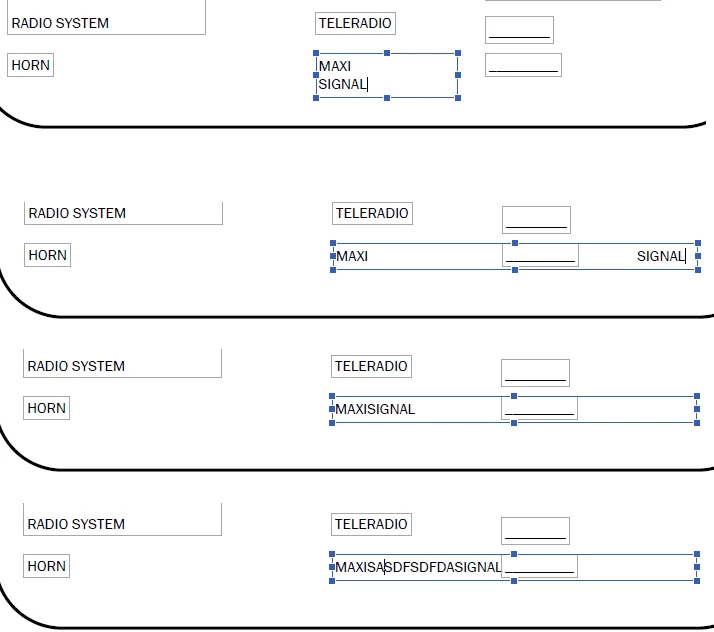
-There are definitely more issues, but they are minor enough that I fix what I can, ignore what I can't, and move on. But today I ran into a real head-scratcher, and it's driving me nuts. What is going on with my Adobe!? Someone please help. I've attached a photo showing the problem. I have a textbox, that said "MAXI." I used the Edit Text & Images tool to open it up, and I typed a space and then the world "SIGNAL." It immediately wrapped the text as if the textbox was half as wide as it is. I extended the text box, and SIGNAL jumped to the far right of the page. I removed the space, and the whole word fit on the line. I then added a bunch of random characters in between the two words, and it never wrapped the text. WHAT?!?!?!?!?!?
 AdChoices