


Copy link to clipboard
Copied
Hi there - forgive the complete noob question, hope you can help.
SecureDep = Security Deposit
RentPW = Rent Per Week
RentPCM = Rent Per Calendar Month (Calculated at RentPW*52/12)
ContractLength = Contract Length in months
I'm trying to populate the Balance to Pay field.
Security Deposit can either be 2 weeks or 6 weeks. The Balance to Pay will change depending on this single field.
If the Security Deposit is 2 weeks, then the Balance to Pay will be ContractLength * RentPCM
If the Security Deposit is 6 weeks, then Balance to Pay will be RentPCM+(RentPW*4)
So....unsuccessfully I have tried:
IF(SecureDep/2=RentPW, ContractLength*RentPCM, RentPCM+RentPW*4) This didn't work  in Simplified Field Notation
Can someone please kindy help me with this? I don't know any Javascript and already tried 2 hours to find a solution, thank you so much!


 1 Correct answer

The custom calculation script could be something like this:
(function () {
// Get the input field values, as numbers
// Blank fields will equal 0 (zero)
var SecureDep = +getField("SecureDep").value;
var RentPW = +getField("RentPW").value;
var RentPCM = +getField("RentPCM").value;
var ContractLength = +getField("ContractLength").value;
// If any of the inputs are zero or less, set this field value to blank
if (SecureDep <= 0 || RentPW <= 0 || Rent PCM <= 0 || ContractLength
...
 17
Replies
17
17
Replies
17



Copy link to clipboard
Copied
Here's an article on simple calculations:
https://acrobatusers.com/tutorials/how-to-do-not-so-simple-form-calculations
Here's one on using an "if' statement in a calculation:
https://acrobatusers.com/tutorials/conditional-execution
And here's a site on everything you want to know about PDF JavaScript calculations:
Calculating field values and more
Use the Acrobat JavaScript Reference early and often
Copy link to clipboard
Copied
Thanks Thom,
I've just read your articles, but I already had spent hours trying to understand Javascript, I'm not as smart as you 
I'm just trying to get help with the code, I'm trying many things, none of which seem to work. Can you please help?
Copy link to clipboard
Copied
The custom calculation script could be something like this:
(function () {
// Get the input field values, as numbers
// Blank fields will equal 0 (zero)
var SecureDep = +getField("SecureDep").value;
var RentPW = +getField("RentPW").value;
var RentPCM = +getField("RentPCM").value;
var ContractLength = +getField("ContractLength").value;
// If any of the inputs are zero or less, set this field value to blank
if (SecureDep <= 0 || RentPW <= 0 || Rent PCM <= 0 || ContractLength <= 0) {
event.value = "";
} else {
// Calculate this field's value
if (SecureDep / 2 == RentPW) {
event.value = ContractLength * RentPCM;
} else {
event.value = RentPCM + 4 * RentPW;
}
}
})();
It will be important that the field calculation order is correct. If you don't know how to confirm that it is, you can do a search and/or post again.
Copy link to clipboard
Copied
Hi George,
Thank you! I appreciate the time you spent to help.
I am getting an error if I try this:
SyntaxError: missing ) after condition 21: at line 22
I am attaching a screenshot of the form, basically the only fields that are manually inputted are ContractLength (length of contract in months) RentPW (rent per week) and SecureDep (security deposit) - the idea is that the form will self-populate itself based on the three manual entries.
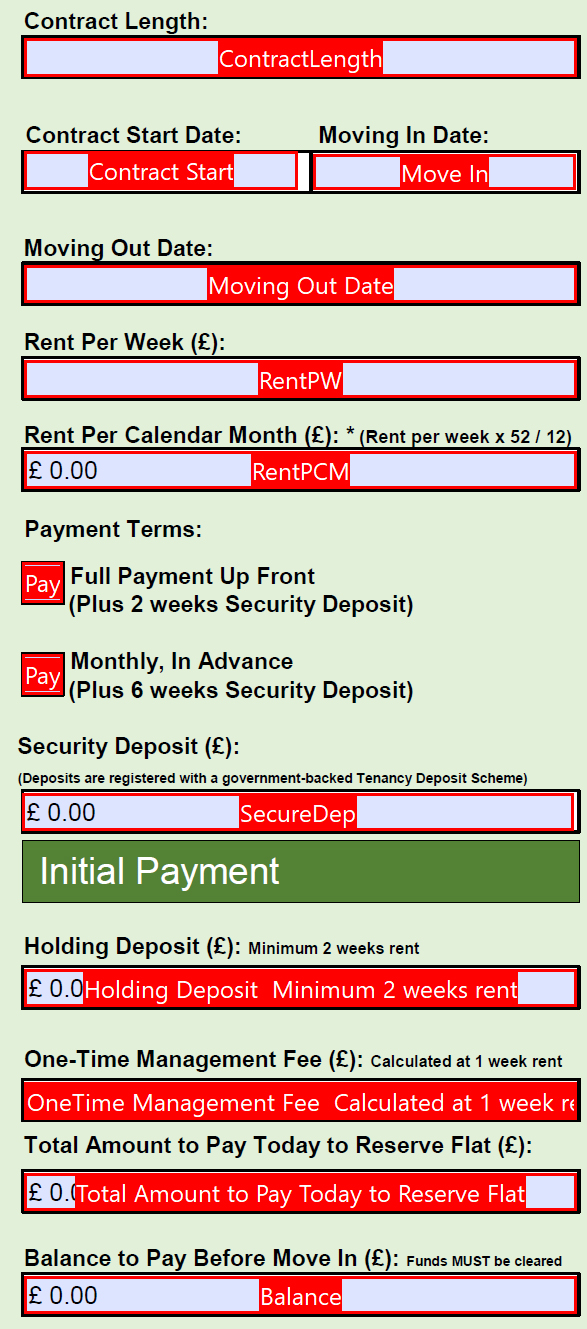
Just in case you need to see the actual form it is here: Dropbox - Test Booking Form.pdf
Thank you so much for taking the time to help

Copy link to clipboard
Copied
The field "Group 1" doesn't exist in the form.
Copy link to clipboard
Copied
Hi, I don't understand, why is that needed? I changed the name of Group 1 to PaymentType
Copy link to clipboard
Copied
In your code you use this:
this.getField("Group 1")
Copy link to clipboard
Copied
Sorry - I was trying something! I was trying to get the radio button to auto-populate the SecureDep field and then have that impact the balance to pay. A wonderful idea, but for someone like me with zero javascript knowledge a bad move!
Here is the form which removes the Group 1 field and removes code: Dropbox - Test Booking Form.pdf
I still have errors for George's code tho
Thank you to anyone who can help
Copy link to clipboard
Copied
To confirm, a user inputs:
Length of Stay = "Duration"
Rent per week = "RentPW"
Security Deposit = "SecureDep"
IF the security deposit is 2 weeks, then the balance to pay "Balance" field is auto-populated to RentPCM+(RentPW * 4), anything else the "Balance" field auto-populates to Duration * RentPCM.
In an ideal world, the radio button will auto-populate the SecureDep field, but I may attempt that slightly later
Copy link to clipboard
Copied
What errors did you get?
Copy link to clipboard
Copied
SyntaxError: missing ) after condition 21: at line 22

Copy link to clipboard
Copied
Post your full code, please.
Copy link to clipboard
Copied
It is posted above and I've attached the form as well
Copy link to clipboard
Copied
I thought you changed it since then. Yes, Bernd's suggestion will solve this issue.
Copy link to clipboard
Copied
When you get the error at adding the code remove the space in:
Rent PCM
Copy link to clipboard
Copied
Thanks Bernd, I'll try that!
Copy link to clipboard
Copied
Thanks that DID the trick!!
After I get the error, I have to remove the space 
Now if I can only figure out how the radio buttons work so the SecureDep field changes dependent on the selection, I'm golden 

Get ready! An upgraded Adobe Community experience is coming in January.
Learn more
 AdChoices