


- Home
- Acrobat SDK
- Discussions
- Re: Assign a document language in Acrobat XI Pro a...
- Re: Assign a document language in Acrobat XI Pro a...

Copy link to clipboard
Copied
Hello,
I'm having an issue with Acrobat XI Pro and Adobe Reader XI. This comes up when assigning a document language to a PDF file, in Acrobat XI Pro.
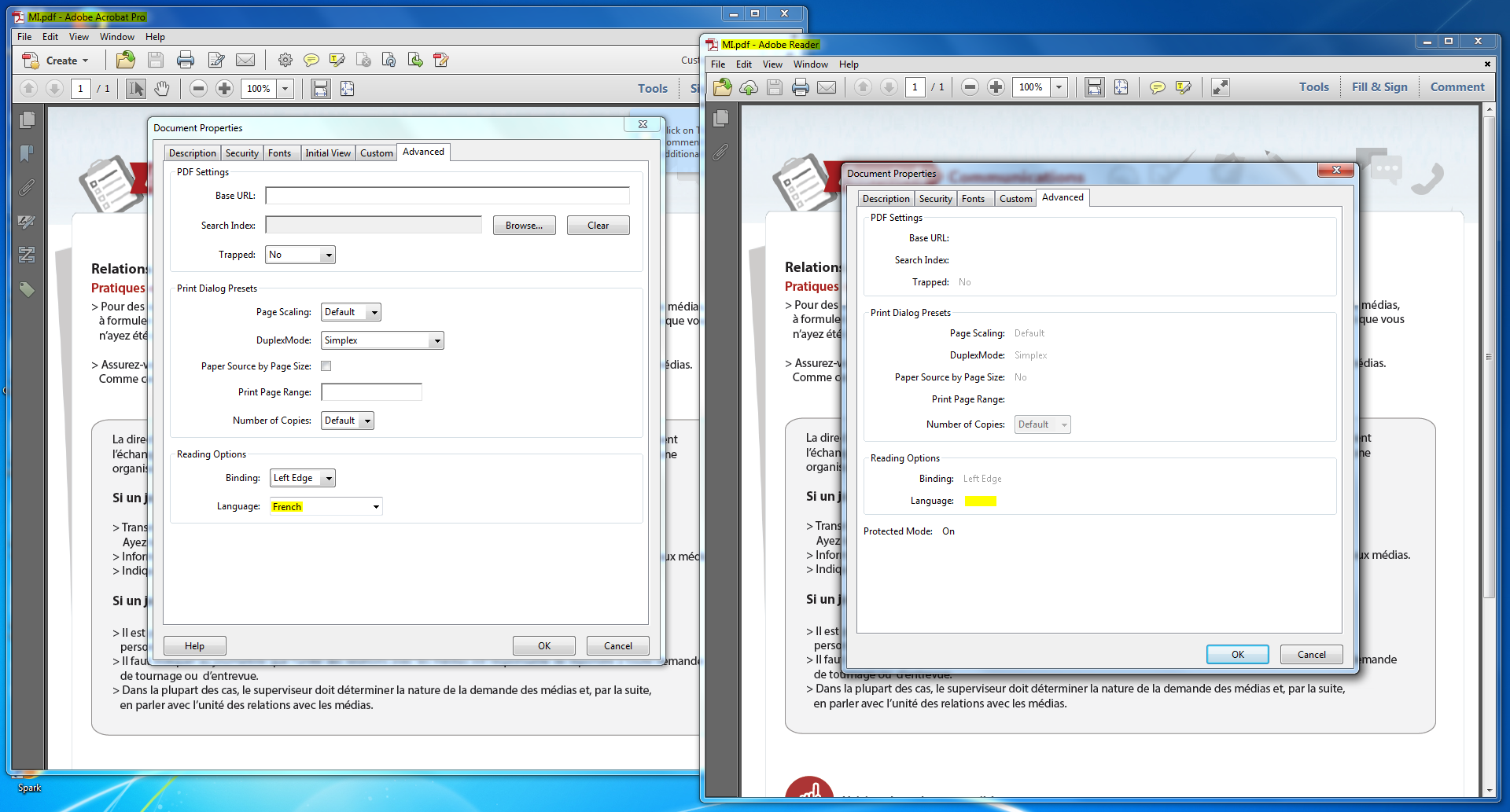
Whenever I assign a document language in Acrobat XI Pro (I do this by setting the document’s language in the Advanced tab of the File Properties dialog [File > Properties]) and open the document in Adobe Reader XI, the document language isn't preserved; instead, if I check the Reading Options (which is located in the same place where I set document’s language, Advanced tab of the File Properties dialog [File > Properties]), there's a blank space next to "Language".
I'm pretty sure I'm doing it right. After all, before closing the document (after assigning a document language), Acrobat XI Pro asks me whether I want to save the changes made to the document. Also, if I open the document in Acrobat XI Pro (after assigning a document language) and I check the reading Options, it says whatever language I chose next to "Language". The problem is that the language isn't preserved in Adobe Reader XI, which I need it to be for accessibility reasons.
So that's my question: How to assign a document language in Acrobat XI Pro and preserve it in Adobe Reader XI?
Here's a screenshot of the same document being opened in both Acrobat XI Pro and Adobe Reader XI to show what I mean:
Thank you for your help.


 1 Correct answer

Assistive Technology (AT - aka screen readers) rely on what is in the structure tree of a tagged PDF. Try setting the top/parent element of the structure tree's language.
Be well...

 6
Replies
6
6
Replies
6


Copy link to clipboard
Copied
Once you change the Language.
Click the OK button.
Then SAVE the document.
You can't make a change in the document until you SAVE it.
If the document is password protected against changes then you need to request the change from the creator of the document.
Copy link to clipboard
Copied
I know that I have to save the document. I did that.
I tried multiple times in multiples ways, just to make sure. It never worked.
I tried hitting save. I tried hitting save as and saving it as a new document. I tried just closing and saving when prompted by Acrobat XI Pro whether I would like to save the changes made to the document. I tried every way I know how.
I even tried yet another time after you replied. Just to make extra sure. Didn't work.
Also, the document isn't password protected. And I tried with more than one document. And one of the documents was made from scratch, by myself (so I know it's not password protected). Unless you tell me that it would be possible for an entire organization to automatically password protect all of the documents made by all employees, I don't think that the document being password protected would be the issue. And even if that was possible, I can still change other things with the document.
Copy link to clipboard
Copied
Can you post a sample document that you have attempted to change the Language property in the Advanced tab and it failed?
Copy link to clipboard
Copied
Something like this?
Daft Punk
Daft Punk est un groupe français de musique électronique originaire de Paris, composé de Thomas Bangalter et Guy-Manuel de Homem-Christo. Actif depuis 1993, le groupe participe à la création et à la démocratisation du mouvement de musique électronique baptisé french touch. Ils font partie des artistes français s’exportant le mieux à l’étranger, et ce depuis la sortie de leur premier véritable succès, Da Funk en 1996. Une des originalités des Daft Punk est la culture de leur notoriété d’artistes indépendants et sans visage, portant toujours en public des casques et des costumes. Ils s’inspirent du film Phantom of the Paradise de Brian De Palma.
Also, the document was made in InDesign. I then attempted assigning the language in Acrobat XI Pro (that's what all the documents and tutorials from Adobe tell you to do). But the language doesn't stay when the document is opened in Adobe Reader XI and screen readers can't read it properly because of it.
Copy link to clipboard
Copied
Assistive Technology (AT - aka screen readers) rely on what is in the structure tree of a tagged PDF. Try setting the top/parent element of the structure tree's language.
Be well...
Copy link to clipboard
Copied
You were right, setting the top/parent element of the structure tree's language did the trick. Thank you! 
However, I'm still concerned about the document properties not saving. Is that normal? Is it important?

Find more inspiration, events, and resources on the new Adobe Community
Explore Now
 AdChoices