williaml51557934
Participating Frequently
April 22, 2016
解決済み

Custom Dynamic Stamp for "Live" Signature

  • April 22, 2016
  • 返信数 1.
  • 8375 ビュー

I am using Acrobat Pro DC. I would like to create custom stamps based on a stamp we have to use in the shop. The stamp requires a live signature and date. Is it possible to create a custom dynamic stamp that would load an image of a persons signature with the current date?

Thanks

このトピックへの返信は締め切られました。
解決に役立った回答 Karl Heinz Kremer

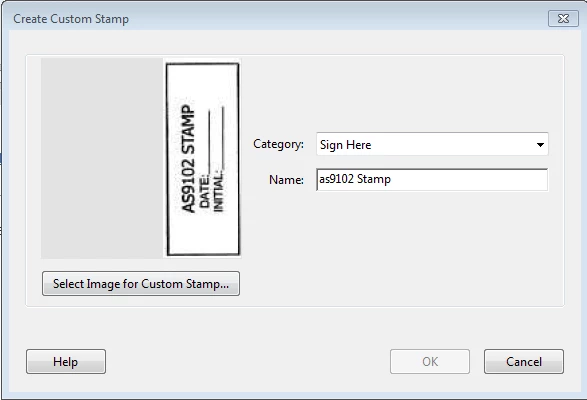
Here's my dilemma, I'm new to Acrobat. I learned how to make the stamp, and have a stamp ready to make a dynamic stamp with the date field. My hang up is when you say "add the text form field that includes the custom calculation script" how do I do that? That's the missing piece. When I search for  adding text to stamp, the instructions have tools I don't have like document processing and the customize button. Is there a tutorial specific to Acrobat DC for a newbie? Also, in DC I don't see where to edit a stamp. The closest I find is below, and it's pretty limited

To edit a stamp, you need to know where it is stored as a PDF file (all stamps are stored in PDF files with one or more pages, and the actual stamp pages identified as "page templates"). There are two options for where these stamps are stored: In the user level stamp directory, or the application level stamp directory. Where these directories are depends on your version of Acrobat, your operating system (and version), and the type of computer you are using (32 bit or 64 bit).

Let's assume you are using Acrobat 11 on Windows 7, 8 or 10, then the user level directory would be this:

C:\Users\<your user name>\AppData\Roaming\Adobe\Acrobat\11.0\Stamps

The application level directory would be (this is for a 32 bit system - the 64bit system would reference "Program Files (x86)"):

C:\Program Files\Adobe\Acrobat 11.0\Acrobat\plug_ins\Annotations\Stamps\ENU

Your stamp files will have cryptic names when you created them via Acrobat's stamp tool (and, in that case, they would also be located in the user level directory).

To add a form field with Adobe Acrobat DC, you would need to start the form editor after loading the stamp file. You do that via Tools>Prepare Form" - once active, you will find the different form fields on the toolbar:

Once you've added a field, you can bring up it's properties via right-clicking on the field (that assumes that the form editor is still active), and selecting "Properties" from the menu. After that, you should be able to add your date script as a custom calculation script on the "Calculate" tab.

返信数 1

Inspiring
April 23, 2016

Yes, assuming the image can be prepared beforehand. Have you created other dynamic stamps before?

williaml51557934
Participating Frequently
April 25, 2016

This will be my first attempt at creating a dynamic stamp. I will probably create the stamp image with the signature and add the java script to insert the date. So, I want to add java to a specific area of a custom stamp made from a Jpeg. Is that possible?

Thanks

Willy

Participant
June 5, 2020

To edit a stamp, you need to know where it is stored as a PDF file (all stamps are stored in PDF files with one or more pages, and the actual stamp pages identified as "page templates"). There are two options for where these stamps are stored: In the user level stamp directory, or the application level stamp directory. Where these directories are depends on your version of Acrobat, your operating system (and version), and the type of computer you are using (32 bit or 64 bit).

Let's assume you are using Acrobat 11 on Windows 7, 8 or 10, then the user level directory would be this:

C:\Users\<your user name>\AppData\Roaming\Adobe\Acrobat\11.0\Stamps

The application level directory would be (this is for a 32 bit system - the 64bit system would reference "Program Files (x86)"):

C:\Program Files\Adobe\Acrobat 11.0\Acrobat\plug_ins\Annotations\Stamps\ENU

Your stamp files will have cryptic names when you created them via Acrobat's stamp tool (and, in that case, they would also be located in the user level directory).

To add a form field with Adobe Acrobat DC, you would need to start the form editor after loading the stamp file. You do that via Tools>Prepare Form" - once active, you will find the different form fields on the toolbar:

Once you've added a field, you can bring up it's properties via right-clicking on the field (that assumes that the form editor is still active), and selecting "Properties" from the menu. After that, you should be able to add your date script as a custom calculation script on the "Calculate" tab.


Could you please suggest how to put signature image on astamp dynamically based on user identity. Ex - I have one stamp with user signature however when I login to diffrent user it should change user signature image? so one stamp will work for both user based on identity. Example image ..