
Participant
January 27, 2016
Answered

Distorted Fonts printing to PDF from Internet Explorer 11

  • January 27, 2016
  • 2 replies
  • 2835 views

When I print to PDF from IE11, my fonts are completely messed up.

I am using IE11 on Windows 7 running Acrobat XI.

This is what my embedded fonts look like:
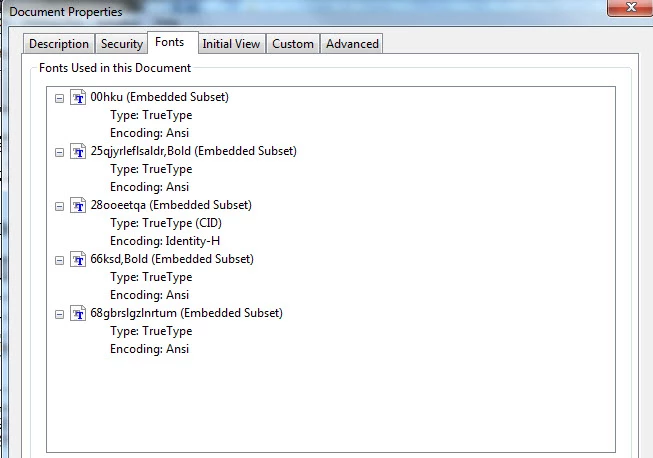
When I reverted back to IE8, it prints fine and the proper fonts are embedded.

What is going on here? Is there a known issue with IE11 and printing to PDF?

Thanks.

This topic has been closed for replies.
Correct answer Dov Isaacs

I assume that you are complaining about the names of the fonts as they appear in the PDF file, not how the characters are rendered.

This is a very well-known problem.

The problem is that IE11 is a Windows WPF application that creates XPS instead of GDI. The XPS is converted to GDI before being passed to the PostScript driver. Nothing that Adobe can do about this. IE8 is a GDI application and thus doesn't suffer from this problem! XPS obfuscates font names and that is what is causing what you see. Complain to Microsoft!

           - Dov

2 replies

Participant
January 28, 2016

Thank you for the response.

The fact that there is missing font information is a legitimate and troubling problem in my business as we print directly from IE to PDF and for disbursement to our clients. We need the proper fonts to be correctly embedded.

In one instance, a file that when distilled from IE11 to PDF, there were over 1,000 fonts of this type listed which eventually crashed Acrobat, making the file unusable.

Is there any work-around other than using IE8? It is not the worst scenario, but we were hoping to upgrade to a modern browser. We need to print (and embed fonts) to PDF from Internet Explorer.

We have used Firefox and Chrome as options, but the do not produce good PDFs, with Chrome outlining all the fonts creating massive PDF files.

Dov Isaacs
Legend
January 28, 2016

The fact is that the proper fonts are embedded but the names as seen in the Document Properties are obfuscated. It should make no difference in terms of how the resultant PDF file displays or prints.

But to answer your direct question, the workaround is to use the IE11 Acrobat PDFMaker plug-in which lets you convert the current web page to PDF. This is done without going through stink'in PostScript and the Distiller. PDF is created directly from the HTML. The fonts will be embedded and properly named.

             - Dov

- Dov Isaacs, former Adobe Principal Scientist (April 30, 1990 - May 30, 2021)
Participant
January 28, 2016

I tried the plugin earlier this morning and found that it produces the intended result. I was just about to post that and saw your response

Thanks for the help and information.

Dov Isaacs
Dov IsaacsCorrect answer
Legend
January 27, 2016

I assume that you are complaining about the names of the fonts as they appear in the PDF file, not how the characters are rendered.

This is a very well-known problem.

The problem is that IE11 is a Windows WPF application that creates XPS instead of GDI. The XPS is converted to GDI before being passed to the PostScript driver. Nothing that Adobe can do about this. IE8 is a GDI application and thus doesn't suffer from this problem! XPS obfuscates font names and that is what is causing what you see. Complain to Microsoft!

           - Dov

- Dov Isaacs, former Adobe Principal Scientist (April 30, 1990 - May 30, 2021)