
Known Participant
May 12, 2017
Question

Explain type: "ok" in code

Hi,

I have 2 questions:

1) I do not understand how something which looks like a button (see Image from Action Wizard form) shows up as a type: "ok" as shown below. I need to understand what a type of "ok" even means and why it is not a "button" as it is with the Skip and Cancel buttons.  I looked and cannot find an explanation anywhere, only check boxes, buttons, etc.

2) Once I understand #1, how can I make it so that the user only has to click this "Apply Label" button once to execute the entire loop. Right now the user has to click on "Apply label" for every document open.  I copied what I think are relevant parts from the code (see Excerpts of Code below).

Image from Action Wizard Form:
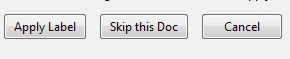
Excerpts of Code (with relevant text in red):

                                 {

                                    type: "view",

                                    align_children: "align_top",

                                    alignment: "align_top",

                                    elements:

                                    [

                                        {

                                            type: "ok",

                                            ok_name: "Apply Label",

                                        },

                                        {

                                            type: "button",

                                            item_id: "Skip",

                                            name: "Skip this Doc",

                                        },

                                        {

                                            type: "button",

                                            item_id: "Abrt",

                                            name: "Cancel",

                                        },

(continued)

.

.

.

.

var DoNumActionDlg = app.trustedFunction(function()

{

   app.beginPriv();

   return app.execDialog(global.DocNumAction);

app.endPriv();

});

    // Setup

var oDoc = event.target;

if(oDoc.xfa)

{

   if(3 == app.alert(oDoc.documentFileName + ": is a LiveCycle Form, which cannot be labeled\n\n Do you want to continue processing files? (Pressing No will Abort the file processing)",1,2))

     event.rc = false;

}

else

    global.DocNumAction.bHidden = oDoc.hidden;

    if(!oDoc.hidden)

       global.DocNumAction.nCurPage = oDoc.pageNum;

    else

       global.DocNumAction.nCurPage = 0;

    global.DocNumAction.nNumPages = oDoc.numPages;


    global.DocNumAction.strFileName = oDoc.documentFileName;

   var cRtn = DoNumActionDlg();

   if("ok" == cRtn)

   {

       // Setup Initial Doc Number

       if(global.DocNumAction.bIncludePageNum)

          global.DocNumAction.nCurrentDocNum = Number(global.DocNumAction.strInitDocNum);

console.println("Do " + oDoc.documentFileName);

       global.DoPlaceDocNumbers(oDoc);


      // Increment Doc Number if applicable

      if(global.DocNumAction.bIncludeDocNum)

      {

          global.DocNumAction.nCurrentDocNum++;

          global.DocNumAction.strInitDocNum = global.DocNumAction.nCurrentDocNum.toString();

      }

  }

  else if("Abrt" == cRtn)

     event.rc  = false;

}

Ce sujet a été fermé aux réponses.

3 commentaires

Joel Geraci
Community Expert
Community Expert
May 12, 2017

The generic "button" type can be used to trigger an event that runs a function that you define. The types "ok", "ok_cancel", and "ok_cancel_other" will dismiss the dialog and trigger the "commit" function and pass the button name that was pressed back the code that called the dialog. That said, you can certainly force a "button" to call the "Commit" function as well.  

Legend
May 12, 2017

What version of the Acrobat JavaScript API documentation are you using? I see "ok" documented with the other valid types for the dialog box elements property.

try67
Community Expert
Community Expert
May 12, 2017

1. In a dialog object an "ok" type field is simply a button that confirms that the user accepted the settings in the dialog.

"ok_cancel" is a set of two buttons, one to accept the settings and one to dismiss them, and "ok_cancel_other" is a set of three buttons: OK, Cancel and a custom one. That's it.

2. This question is not clear... I'm not seeing any loop in your code.

suemo22Auteur
Known Participant
May 13, 2017

HI,

Now I understand what the "ok" type field is.  Thx.

Below is the loop.  How do I make it so the user can click "Apply Label" and it just will stay clicked for entire batch of documents.  Right now the user has to click it each time such that if there are 15 documents, they have to click "Apply Label" for each one.  Eventually I want to make it an option for them to decide if they want to go one by one (which allows them to change the label for a particular document) or just apply labels to all of them all at once.  In the mean time, I want to focus on the latter (labeling all of them all at once with the click of one button).

Here is loop:

// Start Labeling Loop

     var nNumPages = nPgEnd - nPgStart + 1;

     var nCurPgNum = nPgStart;


     for(var nPg=0;nPg<nNumPages;nPg++,nCurPgNum++,nPgTrgStart++)

     {

        // Create text Label

        var strExample = global.DocNumAction.strLabelPrefix;

        if(global.DocNumAction.bIncludeDocNum)

           strExample += global.DocNumAction.nCurrentDocNum;


        if(global.DocNumAction.bIncludePageNum)

        {

           strExample += eval("'" + global.DocNumAction.strPageNumPrefix + "'") + (nCurPgNum + 1).toString();


        if(global.DocNumAction.bPageNumPostfix)

          strExample += " of " + oOrigDoc.numPages;

        }


        // Find Placement location on Page

        // get basic params

        var rcPage = oOrigDoc.getPageBox("Crop",nCurPgNum);

        var mxToDefaultCoords = (new Matrix2D()).fromRotated(oOrigDoc,nCurPgNum);

        var nPgRot = oOrigDoc.getPageRotation(nCurPgNum);


        var rcRot = [];

        var nAlign;

        var nMargX = Number(global.DocNumAction.nMarginX) * 72;

        switch(global.DocNumAction.strHorzPos)

        {

           case"PosL":

             strAlign = "left"; // Left Aligned Text

             rcRot[0] = nMargX;

             rcRot[2] = nMargX + nLabWidth;

             break;

           case"PosC":

             strAlign = "center"; // Left Aligned Text

             rcRot[0] = rcPage[2]/2 - nLabWidth/2;

             rcRot[2] = rcPage[2]/2 + nLabWidth/2;

             break;

           case"PosR":

             strAlign = "right"; // Left Aligned Text

             rcRot[0] = rcPage[2] - nMargX - nLabWidth;

             rcRot[2] = rcPage[2] - nMargX;

             break;

        }


        // Find number of lines

        var nMargY = Number(global.DocNumAction.nMarginY) * 72;

        var nLines = 1;

        var oMtch = strExample.match(/(\n)/g);

        if(oMtch)

          nLines += oMtch.length;


        var bxHght = nLines * (nLabLineHeight + 1);


        switch(global.DocNumAction.strVertPos)

        {

           case"PosT":

             rcRot[1] = rcPage[1] - nMargY - bxHght;

             rcRot[3] = rcPage[1] - nMargY;

             break;

           case"PosB":

             rcRot[1] = nMargY;

             rcRot[3] = nMargY + bxHght;

             break;

        }


        var rectAnnot = mxToDefaultCoords.transform(rcRot);


       // Look for an existing annot and delete if it exists

       var annot = oTrgDoc.getAnnot(nPgTrgStart,"DocNumberLabel");

       if(annot)

         annot.destroy();


       //  Create annotation

       strExample = strExample.replace(/\r\n/g,"\r");

       oTrgDoc.addAnnot({type:"FreeText",page:nPgTrgStart, rect:rectAnnot,

                         rotate:nPgRot, width:0, fillColor:cBkCol,

                         readOnly:global.DocNumAction.strBoxStateSel == "Lckd",

                         richContents:[{textColor:["RGB",0,0,0],textSize:nLabLineHeight,

                                        alignment:strAlign, text:strExample}],

                         name:"DocNumberLabel"

                      });


     } 


     // Flatten

       oTrgDoc.flattenPages();


     // Save File

     if(global.DocNumAction.bSaveWPostFx)

     {

         var cSavePath = oOrigDoc.path.replace(/\/[^\/]+$/,"/");

         var cDocPrefix;

         cDocPrefix = global.DocNumAction.strLabelPrefix;

        cSavePath += global.DocNumAction.strSavePrefix;

//      Document number as prefix


       if(global.DocNumAction.strDocNumInName == "DnPr")

        {

            if(global.DocNumAction.bIncludeDocNum)


            cSavePath += global.DocNumAction.nCurrentDocNum

            cSavePath += "_";

        }


        cSavePath += oOrigDoc.documentFileName.replace(/\.pdf/,"");


        //Document number as prostfix

        if(global.DocNumAction.strDocNumInName == "DnFx")

        {


           if(global.DocNumAction.bIncludeDocNum)

             cSavePath += global.DocNumAction.nCurrentDocNum;

        }

        cSavePath += ".pdf";

        oTrgDoc.saveAs(cSavePath);

     }

     app.endPriv();

  });


}

var DoNumActionDlg = app.trustedFunction(function()

{

   app.beginPriv();

   return app.execDialog(global.DocNumAction);

app.endPriv();

});

    // Setup

var oDoc = event.target;

if(oDoc.xfa)

{

   if(3 == app.alert(oDoc.documentFileName + ": is a LiveCycle Form, which cannot be labeled\n\n Do you want to continue processing files? (Pressing No will Abort the file processing)",1,2))

     event.rc = false;

}

else

    global.DocNumAction.bHidden = oDoc.hidden;

    if(!oDoc.hidden)

       global.DocNumAction.nCurPage = oDoc.pageNum;

    else

       global.DocNumAction.nCurPage = 0;

    global.DocNumAction.nNumPages = oDoc.numPages;


    global.DocNumAction.strFileName = oDoc.documentFileName;

   var cRtn = DoNumActionDlg();

   if("ok" == cRtn)

   {

       // Setup Initial Doc Number

       if(global.DocNumAction.bIncludePageNum)

          global.DocNumAction.nCurrentDocNum = Number(global.DocNumAction.strInitDocNum);

console.println("Do " + oDoc.documentFileName);

       global.DoPlaceDocNumbers(oDoc);


      // Increment Doc Number if applicable

      if(global.DocNumAction.bIncludeDocNum)

      {

          global.DocNumAction.nCurrentDocNum++;

          global.DocNumAction.strInitDocNum = global.DocNumAction.nCurrentDocNum.toString();

      }

  }

  else if("Abrt" == cRtn)

     event.rc  = false;

}

try67
Community Expert
Community Expert
May 13, 2017

This code is incomplete, and anyway it's too long for me to go over it in detail...

If the issue is that the dialog appears for each page then the solution is to call it once, before the pages loop, and then use the values from it in your loop. That way it will only appear one time.