



Copy link to clipboard
Copied
I'm trying to do this lesson i have from a book but it doesn't work.
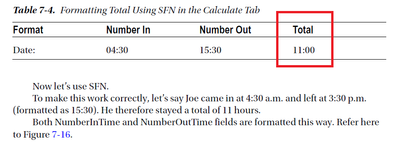
I do everything as described in lesson but my result is 11.00 and not 11:00.
Can someone help?


 1 Correct answer


Surprisingly, it does work... I guess it picks up the Time format setting and converts the values to Date objects. The result is just a number, though. If you want to convert it to a "time" notation use this as the field's custom validation script:
event.value = Number(event.value).toFixed(2).replace(".", ":");
I added the call to the toFixed method because without it if you enter start time 11:30 and end time 14:45, for example, the result is 3.149999999 instead of 3.15. Also, if you only fill
...
 20
Replies
20
20
Replies
20

Copy link to clipboard
Copied
What is the Format setting of the field?
Copy link to clipboard
Copied
First two fields are formatted as time and 3rd field where result is shown is formatted as number with 2 decimals, thats what lesson says to do.
Copy link to clipboard
Copied
Then the screenshot they're using is not correct. A field set up as a Number field can't show the value "11:00".
Copy link to clipboard
Copied
If I set as time I'm not getting any result.

Copy link to clipboard
Copied
What is the book, please? And which version of Acrobat was it written for?
Copy link to clipboard
Copied
Book is "Enhancing Adobe Acrobat DC Forms with JavaScript by Jennifer Harder" it's from 2017.
Copy link to clipboard
Copied
It doesn't make sense to set it as a time field as the result is not an hour, but a total amount of time. If you want it to have a colon then set the field's Format to None and add the column in your code.
Copy link to clipboard
Copied
I don't have any code, in lesson calculation is used by SFN in 3rd field nothing else
Copy link to clipboard
Copied
Unless the hours and minutes are in separate fields, that's not possible, as far as I know. You need an actual script to do it.
Copy link to clipboard
Copied
Here is the 2 pages with that lesson.

Copy link to clipboard
Copied
That doesn't work.
Use the Acrobat JavaScript Reference early and often
Copy link to clipboard
Copied
It did work for me... Maybe it's a version-specific issue? I used Acrobat XI Pro.
Copy link to clipboard
Copied
Surprisingly, it does work... I guess it picks up the Time format setting and converts the values to Date objects. The result is just a number, though. If you want to convert it to a "time" notation use this as the field's custom validation script:
event.value = Number(event.value).toFixed(2).replace(".", ":");
I added the call to the toFixed method because without it if you enter start time 11:30 and end time 14:45, for example, the result is 3.149999999 instead of 3.15. Also, if you only fill in one field it will show a result, which might not be desired.
Copy link to clipboard
Copied
How do you calculate it without SFN?
i try this while format as number var a = this.getField("Text1").value;
var b = this.getField("Text2").value;
event.value = a-b;
I get app alert that format is not right, if I set it to none then got really big number instead of 11.00.
BTW your code work I tried it with adding 4th field that just get value from 3rd and it's working that way.
Copy link to clipboard
Copied
Simplified Field Notation cannot be used to perform math on time values. It does in fact convert the ":" to a decimal, but it does not handle hour minute conversions. And there are no formatting options for converting from a decimal back to time notation.
If you want to really test this, then remove the formatting from the Total field so you can see the real value that is produced from the SFN calculation, then enter numbers that will cross an hour boundary.
Use the Acrobat JavaScript Reference early and often
Copy link to clipboard
Copied
I tried it on Acrobat X, XI, and DC. In all cases the time values were converted decimals and the calculations proceeded as normal decimal numbers. The time values were not handled properly.
You need to try values that cross the hour boundary.
Try 12:00 - 2:15
The time result is 9:45
And the decimal result is 9.85
I get the decimal result.
Use the Acrobat JavaScript Reference early and often
Copy link to clipboard
Copied
Well, it uses 24-hour format and assumes that it's contained within the same day. If you go pass midnight then it doesn't work correctly, no, but neither would a script, unless it was built to do that.
Copy link to clipboard
Copied
My calculation sample doesn't cross midnight.
None of the samples shown in this thead, or the pages from the book show an example that crosses an hour boundary, not midnight, just an hour.
Try 5:00 - 4:45
Tell me this calculation is working for you and send me an example, because I'm not seeing it.
Use the Acrobat JavaScript Reference early and often
Copy link to clipboard
Copied
I assume you mean the other way around... However, you're right, it doesn't return the correct value. It returns "0.5499999999999998".
Copy link to clipboard
Copied
If you start a task at 4:45 and end it at 5:00, then the amount of time it takes to complete the task is 15 minutes. So, SFN does not work for performing time calculations. The only thing is does do is convert a time string to a number with the decimal at the colon position.
Use the Acrobat JavaScript Reference early and often

Get ready! An upgraded Adobe Community experience is coming in January.
Learn more
 AdChoices