
Exit
  • Global community
    • Language:
      • Deutsch
      • English
      • Español
      • Français
      • Português
  • 日本語コミュニティ
  • 한국 커뮤니티
0

Hidden dialog box

New Here ,
Feb 12, 2016 Feb 12, 2016

I have a user who is continually having an issue with, what I think, is a hidden dialog box in Acrobat DC. Periodically, sometimes when saving a PDF, sometimes when commenting, sometimes when just scrolling, Acrobat will appear to lock up. Windows will play the default beep (the ding) whenever we try to click anywhere in Acrobat. It's exactly as if there is a dialog box asking us something, but there is no dialog box to click on. We can't click on or do anything. Using task manager to close Acrobat pops up the warning in the screenshot below. I've tried repairing Acrobat DC and also completely uninstalling using the Acrobat Cleaner tool and then reinstalling. Any other ideas?
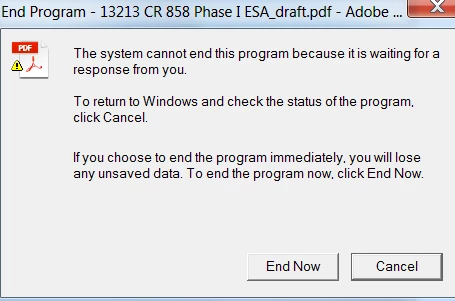
andy1.png

TOPICS
Acrobat SDK and JavaScript
776
Translate
Report
Community guidelines
Be kind and respectful, give credit to the original source of content, and search for duplicates before posting. Learn more
community guidelines
Adobe Employee ,
Feb 13, 2016 Feb 13, 2016
LATEST

Hi Christian239,

Please provide the exact dot version of the software & OS installed at your system .Also check whether is there any update available for the software after going through "help > check for updates "

Follow this thread to reset the preferences for the Acrobat software : How to reset Preference settings in Acrobat.

Is this happening with all the documents or with certain files. Please provide the name of the application used creating this document originally.

Please check with the Different user account as well referring to this Article :- https://helpx.adobe.com/x-productkb/global/create-local-administrator-account-windows.html

Regards,

Yatharth 

Translate
Report
Community guidelines
Be kind and respectful, give credit to the original source of content, and search for duplicates before posting. Learn more
community guidelines