
March 31, 2016
Question

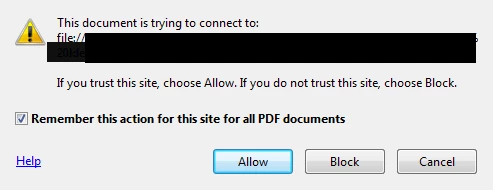
Hyperlink Security Warrning Adobe Acrobat 11.0.15

  • March 31, 2016
  • 2 replies
  • 675 views

I recently upgraded to Microsoft Office 2016 and am revising a few documents--created from a previous word version--with the hyperlinks. The hyperlinks are network paths, but now when saving the doc to PDF ("save as" method), and then loading it in Acrobat the links now prompt a security warning everytime.

I played with the trust manager and security features to include the network path(s) in Adobe Acrobat, but still no luck getting rid of the warning when trying to open a hyperlink in the PDF.

Is there an issue with Office 2016 and Acrobat 11+? Or am I missing something entirely?
This topic has been closed for replies.

2 replies

Inspiring
April 1, 2016

With every new version of a program things change. Both Microsoft Office and Acrobat have been making security changes with each new version. I would make sure both MS Office and Acrobat are up to date with patches.

Do you have Acrobat installed and active in MS Word?

Are you using the "Save as PDF" menu item or the PDF Maker add-in?

try67
Community Expert
Community Expert
March 31, 2016

The issue might be that Acrobat 11 (XI) is not compatible with Office 2016. The "Save as PDF" command is not an Adobe command, but a part of Office, so you're not actually using Acrobat to generate the files, which might explain these weird issues.

March 31, 2016

I find it odd as that command worked fine in Office 2013.

try67
Community Expert
Community Expert
April 1, 2016

Then possibly something changed in the way Office generates PDF files...

This is something you would need to ask Microsoft about, as it's their

functionality.