
jjj119
Participant
February 4, 2016
Answered

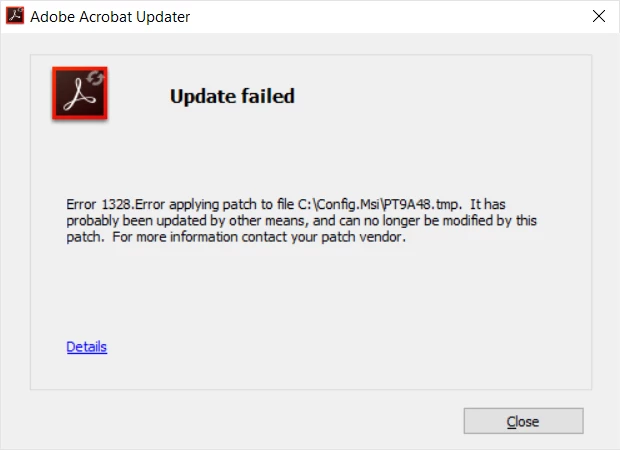
I installed Adobe Acrobat XI Pro on a new computer and tried to update it but got a 1328 error message. Any thoughts?

  • February 4, 2016
  • 1 reply
  • 670 views

I tried re-installing twice, as suggested on many of the threads I've read, but keep getting the same message.  Tried clearing any registry errors, and some other things, but no luck.   I am using Windows 10 and a Chrome browser for the update.  I took a screenshot which I will post below.  Any thoughts? 
This topic has been closed for replies.
Correct answer AadeshSingh

Hi jjj119,

1328Error applying patch to [filename]. It's likely that something else updated the file, and the patch can't modify it. For more information, contact your patch vendor.A file has changed or is missing. Uninstall and reinstall the program.

Uninstall it using this cleaner tool Download Adobe Reader and Acrobat Cleaner Tool - Adobe Labs, restart your system & reinstall Acrobat XI https://helpx.adobe.com/acrobat/kb/acrobat-downloads.html.

Regards,
Aadesh

1 reply

AadeshSingh
AadeshSinghCorrect answer
Participating Frequently
February 4, 2016

Hi jjj119,

1328Error applying patch to [filename]. It's likely that something else updated the file, and the patch can't modify it. For more information, contact your patch vendor.A file has changed or is missing. Uninstall and reinstall the program.

Uninstall it using this cleaner tool Download Adobe Reader and Acrobat Cleaner Tool - Adobe Labs, restart your system & reinstall Acrobat XI https://helpx.adobe.com/acrobat/kb/acrobat-downloads.html.

Regards,
Aadesh

jjj119
jjj119Author
Participant
February 4, 2016

Aadesh,

   Thanks so much for the help.  I had found a reference to the cleaner and used it once but still got the 1328 error.  But after getting your message I uninstalled the program and reused it, and then downloaded from the website you provided instead of from my disk, which perhaps made the difference.  Bottom line, no error now - thanks so much for your help. 

John

AadeshSingh
Participating Frequently
February 4, 2016

Hijjj119,

You're welcome!

I am glad that your issue is fixed.

Regards,
Aadesh