


Copy link to clipboard
Copied
I need help with this rounding:
var v3 = (this.getField("valor_for").value-10)/2;
event.value = Math.floor(v3);
I need the value of the operation always be rounded down
thanks


 1 Correct answer


A good way to debug these things (besides actually running in the JavaScript debugger and stepping through your code one line at a time) is to add debug output to your script. Add these two lines just after you calculate v3:
console.println("v3 = " + v3);
console.println("Math.floor(v3) = " + Math.floor(v3));
Now you can see what your script does. It works correctly for me.
If you are not getting the correct results, and if the value of the "valor_for" field is calculated as well, you need to check
...
 4
Replies
4
4
Replies
4

Copy link to clipboard
Copied
Please give some examples of when it’s not working correctly. What values do you enyet, what do you expect as output, and what is the actual output?
Copy link to clipboard
Copied
When I write the code without Math.floor, the calculation works, for example:
var v3 = (this.getField("valor_for").value-10)/2;
event.value = (v3);
valor_for field output of calculation (20-10)/2 = 5

But when I put Math.floor, nothing happens:
var v3 = (this.getField("valor_for").value-10)/2;
event.value = Math.floor(v3);
valor_for field output of calculation (31-10)/2 = 10,5 -
with Math.floor the result would be 10 right?

these are my lines of code:
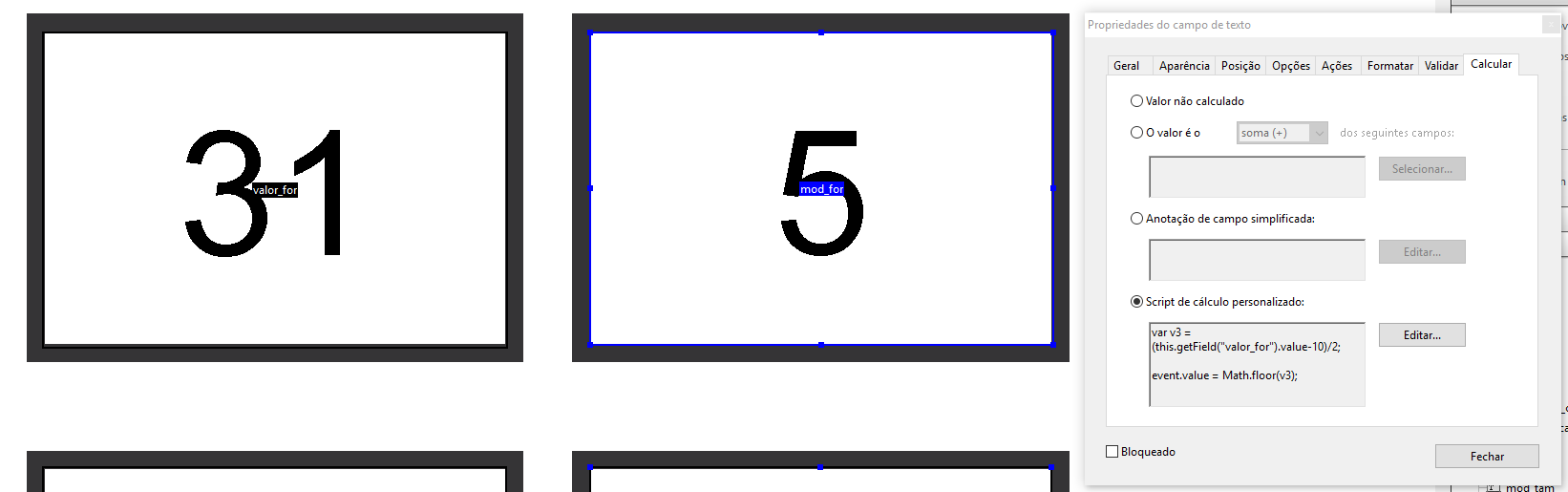
What's wrong?
Thank you

Copy link to clipboard
Copied
Check the calculation order.
Copy link to clipboard
Copied
A good way to debug these things (besides actually running in the JavaScript debugger and stepping through your code one line at a time) is to add debug output to your script. Add these two lines just after you calculate v3:
console.println("v3 = " + v3);
console.println("Math.floor(v3) = " + Math.floor(v3));
Now you can see what your script does. It works correctly for me.
If you are not getting the correct results, and if the value of the "valor_for" field is calculated as well, you need to check your calculation order (which is what I think Bernd wanted to say): If the 2nd field gets calculated before the results of the first field are available, then you are working with the previous value, which could explain the behavior you are seeing.

Get ready! An upgraded Adobe Community experience is coming in January.
Learn more
 AdChoices