


Participating Frequently
March 30, 2016
Answered

Multi-line fields lose data when saving/signing

  • March 30, 2016
  • 1 reply
  • 504 views

I create online forms for a medical company and Acrobat DC works great for what I need to do, mostly convert paper forms to something we can fill out online. To this purpose we need to be able to both save and sign the documents.

Recently we have found that when a document is signed multiple times or saved multiple times and then signed any multi-line fields lose data. It looks as if the individual lines get pushed further and further apart every time its signed till lines are pushed out of the box and gone.

This is an example of what it should look like:
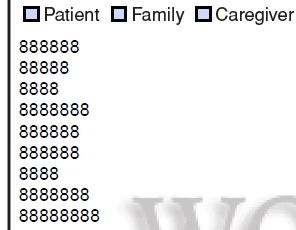
  This is what it looks like after multiple saves: 

Any help or advice would be appreciated.

This topic has been closed for replies.
Correct answer George_Johnson

Any ideas on how to fix that? I have found that replacing multi-lines to a bunch of single lines works, but isn't very viable for what i am doing.


The fix would have to be on the server side since that's the source of the problem, not the PDF forms that you created. Without knowing what software is being used, it's impossible to say what can be done. For a proper fix, different software may have to be used.

1 reply

Inspiring
March 30, 2016

What PDF viewer is being used in that second screen shot?

Scott_BIAuthor
Participating Frequently
March 30, 2016

They are the same viewer, Adobe Acrobat Pro DC. Its just been finalized on the site which removes the overlays. It would look the same even if I hadn't done that though.

example:

Inspiring
March 30, 2016

Do you notice that the check box character is different in those two screen shots? I'm trying to figure out why that is, which will probably lead to the source of the problem. When you say "finalized on the site", what do you mean exactly? Is there some process on a web server that's saving the filled-in PDFs?