


- Home
- Acrobat SDK
- Discussions
- Re: Notallowed signaturesign javascript DC Reader
- Re: Notallowed signaturesign javascript DC Reader
Notallowed signaturesign javascript DC Reader

Copy link to clipboard
Copied
Hi,
I have been using a custom javascript I wrote for years on Acrobat Pro 6. It also works on Acrobat Standard X but I have not been able to get it work on Acrobat Reader DC.
The javascript finds a location for a signature field, creates the field, then signs it with a Digital Certificate Signature.
everytime the code gets to
field.signatureSign
The console gives a Notallowed security error. I already have a trusted function etc (this all worked in Acrobat X) but cannot get it to work in DC Reader.
After it errors, I can click on the signature field with my mouse and Reader DC pops up up the sign dialog and I can then sign the file, so reader is working with the digital ID, is able to sign the documents etc, but not from javascript?
Can anyone tell me whats different, is this a function not available in Reader?
Can anyone confirm they can get Adobe Reader DC to field.signatureSign in javascript correctly
Code section below, it is "C:\Program Files (x86)\Adobe\Acrobat Reader DC\Reader\Javascripts\DigSigJC.js"
Note: Calling it config.js makes no difference.
// Adds signature to document and saves
function sign_document(operation)
{
	var field = this.addField({cName:'Signature', cFieldType:'signature', nPageNum:0, oCoords:[0,0,0,0]}); // Creates Signature Field
	field.rect=[320,75,375,60];
    trusted_signature(field); // Add signature to field
    app.execMenuItem('Save',this); // Save document
}
// Trusted operation to perform signing
var trusted_signature =app.trustedFunction(function(field)
{
	app.beginPriv();
		var sig = {appearance:'Approved',reason:'Approved for Manufacture',mdp:'allowNone'};
		var sec = security.getHandler('Adobe.PPKLite', false);
                // List all the available signature handlers
		//for (var i=0; i<security.handlers.length; i++)
		//	console.println(security.handlers[i]);
                //sec.login({bUI:true}); Makes no difference
		//console.println("isLoggedIn="+sec.isLoggedIn);
		field.signatureSign({oSig: sec, oInfo: sig, bUI: false});
	app.endPriv();
});
I also have the following javascript settings, but have tried them all to no avail.

Any help greatly appreciated.
John.


 26
Replies
26
26
Replies
26


Copy link to clipboard
Copied
Look at the documentation of the function.
Copy link to clipboard
Copied
I did. It doesn't work. I've read both the Developing Application using Javascript and the API reference.
If I am doing something wrong I cannot see what it is. If you can please let me know.
Here's an even simpler version.
// Adds signature to document and saves
var sign_document=app.trustedFunction(function (operation)
{
	app.beginPriv();
		var pageRec = this.getPageBox({nPage: 0});	// Page dimensions
		var field = this.addField({cName:'Signature', cFieldType:'signature', nPageNum:0, oCoords:[0,0,0,0]});	// Creates Signature Field
		var sig = {appearance:'Approved',reason:'Approved for Manufacture',mdp:'allowNone'};
		var sec = security.getHandler('Adobe.PPKLite', false);
	  	field.rect=[320,75,375,60];
        field.signatureSign({oSig: sec, oInfo: sig, bUI: false});
	app.endPriv();
})
Still doesn't work.
Documentation says:
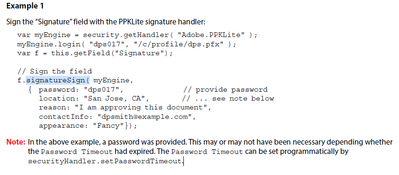
I tried the login line, makes no difference.
Still fails at field.signatureSign.
JC.
Copy link to clipboard
Copied
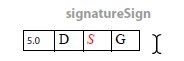
Look at the quick bar on the documentation:
Copy link to clipboard
Copied
>5.0 Yes
D: Changes Document : Yes
S : Enable Menu Items : Yes,
app.trustedfunction: Yes,
provided the certifier’s certificate is trusted for running embedded high privilege Javascript : Yes
G: Requires digital signature rights : Yes
What am I missing?
Copy link to clipboard
Copied
Stupid emoji's
D : Changes Document : Yes
Copy link to clipboard
Copied
I can't see anything that tells me it shouldn't work in Reader vs Pro/Std.
Copy link to clipboard
Copied
The FDF SignatureSign is Pro/Std only but the filed.signatureSign is as per the bar you posted.
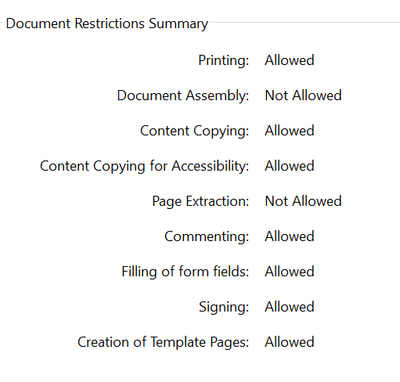
Available in Reader but requires digital signature rights. Which I assume is: signing?
Copy link to clipboard
Copied
You can add the digital signature rights to the document with a server product. The old name of this product was Livecycle Reader Extensions.
Copy link to clipboard
Copied
My understanding is this requirement was dropped since reader xi.
I am able to sign/certify with reader, just can't get the JavaScript to work.
Copy link to clipboard
Copied
What was dropped?
Copy link to clipboard
Copied
The requirement to add digital signature rights to PDF files to allow signing with reader.
Signing with reader is now allowed since version 11, when before it wasn't
Copy link to clipboard
Copied
You need the digital signature rights when you want sign per Javascript.
Copy link to clipboard
Copied
Can you confirm that it is possible to sign a file with javascript and reader if the file has digital signature rights?
Copy link to clipboard
Copied
Yes.

Copy link to clipboard
Copied
Did you ever get this to work? How? I have the same issue and can't get javascript to execute the signatureSign method successfully. I get an error that security settings don't allow the method. However, I'm using a document level script, I'm using an an app.trustedFunction, the digital signature pfx I'm using has security to run javascript, and the pdf file allows changes and digital signatures. I've searched these forums and have been studying the Acrobat API guide, but no luck.

Copy link to clipboard
Copied
Well, the documentation says that it won't work, so this seems right.

Copy link to clipboard
Copied
Are you trying to do it in Acrobat or in Reader? What's the exact error message you're getting?
Copy link to clipboard
Copied
I'm trying to use the signatureSign method in Reader. The documentation shows availability as "G", so it should work in Reader, and the document I'm working on has digital rights (i.e., digital signatures are Allowed).
The error I'm getting is "NotAllowedError ... Security settings prevent access to this property or method."
Copy link to clipboard
Copied
How have you added the rights?
https://en.m.wikipedia.org/wiki/Adobe_LiveCycle_Reader_Extensions
Copy link to clipboard
Copied
No i never got it to work.
Ended up with acrobat pro where it works straight away.
I personally don't believe it can be done in reader.
JC.
Copy link to clipboard
Copied
It can be done in Reader if you add the rights. At least, that's what the documentation says. I don't have some tens of thousands of dollars to spare to license the software to add the rights.
Copy link to clipboard
Copied
I don't believe any of this.
all those docs point to very old versions. I can apply digital signatures with reader dc. These documents relate to version 7 and lower and state reader cannot apply digital signatures.
Afaict reader cannot use the JavaScript signature sign method despite the current documentation saying it can.
I won't believe anyone until they prove otherwise.
Copy link to clipboard
Copied
"I don't believe any of this" That's your privilege. Replies are indeed often wrong.
"Afaict reader cannot use the JavaScript signature sign method despite the current documentation saying it can." Seems to me you are being selective. The documentation clearly says it can sign PDF files IN READER IF AND ONLY IF USAGE RIGHTS ARE APPLIED. Since you haven't tested this with files having usage rights, I don't see that you can say the documentation is wrong. Indeed, your results support the documentation being correct, so far as you have gone.
I have looked for a sample PDF with signing rights, which would answer the question quickly, but sadly I can't find them.
Yes, it's inconvenient and/or expensive; but Adobe create their APIs to generate revenue. For them.
Copy link to clipboard
Copied
I've not purchased separate software to add rights for use with Reader. I thought I had read somewhere that the later releases no longer required a separate product, plus I was going off the documentation that said (at least to my reading) that the signatureSign method is supported in Reader. However, based on the various replies here, I take it that that's only true if one obtains the separate product to add rights.
While not the answer I was looking for, this at least clarifies. Thanks.

-
- 1
- 2
Get ready! An upgraded Adobe Community experience is coming in January.
Learn more
 AdChoices