


- Home
- Acrobat SDK
- Discussions
- Re: PDF not created error msg=%%[ ProductName: Dis...
- Re: PDF not created error msg=%%[ ProductName: Dis...

Copy link to clipboard
Copied
Why can't I create pdf any more


 1 Correct answer

The symptoms sound like you have a PostScript file being distilled for which the fonts were embedded in the PostScript but are not actually being used by the Distiller. One situation that could cause this is an option, on by default, for the Adobe PDF PostScript printer driver instance.
Go to the Printer Control Panel and right click on the Adobe PDF printer and click Properties. Go to the Advanced tab and click on Preferences. Click on Printing Defaults and select the Adobe PDF Settings tab.
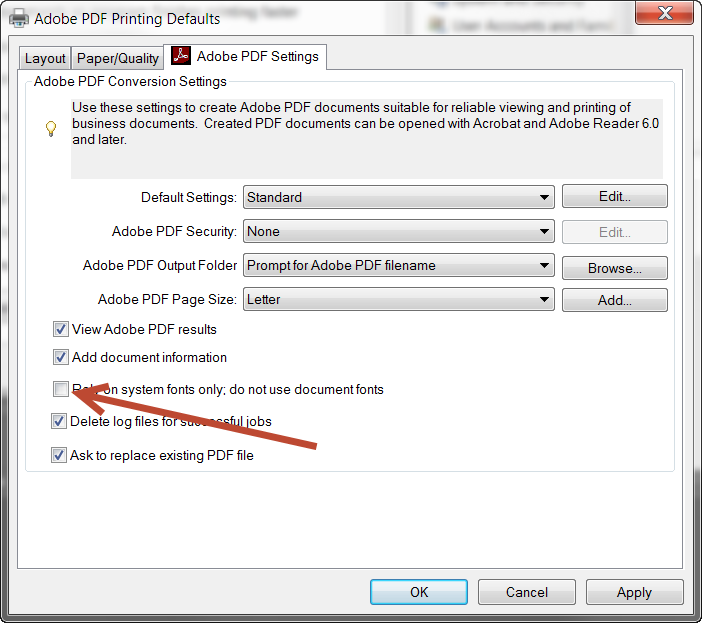
In t
...
 6
Replies
6
6
Replies
6



Copy link to clipboard
Copied
Hi Ika Sassaloon,
Please let us know the dot version of Adobe Acrobat and OS you are using.
Also share the exact workflow you do to create a PDF.
Could you please also share the screen shot of the exact error message you get.
Regards,
Meenakshi
Copy link to clipboard
Copied
The symptoms sound like you have a PostScript file being distilled for which the fonts were embedded in the PostScript but are not actually being used by the Distiller. One situation that could cause this is an option, on by default, for the Adobe PDF PostScript printer driver instance.
Go to the Printer Control Panel and right click on the Adobe PDF printer and click Properties. Go to the Advanced tab and click on Preferences. Click on Printing Defaults and select the Adobe PDF Settings tab.
In that dialog, make sure to deselect the Rely on system fonts only. Do not use document fonts option. (See below, pointed to by arrow!) Press OK all the way back to the Printer Control Panel. Restart the application from which you were trying to create PDF via Adobe PDF and see if that resolves the problem.
- Dov

Copy link to clipboard
Copied
Update for 2023 and future problem solvers:
This solution worked for Aptos, the new default font from microsoft. My system log file was saying "Aptos not found, using Courier"
My guess is that Microsoft is pushing the new font, some people have it others don't and when someone tries to print a document from someone that has the Aptos font on a system that doesn't the Distiller doesn't know what to do.ssssssssssssss

Copy link to clipboard
Copied
Yes, Microsoft has started using Aptos as its default/system font and Adobe is not pushing it out to its programs probably over some behind-the-scenes p1ssing match between Microsoft and Adobe. At the expense of hundreds of hours of lost time for their users. We had the same BS when Microsoft switched to Calibri and Cambria back in the day.

Copy link to clipboard
Copied
Thank you for noting Aptos here! Today (January 23, 2024) I started getting errors like crazy. Initially blamed it on other software I just installed, but problem persisted after uninstalling, rebooting, repairing Adobe install, rebooting again, etc. A google search for "distiller aptos not found" brought me to an eight year old discussion but then I noticed your comment here. I unchecked the "rely on system fonts only" and tested a print to PDF that was crashing distiller. Working perfectly now! Thanks also back to the original poster of the fix, that still is fixing things eight years later!
Copy link to clipboard
Copied
hi, I have this problem now too! I have deactivated the hacker, if I print now then everything is displayed nicely, but special characters or umlauts do not work.... do you have a solution ?

Get ready! An upgraded Adobe Community experience is coming in January.
Learn more
 AdChoices
