
Participant
February 24, 2016
Answered

Placing a PDF into another PDF

  • February 24, 2016
  • 1 reply
  • 633 views

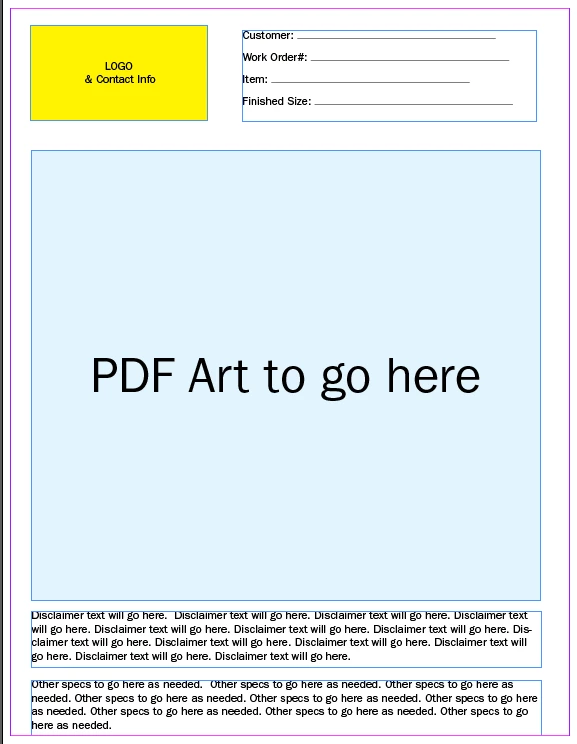
I am trying to create a branded Proof Template Sheet for my company.  I need to define an area on a form, within which I can place another PDF document (an art file) into.  The screen shot below, shows what I am trying to achieve.  I need to use the light blue area defined to be able to import/place a PDF, centered proportionately, to fill the area.

The other portions of the form may be editable fields, I just need to define the area so that the art can be placed proportionately.
I appreciate any input you can give. 

Sincerely,

Steve Grahek

Meridian

sgrahek@meridian-direct.com

This topic has been closed for replies.
Correct answer George_Johnson

Create a button that's as large as large as that area. On the Options tab of the button properties dialog, set the Layout to "Icon Only" and set the scaling options to suit your needs. You can either manually set the button icon to a page from a PDF, or add the following JavaScript to the Mouse Up event:

event.target.buttonImportIcon();

When the button is clicked, the user will be prompted to select a page from a PDF to use for the button icon. A more involved script can be used to deal with problems importing as well as resetting the icon to blank. Acrobat users will also be able to select other file formats (e.g., images), but Reader users (11 & DC only) are limited to PDF.

1 reply

George_JohnsonCorrect answer
Inspiring
February 24, 2016

Create a button that's as large as large as that area. On the Options tab of the button properties dialog, set the Layout to "Icon Only" and set the scaling options to suit your needs. You can either manually set the button icon to a page from a PDF, or add the following JavaScript to the Mouse Up event:

event.target.buttonImportIcon();

When the button is clicked, the user will be prompted to select a page from a PDF to use for the button icon. A more involved script can be used to deal with problems importing as well as resetting the icon to blank. Acrobat users will also be able to select other file formats (e.g., images), but Reader users (11 & DC only) are limited to PDF.

Participant
February 24, 2016

If I read her question correctly she had an art file of the PDF. If that's the case George's instructions are perfect you just don't need the last part.

"Create a button that's as large as large as that area. On the Options tab of the button properties dialog, set the Layout to "Icon Only" and set the scaling options to suit your needs."

Inspiring
February 24, 2016

Using the JavaScript option just makes it a lot easier to work with such a form, especially for users who are unfamiliar with or unable to edit buttons, or if the form needs to be secured against certain types of changes, or if using Reader.