
Known Participant
May 18, 2016
Answered

Pupulating the date field up on opening the document

  • May 18, 2016
  • 2 replies
  • 718 views

Hello,

Have a 6 page doc.  some pages have date field but with different field's names.  On first page I want to check if the date is null then populate it with current date, then copy the populated date to other pages... if the document was save and reopened latter I want the first populated date to be kept as it was populated the first time.

First date field "TodaysDate" is Open for update date fields on other pages are readonly.

First page date field named as: TodaysDate.

and following code is run upon opening of doc. under Tool/JavaScript/Document JavaScripts:

function populate_date(doc)

{

var f = this.getField("TodaysDate");

if (!f.value) f.value = util.printd ("m/d/yyyy", new Date());

}

populate_date(this); // call my function

Problem I have it does not get populated at all.. and this is the screen capture I get via Consul:
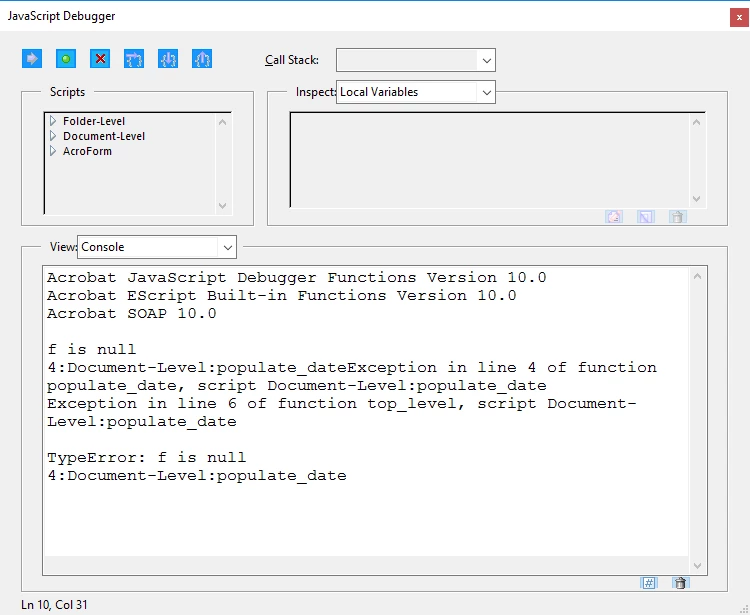
any idea what could be wrong?

Regards,

Jeff P.

This topic has been closed for replies.
Correct answer maxwyss

Assuming that the field TodaysDate exists, you encounter a timing issue.

At the time the function is executed, the fields have not yet been established. This is quite common with multipage forms.

Therefore, you can define the function in a document-level script, but you will call it in the PageOpen event of the page at which the document opens. You may protect it, so that it runs only once.

About the function, I have some doubts that it works, because you test whether the field value exists. This is always the case. Instead test whether the field's value is equal to the field's defaultValue. The function would then look like this:

function populateDate()

{

if (this.getField("TodaysDate").value == this.getField("TodaysDate").defaultValue) {

this.getField("TodaysDate").value = util.printd("m/d/yyyy", new Date() ;

}

}

As stated, it is not even necessary to define the function, just execute the code in the pageOpen event.

Hope this can help.

2 replies

maxwyssCorrect answer
Legend
May 18, 2016

Assuming that the field TodaysDate exists, you encounter a timing issue.

At the time the function is executed, the fields have not yet been established. This is quite common with multipage forms.

Therefore, you can define the function in a document-level script, but you will call it in the PageOpen event of the page at which the document opens. You may protect it, so that it runs only once.

About the function, I have some doubts that it works, because you test whether the field value exists. This is always the case. Instead test whether the field's value is equal to the field's defaultValue. The function would then look like this:

function populateDate()

{

if (this.getField("TodaysDate").value == this.getField("TodaysDate").defaultValue) {

this.getField("TodaysDate").value = util.printd("m/d/yyyy", new Date() ;

}

}

As stated, it is not even necessary to define the function, just execute the code in the pageOpen event.

Hope this can help.

Bernd Alheit
Community Expert
Community Expert
May 18, 2016

Looks like that there is no field named "TodaysDate" in the document.