
tahjonessdp
Participant
August 8, 2016
Question

"The Bullets and Numbering" are not showing in the Format Area. How do I make it appear?

  • August 8, 2016
  • 2 replies
  • 3591 views

Hello,

My company just recent acquired the Acrobat DC program.

In the process of trying to edit a PDF, I notice I did NOT have the capability to add bullets and numbering.

All the tutorials says that is should be under the Format area but this is what I see.
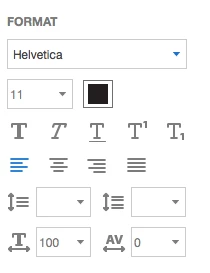
As you can see there is no section for bullets and numbering under Format.

Why can't I see this simple editing tool.

I have a Mac OS X 10.9.5 machine.

Please assist.

This topic has been closed for replies.

2 replies

Karl Heinz  Kremer
Community Expert
Community Expert
October 18, 2016

This feature was added in the October 2015 update to the subscription version. The "Classic" or perpetual license version does not get any updates, only bug fixes and security updates. Here are the new features added with this particular update: What's new in Adobe Acrobat DC

wzupdoc
Participant
October 18, 2016

Thanks, Karl -- I appreciate your help.

try67
Community Expert
Community Expert
August 8, 2016

Do you see a small Plus-sign next to the "Format" title of this section? If so, click it.

Also, make sure you update to the latest version available of Acrobat DC.

tahjonessdp
Participant
August 8, 2016

Hello,

Thank you for responding.

Unfortunately, I don't see a small plus sign next to "Format" or anywhere

I have Acrobat Pro DC 2015 Release (Classic) version 2015.006.30201.

I checked for updates and it told me I was at the latest version.

Bernd Alheit
Community Expert
Community Expert
August 8, 2016

May be this is not available in the Classic track.