
yanksgirl
Inspiring
November 14, 2018
Question

Radio button to populate a text field

  • November 14, 2018
  • 1 reply
  • 3476 views

I have a form that has 5 different radio button options.  The group name is Unauthorized Debit.  Each radio button has a unique export value, i.e. button 1 is value 1, button 2 is value 2, button 3 is value 3, button 4 is value 4 and button 5 is value 5.

Each of these radio buttons has a text field in the sentence they are attached to that i want to populate ONLY if that sentences radio button is selected.  I have written a script to do this, and it populates when i select an option, HOWEVER, if the user decides that they didn't want to click that radio button and they select a different one, the previous selections text field stays populated, even though a new selection has been made.

This is the script I added to each radio button.  The getField changes in each, button 1 has a field that is just COMPANY NAME, the below example is for button 2, and so on for buttons 3 (COMPANY NAME_3), 4 (COMPANY NAME_4) and 5 (COMPANY NAME_5).  I cannot find anything on how to make a text field CLEAR when a different radio button is selected and the previous value is now Off.  Any help would be appreciated!!
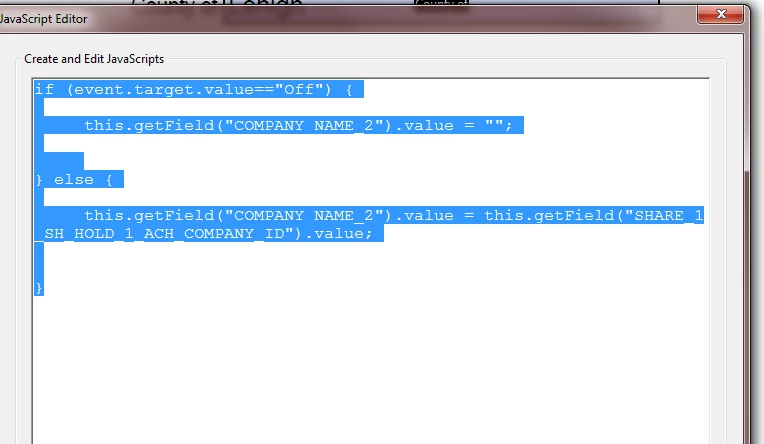
This topic has been closed for replies.

1 reply

try67
Community Expert
Community Expert
November 14, 2018

Do you want the user to be able to edit the text fields, or should their values depend entirely on the radio-buttons?

yanksgirl
yanksgirlAuthor
Inspiring
November 14, 2018

try67,

I guess I don't really have a preference.  I'd probably prefer them not to edit, however, the text field is mapped from a source selection list, and if they selected the wrong source list and the fields weren't editable, then the only way they can fix their mistake is to close out and completely reproduce the form again (as the mapped value is hidden and clearing fields wont matter in that instance).

yanksgirl
yanksgirlAuthor
Inspiring
November 14, 2018

In that case you can use something like this as the text field's custom calculation script:

var v = this.getField("RADIO1").valueAsString;

if (v=="Off") event.value = "";

else if (v=="1") event.value = this.getField("COMPANY NAME").valueAsString;

else if (v=="2") event.value = this.getField("COMPANY NAME2").valueAsString;

else if (v=="3") event.value = this.getField("COMPANY NAME3").valueAsString;

// etc.

Make sure the field names are spelled correctly, including lower/upper-case letters, special symbols, etc.


Thank you!  I'll try this and let you know how I make out.