
dw45169015
Participant
June 15, 2016
Answered

Remove JavaScript

  • June 15, 2016
  • 3 replies
  • 9751 views

Hi

I need to ensure that there is no JavaScript code in my PDF documents. Some of the documents come from the Internet while others are created using the Adobe PDF printer of Acrobat X. I'll have to process several documents a week.

I've read in this post Re: remove script about a Preflight fixup. However, I could not find it in Acrobat X Pro. What is the best way to remove possible JavaScript code?

Many thanks!
This topic has been closed for replies.
Correct answer George_Johnson

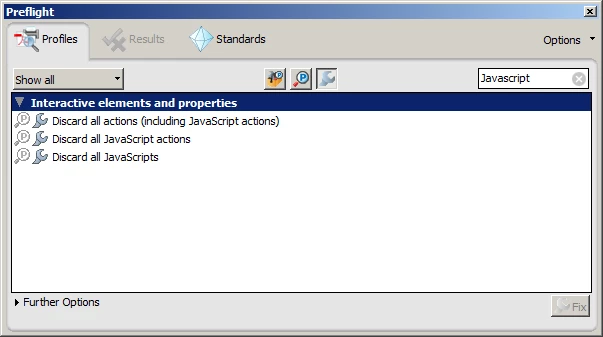
In the Preflight search box, enter "Javascript" and you should be shown a list like the following (which is from Acrobat 9):

The one you want is the last one.

3 replies

JR Boulay
Community Expert
Community Expert
June 16, 2016

Hi.

You can use the PDF Optimizer too.

It can remove JavaScripts, actions, comments, destinations, etc., etc.

Acrobate du PDF, InDesigner et Photoshopographe
Inspiring
June 15, 2016

Yes, you should run both to remove all JavaScript.

dw45169015
Participant
June 15, 2016

Thanks for confirmation!

George_JohnsonCorrect answer
Inspiring
June 15, 2016

In the Preflight search box, enter "Javascript" and you should be shown a list like the following (which is from Acrobat 9):

The one you want is the last one.

dw45169015
Participant
June 15, 2016

Great! That's exactly what I was looking for.

Thanks a lot!