


Remove the Empty space in the Acrojs - Acrobat Javascript dialog
Requirement:
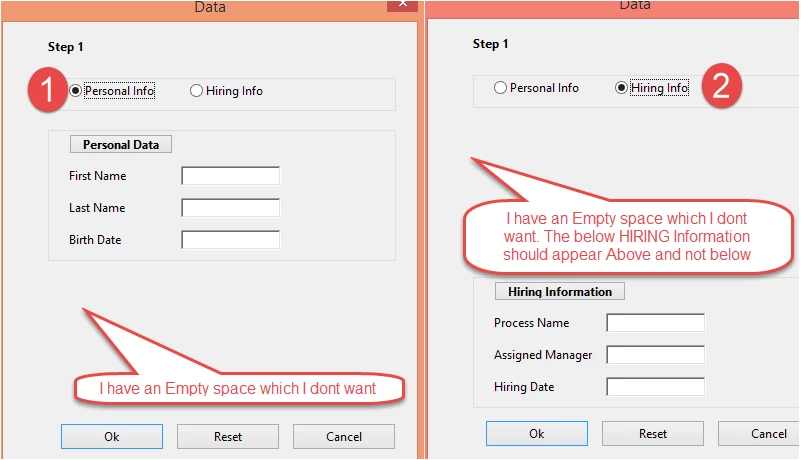
In the screen 1 on Left the Empty space should not appear at all.
In the Screen 2 on the right the Empty space on the Top should not appear. It should be replaced by the Hiring Information Cluster Block.
I need a Grid layout in which I can place my Fields.
Please find below my complete code.
////My code
// This should be pasted in the folder depending on the Adobe Version : C:\Program Files (x86)\Adobe\Acrobat 11.0\Acrobat\JavaScripts
app.addMenuItem({ cName: "Hiring Info", cParent: "File", cExec: "helloWorld()" });
var helloWorld = app.trustedFunction(function () {
app.beginPriv();
var dialog2 =
{
initialize: function (dialog) {
dialog.visible({ "CLU2": false });
},
rd01: function (dialog) {
// First Option - Enable
dialog.visible({ "CLU2": false });
dialog.visible({ "CLU1": true });
},
rd02: function (dialog) {
dialog.visible({ "CLU1": false });
dialog.visible({ "CLU2": true });
},
// The Dialog Description
description:
{
name: "Data",
elements:
[
{
type: "view",
align_children: "align_center",
elements:
[
{
type: "static_text",
name: "Step 1",
bold: true,
font: "dialog",
char_width: 30,
height: 20,
alignment: "align_left"
},
{
type: "cluster",
align_children: "align_row",
elements:
[
{
type: "view",
align_children: "align_center",
elements:
[
{
type: "radio",
item_id: "rd01",
group_id: "rado",
name: "Personal Info"
}
]
},
{
type: "view",
align_children: "align_center",
elements:
[
{
type: "radio",
item_id: "rd02",
group_id: "rado",
name: "Hiring Info"
}
]
}
]
},
// Add the Individual Types....
//First
{
type: "cluster",
item_id: "CLU1",
align_children: "align_left",
elements:
[
{
type: "button",
name: "Personal Data",
item_id: "BUT1",
bold: true,
font: "dialog",
width: "40",
height: 20,
alignment: "align_left"
},
{
type: "view",
align_children: "align_row",
elements:
[
{
type: "static_text",
item_id: "1000",
name: "First Name",
width: 100
},
{
item_id: "1001",
type: "edit_text",
width: 100,
height: 20
}
]
},
{
type: "view",
align_children: "align_row",
elements:
[
{
type: "static_text",
name: "Last Name",
item_id: "1002",
width: 100
},
{
type: "edit_text",
width: 100,
item_id: "1003",
height: 20
}
]
},
{
type: "view",
align_children: "align_row",
elements:
[
{
type: "static_text",
item_id: "1004",
name: "Birth Date",
width: 100
},
{
type: "edit_text",
width: 100,
item_id: "1005",
height: 20
}
]
}
]
},
{
type: "cluster",
item_id: "CLU2",
align_children: "align_left",
elements:
[
{
type: "button",
name: "Hiring Information",
bold: true,
item_id: "BUT2",
font: "dialog",
width: "40",
height: 20,
alignment: "align_left"
},
{
type: "view",
align_children: "align_row",
elements:
[
{
type: "static_text",
name: "Process Name",
item_id: "1008",
width: 100
},
{
type: "edit_text",
item_id: "1009",
width: 100,
height: 20
}
]
},
{
type: "view",
align_children: "align_row",
elements:
[
{
type: "static_text",
name: "Assigned Manager",
item_id: "1010",
width: 100
},
{
type: "edit_text",
item_id: "1011",
width: 100,
height: 20
}
]
},
{
type: "view",
align_children: "align_row",
elements:
[
{
type: "static_text",
item_id: "1012",
name: "Hiring Date",
width: 100
},
{
type: "edit_text",
item_id: "1013",
width: 100,
height: 20
}
]
}
]
},
{
type: "ok_cancel_other",
ok_name: "Ok",
cancel_name: "Cancel",
other_name: "Reset"
}
]
},
{
type: "gap", //add a small vertical gap between
height: 20 //..radio fields and buttons
},
]
}
// End of Code for linking the Document for the Client....
};
app.execDialog(dialog2);
app.endPriv();
});
 AdChoices