
Inspiring
May 23, 2016
Answered

set default opening properties

  • May 23, 2016
  • 1 reply
  • 775 views

Each time I make a pdf I have to go into into properties and set the page layout to Single Page and the magnification to Fit page. Is it possible to make Acrobat default to these settings so that you do not have to change it each time?

Thanks

Ian
This topic has been closed for replies.
Correct answer Karl Heinz Kremer

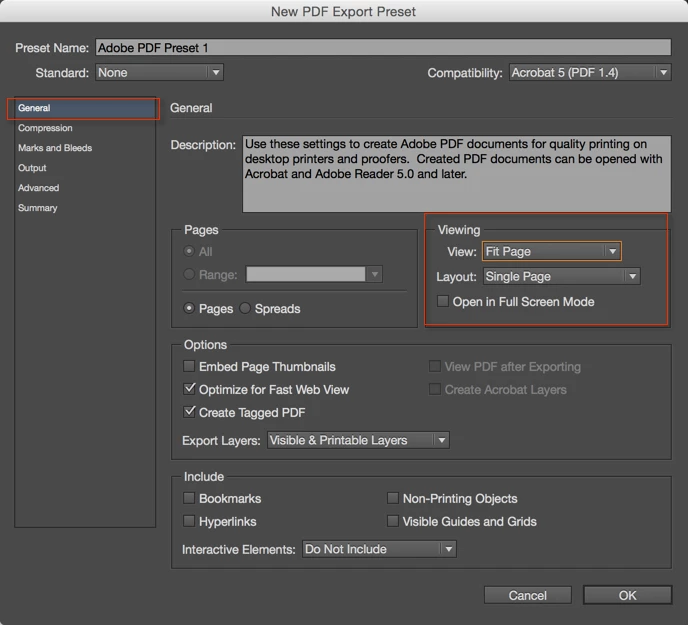
You need to create a new PDF preset (File>Adobe PDF Presets), and then set the "Viewing" options as follows:

Then, when you use this PDF preset to export your documents, the zoom and layout options will be correct. You can base your new preset on an existing one that you use on a regular basis. This way, you don't have to come up with all the settings.

1 reply

Karl Heinz  Kremer
Community Expert
Community Expert
May 23, 2016

How exactly do you create your PDF files? Is this on a Mac or on Windows?

Ian BlogsAuthor
Inspiring
May 23, 2016

I create them from indesign on Windows 10.

Karl Heinz  Kremer
Community Expert
Karl Heinz KremerCommunity ExpertCorrect answer
Community Expert
May 24, 2016

You need to create a new PDF preset (File>Adobe PDF Presets), and then set the "Viewing" options as follows:

Then, when you use this PDF preset to export your documents, the zoom and layout options will be correct. You can base your new preset on an existing one that you use on a regular basis. This way, you don't have to come up with all the settings.