
pilotmitch
Participant
August 3, 2020
해결됨

Set default value of PDF form field as the value of another field in the same PDF form

  • August 3, 2020
  • 1 답변
  • 10849 조회

Does anyone know how to make the default value in a field be equal to another field.

For example if I had a field called "Name" and I wanted that field contents to be the Default value in a field called "Name2".  The idea is not having to input the value twice but leaving the possibility to change the value in field "Name2" "the default value" to another value if desired.
이 주제는 답변이 닫혔습니다.
최고의 답변: ls_rbls

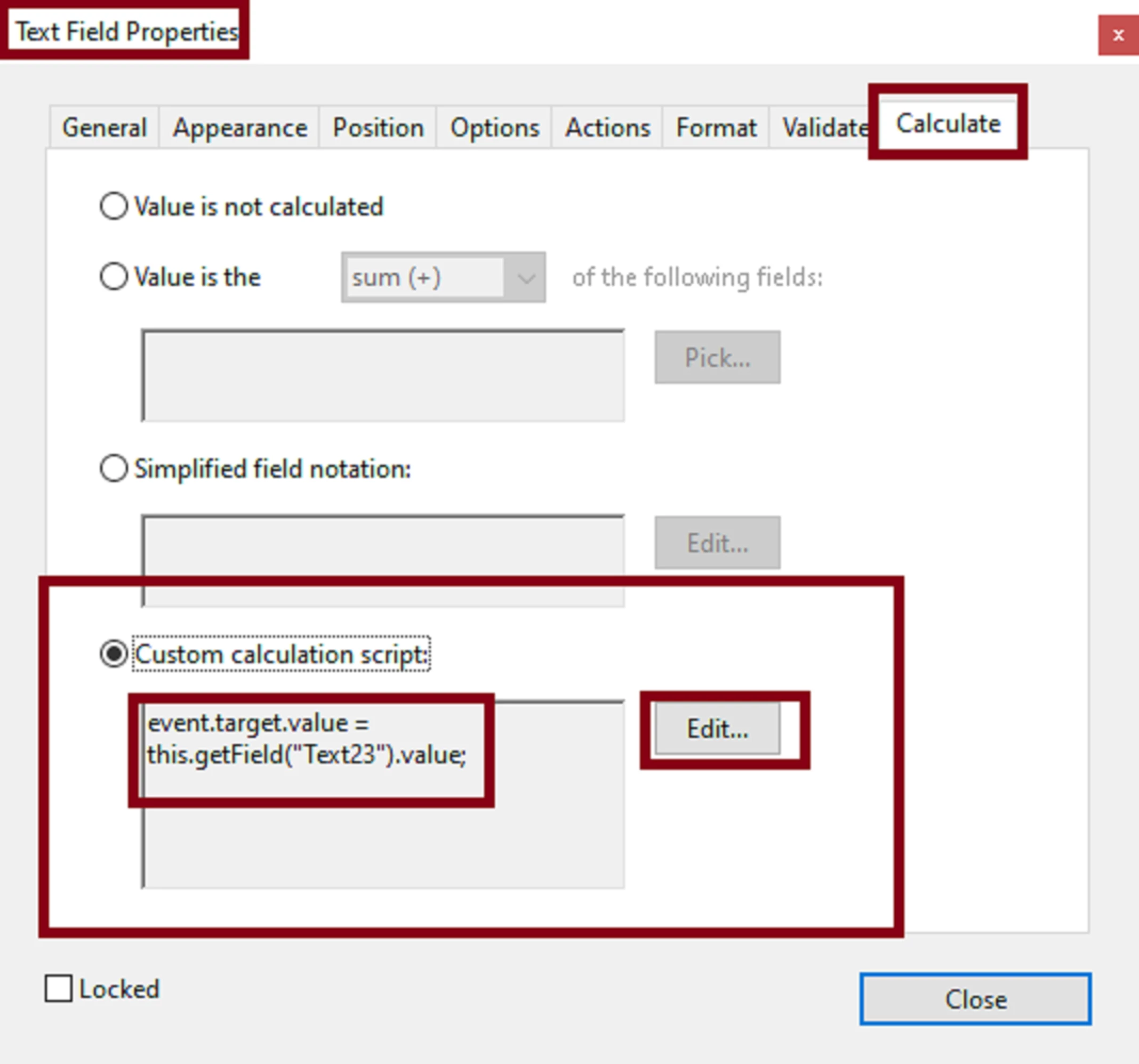
Custom calculation script.


Right-click on that field and select Properties from the context menu. Then go to the calculate tab.


See slide:


1 답변

ls_rbls
Community Expert
Community Expert
August 3, 2020

There's always many ways to achieve this with javascripting.


In  my case, this simple line of code worked for me:


event.target.value = this.getField("Name").value;


Use the script as custom calculation script in field "Name".

pilotmitch
pilotmitch작성자
Participant
August 3, 2020

Where do I put that?  I was thinking in the Default Value under options but that doesn't seem to work

Participant
August 3, 2022

PS. And remove the calculation script from "Lodging travel report.0", of course, if it's still there.


This seems to work exactly as I desired it to, thank you very much!