
Exit
  • Global community
    • Language:
      • Deutsch
      • English
      • Español
      • Français
      • Português
  • 日本語コミュニティ
  • 한국 커뮤니티
0

Timesheet Calculation PDF Form

New Here ,
Aug 05, 2024 Aug 05, 2024

Hello,


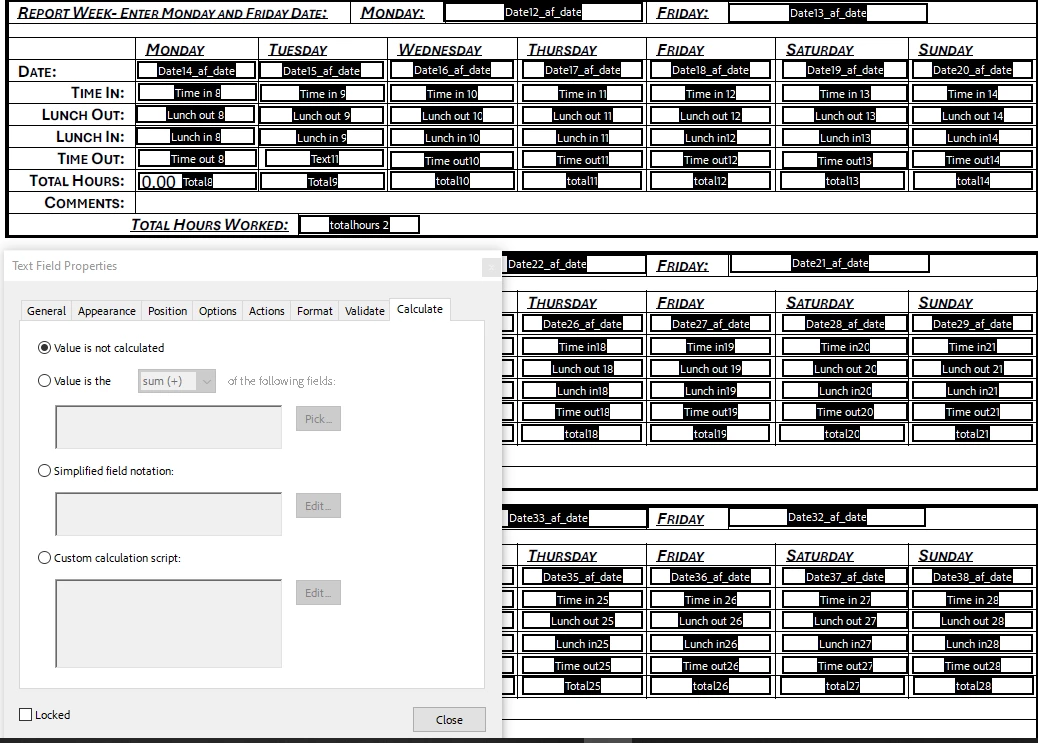
I'm very new to trying to add calculations to a PDF fillable form, and I have a timesheet that has the days of the week with Time In, Lunch Out, Lunch In and Time Out sections for each day, along with the total hours for the day and week in their own boxes. I need to know how to add in whatever is needed to get it to calculate if that is possible. This would be a form I have to send out and auto-calculate for the employee. I have added a screenshot of what I am referring to below.  Im not even sure if im trying to add these into the correct spot. I have read multiple other posts, but I'm just to new to understand them fully and can't find a good video. If there is any help or suggestions on what I need to do to make it work, please let me know, and pleasebe nice,Im trying to learn. 
Brittany26681150ufze_0-1722876032796.png


-Brittany

TOPICS
Acrobat SDK and JavaScript , Windows
602
Translate
Report
Community guidelines
Be kind and respectful, give credit to the original source of content, and search for duplicates before posting. Learn more
community guidelines

correct answers 1 Correct answer

Community Expert , Aug 05, 2024 Aug 05, 2024

Try this as 'Custom calculation script' of "Total8" field (for other total fields, just change four field names in the script)


function timeToMinutes(timeStr) {
 if (timeStr === "") return 0;

 var parts, hours, minutes;
    
 var isPM = timeStr.toLowerCase().indexOf("pm") !== -1;
 var isAM = timeStr.toLowerCase().indexOf("am") !== -1;
    
 if (isPM || isAM) {
  timeStr = timeStr.replace(/(am|pm)/i, "").trim();
        
  parts = timeStr.split(":");
  hours = parseInt(parts[0], 10);
  minutes
...
Translate
Community Expert ,
Aug 05, 2024 Aug 05, 2024

Try this as 'Custom calculation script' of "Total8" field (for other total fields, just change four field names in the script)


function timeToMinutes(timeStr) {
 if (timeStr === "") return 0;

 var parts, hours, minutes;
    
 var isPM = timeStr.toLowerCase().indexOf("pm") !== -1;
 var isAM = timeStr.toLowerCase().indexOf("am") !== -1;
    
 if (isPM || isAM) {
  timeStr = timeStr.replace(/(am|pm)/i, "").trim();
        
  parts = timeStr.split(":");
  hours = parseInt(parts[0], 10);
  minutes = parseInt(parts[1], 10);
        
  if (isPM && hours < 12) hours += 12;
  if (isAM && hours === 12) hours = 0;} 
  else {
   parts = timeStr.split(":");
   hours = parseInt(parts[0], 10);
   minutes = parseInt(parts[1], 10);}

   return (hours * 60) + minutes;}

var timeInStr = this.getField("Time in 8").valueAsString;
var lunchOutStr = this.getField("Lunch out 8").valueAsString;
var lunchInStr = this.getField("Lunch in 8").valueAsString;
var timeOutStr = this.getField("Time out 8").valueAsString;

if (timeInStr === "" || timeOutStr === "") {
 event.value = "";} 
else {
 var timeIn = timeToMinutes(timeInStr);
 var timeOut = timeToMinutes(timeOutStr);

 var totalMinutesWorked = timeOut - timeIn;

 if (lunchOutStr !== "" && lunchInStr !== "") {
  var lunchOut = timeToMinutes(lunchOutStr);
  var lunchIn = timeToMinutes(lunchInStr);
  totalMinutesWorked -= (lunchIn - lunchOut);}

 var totalHoursWorked = totalMinutesWorked / 60;

 if (!isNaN(totalHoursWorked)) {
  event.value = totalHoursWorked;} 
else {
 event.value = "";}}


Translate
Report
Community guidelines
Be kind and respectful, give credit to the original source of content, and search for duplicates before posting. Learn more
community guidelines
New Here ,
Aug 05, 2024 Aug 05, 2024
LATEST

Nesa Nurani

Thank you so much. That worked out perfectly. I was able to get that to work and use the same one just with different numbers for each, and it worked. 
-Brittany
Translate
Report
Community guidelines
Be kind and respectful, give credit to the original source of content, and search for duplicates before posting. Learn more
community guidelines