
johnf0318
Participant
March 26, 2016
Answered

What happened to the "Open" icon in the Acrobat DC toolbar?

  • March 26, 2016
  • 1 reply
  • 1170 views

What happened to the Open icon (with the green arrow) in Acrobat DC? If I am viewing a document and I want to open another document, I now need to click File and then click Open, instead of just clicking the Open icon. I cannot seem to add this icon to my toolbar.
This topic has been closed for replies.
Correct answer Rave

Hi John,

You can try this:

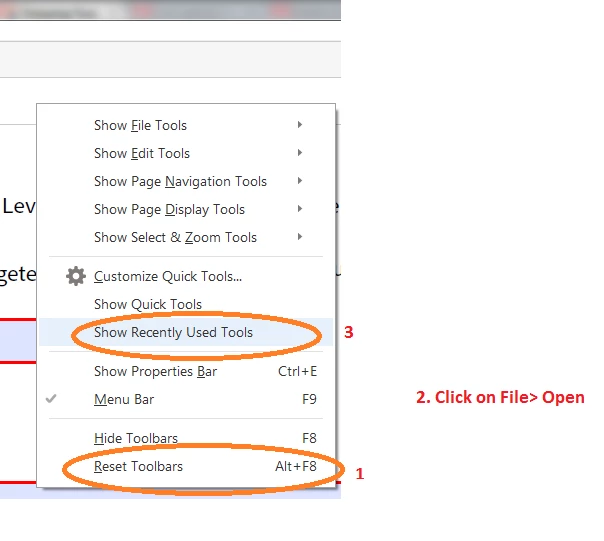
1, Right click on the tool bar in Acrobat and select 'Reset toolbars'

2. Now click File> Open

3. Now again right click on the toolbar and select 'Show Recently Used tools'

You will now see a new 'File Open' icon on the toolbar

PS: You can ignore Step 1 if you don't want to reset the toolbars.

Regards,

Rave

1 reply

Meenakshi Negi
Legend
April 3, 2016

Hi John Forbess,

Please let us know the dot version of Acrobat and OS installed on your system.

Could you please also describe which open icon you are referring to.

Regards,

Meenakshi

johnf0318
johnf0318Author
Participant
April 3, 2016

The Open button/icon I am referring to is marked below in red. In past versions of Acrobat, I have always been able to set this Open button/icon as part of the permanent tool bar, so all I need to do in order to open a file is to click the icon. Now, in order to open a file, I have to click <File> and then <Open>. Wherever possible, I am trying to cut down on the number of clicks that I need to do in order to accomplish a task. Thanks.