

When printing pages smaller than my printer's page size, Acrobat won't center the page. It forces the page to the upper left corner, partially past the non printable area. How do I fix this?
Whenever I try print a page that is smaller than the letter or tabloid page set in one of my printers, Acrobat DC forces the page all the way to the upper left corner. I cannot center the smaller page on the printed page like I can with Indesign, Photoshop or Illustrator. It goes to the page edge rather than the printable area edge, so parts of the image do not print. See below screenshot from the print preview window. DC has NO feature that I can see to set the page alignment. As a test, we created some VERY simple filled rectangles a 5 x 7 document within both Illustrator and Indesign. I tried to print them within Acrobat DC, the same off center issue occurred. We then tried to print the same documents within older versions of Acrobat and ALL of the older versions had no issue. They were all able to center the document automatically. So this seems to be an exclusive issue of Pro DC.
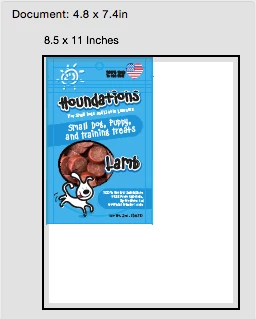
Message was edited by: David Spivak - We did some tests and added the results in italics.
 AdChoices