
Participant
June 16, 2016
Question

How do you print color as black (monochrome printing)

  • June 16, 2016
  • 1 reply
  • 2468 views

How can I print color as black with my Acrobat Pro 11.0.14? Note that I'm NOT interested in greyscale printing.

When I look in discussion threads and forums people refer to a box called "print color as black" in the "file>print" window, but my print window does not look anything like in the Acrobat forums and there is no "print color as black" box to be found. Another popular reply on this question is how to do grayscale printing. I don't want that.

What I'm trying to do is to convert color pdf files as monochrome pdf files using a pdf printer. If anyone knows how to convert color as black by editing the pdf file that would be fine too. The color pdf files is actually batch-converted dwg files, so if anyone knows how to batch convert dwg files to one monochrome pdf file using Acrobat Pro it would be even better.
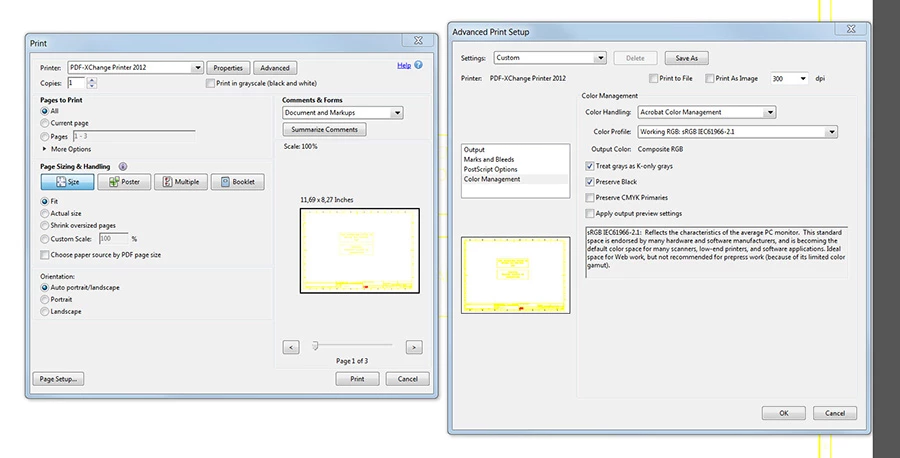
BR/

This topic has been closed for replies.

1 reply

Karl Heinz  Kremer
Community Expert
Community Expert
June 16, 2016

I don't remember a "print color as black" option ever being in Acrobat. There is a "Print in grayscale" on the print dialog.

Let's take a step back: What exactly do you mean by printing in black vs. grayscale printing? What should happen to different colors (e.g. red, green blue) when you print in black? Should all colors be mapped to black?

Participant
June 16, 2016

Yes, I want all colors to be mapped as black!

When people use AutoCAD they often use yellow or other light colors for lines and fonts against black background. When you convert these AutoCAD files to Acrobat PDF you will get yellow against white which make the files unreadable. Printing them as black and white using greyscale does not make them more readable.

I found the "print color as black" option in a Acrobat help page when trying to find a solution, please follow the link.

https://helpx.adobe.com/acrobat/kb/print-black-white-acrobat-reader.html

This page describes two options: "Print color as shades of gray" and "Print color as black"