


- Home
- Acrobat Services API
- Discussions
- Adobe reader annotations disappear
- Adobe reader annotations disappear
Adobe reader annotations disappear

Copy link to clipboard
Copied
I have implemented adobe reader in my web app and I am facing a problem.
Users can add annotations, check the image below (annotations are First Name and Sign showing in the pdf with the red color):

When moving any of the annotations to another area, ALL annotations disappear.
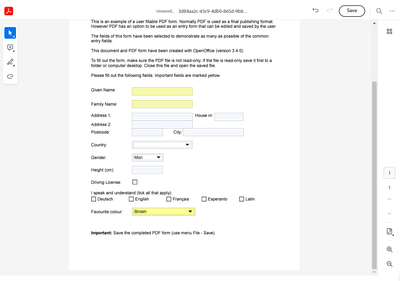
I'm also unable to undo the action.
The implementation is done using this document as a reference: https://developer.adobe.com/document-services/docs/overview/pdf-embed-api/
Is this a known problem for Adobe Reader?


 7
Replies
7
7
Replies
7




Copy link to clipboard
Copied
Hope you are doing well. Sorry for your experience with Acrobat Online Services.
Would you mind telling us what happens when you click the undo button on the top right of the window beside the save button?
Also, does this happen with every file you are trying to work with or with a specific file?
I would suggest checking the steps given in this link for better information: How-Tos Comments | PDF Embed API | Adobe PDF Services
Look forward to hearing from you.
-Souvik
Copy link to clipboard
Copied
Hello @S. S
Yes, it is happening with every file.
When I click the undo button it just stays the same, the annotations aren't there.
Copy link to clipboard
Copied
@S. S Any update for this?
Copy link to clipboard
Copied
Hi @S. S
I have attached a screen record of the bug I am mentioning.
Please have a look and let me know if is there something I can do to fix it.
Thanks!
Copy link to clipboard
Copied
@Endi29157332orrm Thank you for the details.
Let me share this with the team for further investigation and get back to you as soon as possible.
-Souvik
Copy link to clipboard
Copied
@S. S Is there any update?

Copy link to clipboard
Copied
This seems to be the same bug mentioned here .
I was honestly hoping, that it was fixed with the last update, but sadly it wasn't.

Get ready! An upgraded Adobe Community experience is coming in January.
Learn more
 AdChoices
