


- Home
- Acrobat Services API
- Discussions
- Re: Entire documents are nothing but images
- Re: Entire documents are nothing but images
Entire documents are nothing but images

Copy link to clipboard
Copied
Hi,
I was trying to extract the document attached to this question, when I try to extract it with Adobe APIs I just get a collection of images, one for each page.
I think this has to do with document parsing (probably parsed as a svg) and I don't know how to solve it!
Can sombody help me?
Thanks,
Giovanni


 15
Replies
15
15
Replies
15




Copy link to clipboard
Copied
To be cleare, are you using the Extract API? It doesn't return just an image, but JSON, and optionally included images in the PDF (as well as other stuff).
Copy link to clipboard
Copied
Yes, I am using the Extract API.
I only get the image data from each page, can you send me the JSON you are talking about?
thanks in advance,
Giovanni
Copy link to clipboard
Copied
What you are describing is impossible. 🙂 Our Extract API returns a zip file. The zip file _always_ contains structuredData.json. It *optionally* includes images and tables.
Copy link to clipboard
Copied
Is there a way to extract the JSON representation for each vector Figure element?
Copy link to clipboard
Copied
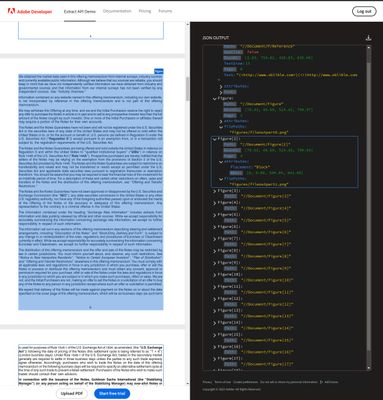
For reference, this is the output I get:
Copy link to clipboard
Copied
I don't understand your output. See my earlier comment. The API returns a zip, not just an image. Maybe show the code you're using?
Copy link to clipboard
Copied
I indeed get a zip file, but for some reason each page in this particular document is extracted as if it was a Figure and not as structured data.
The code I am using works well for any documents (and is identical to the examples provided in the documentation) but in this case is unable to detect the structured data contained in pages.
To better understand my output simply upload the document attached in the Extract API.

Copy link to clipboard
Copied
@Giovanni290542994dvw I get the same result as you do when I run your file through the SDK. There is no text in the resulting JSON. We've had similar issues with some files where numerous lines and boxes are recognized as an image instead of text. However, your PDF seems to be mostly text-based.
Copy link to clipboard
Copied
Hi @Aftia_Jeff, did you guys find a workaround for this issue?
Copy link to clipboard
Copied
No, the issue we have run into is a product bug (DCSV-53202) which is because the ML model wasn't trained on forms (which contain a lot of lines and boxes). However, your example document doesn't look like a form.
Copy link to clipboard
Copied
Ok, to be clear, you are getting the JSON back - I tested via the SDK and I see the JSON. And it has structured data. But it does not seem to read the text. If we look at the properties of the PDF, the producer, iLovePDF, is not a great one. So yes you have a readable PDF, but the underlying way it was built was "less than optimal" (imo). It's basically really a set of images so Extract is 'properly' reading it. Best I can suggest is creating your PDF in a better tool (obviously we would recommend Acrobat. 😉
Copy link to clipboard
Copied
@Raymond Camden Thanks for the response.
In such cases is it possible to "convert" the PDF in a more readable format?
Copy link to clipboard
Copied
Per my coworker, Joel Geraci, who is a PDF Jedi, he said he was able to use Acrobat to export to PostScript, convert it back to PDF, and it corrected it. If that's an option for you, you can consider that.
Copy link to clipboard
Copied
that is interesting, thanks!

Copy link to clipboard
Copied
Hi Giovanni,
It sounds like the document is being processed as an image-based PDF rather than a text-based one. This often happens when the original document was scanned or created in a way that embeds text as part of images.
You might need to use OCR (Optical Character Recognition) to extract the text properly. Adobe APIs have OCR capabilities, or you can try alternative tools specialized in document processing.
If you're handling document-related tasks in a business setting, you might find useful resources at wagner-inkassoservice.de (https://www.wagner-inkassoservice.de/).
Hope this helps!

Find more inspiration, events, and resources on the new Adobe Community
Explore Now
 AdChoices