


- Home
- Acrobat SDK
- Discussions
- Re: Format default text in text box
- Re: Format default text in text box
Format default text in text box

Copy link to clipboard
Copied
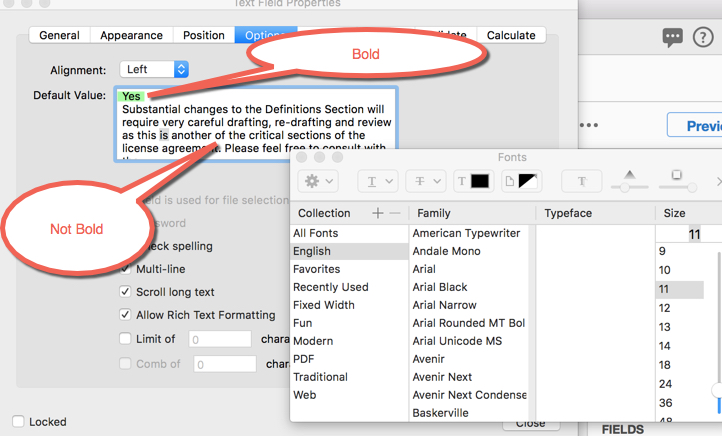
Is there a way apply different formatting to text as default text in a text box?
In the example shown, I would like to have the first word (shown in green in the example) bold - and the rest normal unbold.
Unfortunately, applying formatting appears to apply to the entire contents of the "Default Value" - not just selected text.
If that isn't possible, can the text box have a title?


 7
Replies
7
7
Replies
7




Copy link to clipboard
Copied
I don't think that's possible, as the default value of a field is just a string of text, not an array of Span objects, which is what you would need to use to do it.
Copy link to clipboard
Copied
One workaround I thought of is to use the field's On Blur event and apply that rich value, if the field is empty.
However, that won't work when the form is reset manually...
Copy link to clipboard
Copied
That won't work in this case - the text field is read only. (I'm using it only to display a response to the checkbox)
Copy link to clipboard
Copied
In that case it's certainly possible. You just need to apply the value using a script.
Copy link to clipboard
Copied
Thank you, I was afraid that that was the answer...
I should probably pose this as a separate question, but the solution applies to the same problem:
Is it possible to LINK to text boxes together in a group? I am trying to hide/show text on a form based on the response to a checkbox (I can easily do this with javascript with ONE field - and yes, I know I could turn on two or more fields, it just gets really messy).
Or ---
How hard (if possible at all) would it be simply add(display) text based on a checkbox response (again using javascript)
Copy link to clipboard
Copied
- You can access multiple fields at once if they are named in a specific way that makes them all a part of a group.
The way to do that is to use a period with the group's name before it and the field's individual name after it.
For example: MyField.Text1 and MyField.Text2
You can then hide both fields like this:
this.getField("MyField").display = display.hidden;
- Setting the value of a text field based on a check-box is a common thing. You can use a script under the text field's custom calculation script to achieve it. Here's a simple example:
if (this.getField("Checkbox1").value=="Off") event.value = "NO";
else event.value = "YES";
Copy link to clipboard
Copied
Genius! postfixing the fieldname with ".name" made life much easier. try67

Get ready! An upgraded Adobe Community experience is coming in January.
Learn more
 AdChoices